







Software
When to Build Custom Software: 5 Signs It’s the Right Time

sachin pokharel
16 Sep 2026
Custom software is worth considering only when the way your business operates has become too specific for standard tools and when you have the process clarity, internal ownership, and budget to support a system long term.
If existing software can still adapt to the problem, building is premature.
The harder part is separating a genuine software-fit problem from everyday frustration with the tools you already use.
Instead of steering you toward development, this guide gives you clear reasons to stop, a 10-point readiness test, and a practical cost check so you can decide whether to build, wait, or keep what you have.
Key Highlights
- Custom software makes sense when an important business process structurally cannot fit standard products and your organization is ready to own it.
- A missing feature is usually easier to solve than a structural mismatch between your workflow and the software's underlying model.
- Rising license costs and manual workarounds strengthen the case for custom software, but neither replaces the need for a genuine differentiator.
- A useful custom software readiness test measures both how badly you need the system and whether you are prepared to maintain it.
- If there is no internal owner, stable process, long-term budget, or clear competitive reason, delaying the build is usually smarter.
When to Build Custom Software: Start with These 6 Questions
Use this table as a quick self-check to see whether your current situation points more toward improving what you already have or seriously considering custom software.
If the right-hand column "Consider building if" describes your business more often than the left "Buy off-the-shelf if", there is a case worth testing rather than an automatic reason to start development.
| The question | Buy off-the-shelf if | Consider building if |
| Is the process standard or unusual? | Other businesses run the same process. | The process is genuinely different and contributes to how you compete. |
| Where is the pain: Features or Fit? | You need a feature, integration, report, or configuration change. | The product assumes a workflow or data structure that does not match yours. |
| What are you paying per user per month? | Costs remain reasonable as the organization grows. | Per-seat fees, upgrades, add-ons, and patch tools rise heavily with headcount. |
| Does the process change often? | You are still changing how the workflow operates. | The core process is established and unlikely to change materially. |
| Who will own it internally? | Nobody has time to make decisions, test, and drive adoption. | A named person has the authority and time to own the system. |
| How long will you run it? | The process or business model may change significantly soon. | The process will remain important for several years. |
Five Conditions That Justify Building Custom Software
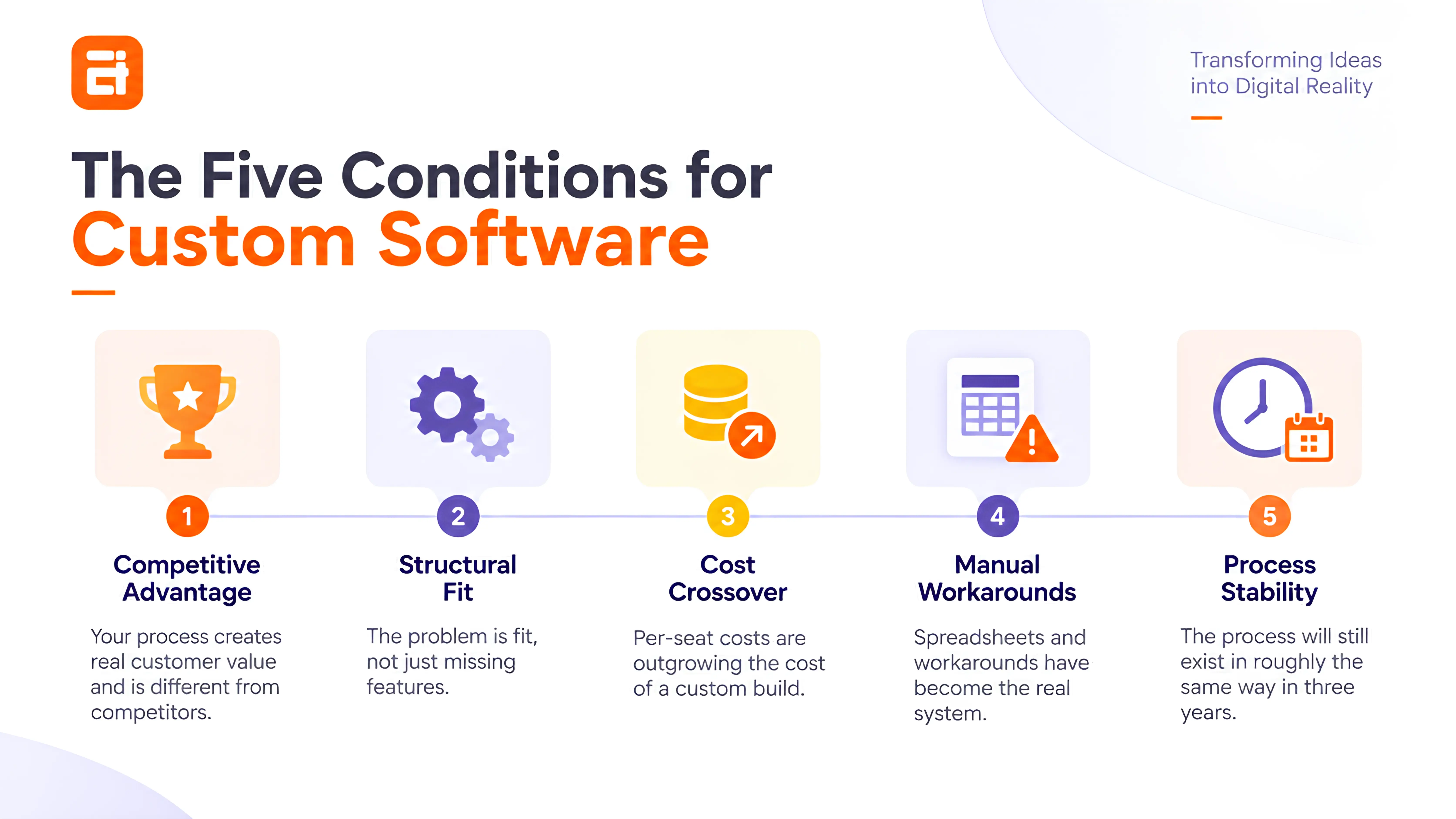
Building custom software is justified only when several conditions point to a genuine structural business need, not when one isolated problem is present.
A practical rule is that at least three of these five conditions should be true at the same time, and Condition 1 should be one of them.
Without a genuine competitive reason to build, the other remaining conditions usually describe operational frustration rather than a strong custom software case.
Condition 1: Your Process Is a Competitive Advantage
A process is worth considering for custom software when the way you operate creates real customer value that standard tools cannot easily support.
Payroll, email, accounting, and basic project management are how almost every organization operates.
Mature products already solve those common problems, so building your own version rarely creates meaningful business value.
The stronger case starts with something your business actually does differently.
For example, a distributor may use a unique combination of pricing, stock allocation, and order-routing rules that directly affect how quickly and profitably it serves customers.
Ask one direct question: "What do we do differently that creates value for the customer?"
If you cannot clearly explain it, this condition does not apply. Different dashboards, report layouts, extra fields, or preferred button positions do not make a process strategically unique.
The thing worth owning is the workflow that helps you compete, not every piece of software your employees use.
Condition 2: The Problem Is Fit, Not Missing Features
A missing feature and a fit problem feel similar when staff are frustrated, but they lead to very different decisions.
A feature gap means the software mostly works for your business but is missing something specific, such as a report, export option, automation, or integration.
In many cases, the vendor can add it; an add-on can solve it, or another existing tool may already offer what you need.
A fit problem is more serious. It means the software is built around a way of working that does not match how your business actually operates.
For example, the software may expect every order to move through A → B → C, while your business sometimes needs A → C, A → B → D, or a completely different route depending on the customer, product, location, or contract.
If the system cannot support those variations even after configuration, the problem is not simply a missing feature. The software itself does not fit the way your workflow operates.
Ask your vendor: “Can the product be configured to work this way?” “Not currently available” suggests a feature gap while “The system does not work that way” points to a structural mismatch.
If you want to explore this decision in more detail, see our guide on Off-the-Shelf vs Custom Software
Condition 3: Per-Seat License Costs Are Outgrowing a Build
Per-seat software often makes financial sense when your team is small because the upfront commitment is low. The economics can change as headcount grows while the underlying workflow remains largely the same.
The base license is rarely the only cost that increases. Growth can bring higher pricing tiers, paid automation, additional storage, specialist modules, integrations, and separate tools used to fill gaps in the main platform.
The important signal is not simply that your software bill has increased. It is that recurring costs keep rising without a comparable increase in what the system does for the business.
When that happens, stop assuming that either option is cheaper. Compare the cost of continuing with your current setup against the cost of owning a system built around the process you need.
Condition 4: Manual Workarounds Have Become the Real System
One of the clearest signs you need custom software is when the official system no longer reflects how the work is actually completed.
When the software no longer fits the actual workflow, teams often create their own workarounds.
Data gets exported to spreadsheets; one person ends up maintaining the file everyone relies on, and the same information may be entered into multiple systems until a shared document quietly becomes the real source of truth.
At that point, the workaround is no longer temporary. It has become part of your operating system.
AITC encountered that problem internally. Before we built the AITC Inventory Management System, our IT operations relied on spreadsheets without a shared history of asset assignments and transfers, while warranty information depended on whichever sheet had most recently been updated.
The important cost is easy to miss because it rarely appears in the software budget. It appears in manual checks, repeated data entry, staff time, delayed reporting, and dependency on the few people who understand how the workaround works.
Condition 5: The Process Will Still Exist in Three Years
Custom software is a long-lived asset with an ongoing maintenance obligation.
If the process might disappear next year, the commercial model is still changing, or you are testing an idea rather than running an established operation, buying or renting software is usually safer.
That is because a custom build only makes sense when the underlying process is stable enough to be encoded.
When that assumption is wrong, every change in the business creates another change in the software. What looked like flexibility at the start becomes a permanent stream of rework.
Ask: "Will we still run this process in roughly the same way three years from now?"
If you are not confident in the answer, preserve flexibility. Use configurable SaaS, spreadsheets, no-code tools, or lightweight integrations while you continue learning how the business should operate.
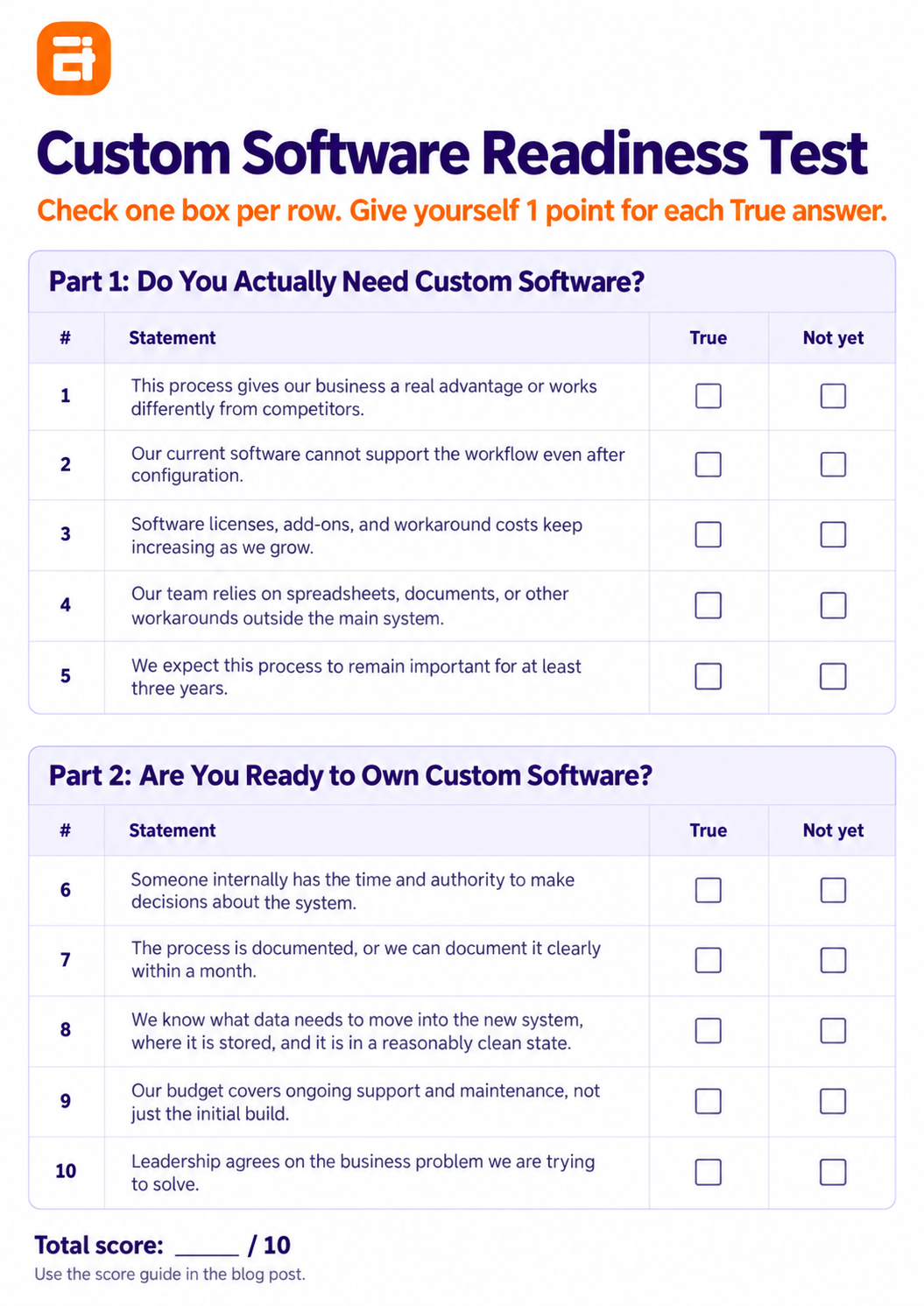
Custom Software Readiness Test: Are You Ready to Build?
Give yourself one point for every statement that is genuinely true today.
For each statement, select either “True” or “Not yet.” Give yourself 1 point for every “True” answer and 0 points for every “Not yet” answer. Your total out of 10 is your readiness score.
Part 1: Do You Actually Need Custom Software?
| # | Statement | True: | Not yet |
| 1 | This process gives our business a real advantage or works differently from competitors. | ☐ | ☐ |
| 2 | Our current software cannot support the workflow even after configuration. | ☐ | ☐ |
| 3 | Software licenses, add-ons, and workaround costs keep increasing as we grow. | ☐ | ☐ |
| 4 | Our team relies on spreadsheets, documents, or other workarounds outside the main system. | ☐ | ☐ |
| 5 | We expect this process to remain important for at least three years. | ☐ | ☐ |
Part 2: Are You Ready to Own Custom Software?
| # | Statement | True | Not yet |
| 6 | Someone internally has the time and authority to make decisions about the system. | ☐ | ☐ |
| 7 | The process is documented, or we can document it clearly within a month. | ☐ | ☐ |
| 8 | We know what data needs to move into the new system, where it is stored, and it is in a reasonably clean state. | ☐ | ☐ |
| 9 | Our budget covers ongoing support and maintenance, not just the initial build. | ☐ | ☐ |
| 10 | Leadership agrees on the business problem we are trying to solve. | ☐ | ☐ |
Score 0–4: The Answer Is No, and That Is a Useful Answer
Do not build yet. At this score, a custom project is likely to create an expensive version of a problem that has not been defined or stabilized properly.
Look at the missing points instead. If the process is unclear, fix it. If your current product has not been properly configured, test it.
Likewise, if your data is scattered or unreliable, clean it and if the business model is changing quickly, keep the technology flexible while you learn.
A score of four is useful because it prevents you from turning uncertainty into development costs.
Score 5–7: There Is a Real Case, but Not Yet a Project
You probably have a legitimate software problem, but the missing points matter more than the total.
Look first at the readiness half of the test. A business with a strong structural fit problem, but no internal owner is not ready to commission software.
The same is true when a critical process still exists mainly in people's heads rather than in a documented workflow. Fix those gaps before development begins.
Once the need itself is established, the next step is to define business needs before software development, not a long feature list or an immediate development quote.
Score 8–10: Build, and Scope It Properly
At this score, you have both a strong business reason to consider custom software and enough organizational readiness to move into serious scoping.
That does not mean development should begin immediately. Use this stage to validate the workflow, define the requirements, identify the people responsible for decisions, and establish what success should look like.
The score tells you that the case is strong enough to investigate as a real project. The next step is turning that case into a clear, testable scope before committing to development.
5 Clear Signs You Don't Need Custom Software
Frustration with your current software does not automatically mean you need to replace it with something custom.
Before committing to development, check whether the real problem can be solved more simply.
1. You Are Not Using What You Already Have
Before replacing your current software, ask the vendor to demonstrate how it handles the workflow causing trouble.
You may already have access to a configuration option, automation, integration, role setting, or module that solves the problem without requiring a new system.
2. The Problem Is the Process, Not the Software
If different teams disagree about how an order, approval, request, or other workflow should move forward, the problem is not ready to be solved with software.
First agree on how the process should work, including who makes decisions and how exceptions are handled. Once the workflow is clear, you can determine whether your existing software supports it or whether a genuine system limitation remains.
3. Nobody Internally Has Time to Own It
A development partner can design and engineer the system, but responsibility for the product cannot sit entirely outside your organization.
Someone internally needs enough authority and time to answer questions, review workflows, test releases, prioritize changes, and support adoption. If nobody can take that role, delay the project until ownership is clear.
4. You Need the Solution Live in Weeks
An urgent operational problem does not always justify an urgent custom build.
If the business needs a solution within weeks, configuring your existing platform, connecting current systems, or using a low-code tool can provide a faster bridge. Once the immediate pressure is under control, you can reassess whether a custom system is still necessary.
5. Your Budget Stops at Launch
A custom system creates an ongoing financial commitment after the first release. Your budget therefore needs to account for ownership beyond the initial development project.
If funding exists only for the build itself, define the longer-term operating model before committing.
Our guide on how to choose a software development company also explains what to assess beyond the initial development quote.
The Cost of Getting the Custom Software Decision Wrong
You can get this decision wrong in two directions: building too early creates a visible project cost, while waiting too long creates an operational cost that is much easier to overlook.
The Cost of Building Custom Software You Didn't Need
Building custom software you do not actually need costs more than the development fee because it also consumes internal time and creates avoidable rework.
The development fee is only one part of an unnecessary build. Employees also spend time reviewing requirements, providing feedback, preparing data, testing releases, learning the new system, and managing the transition.
You can also end up operating the old and new systems at the same time when the replacement does not fully cover the original workflow. That leaves the business paying for a custom project while still depending on the tools it was supposed to replace.
The expensive part of building too early is therefore not just the software itself. It is the business time and rework consumed by a project that started before the problem was sufficiently defined.
In our delivery work, we have seen projects become harder to manage when the business process is still being debated during development. This often leads to changing requirements, extra revisions, and rework.
The Cost of Waiting Too Long to Build
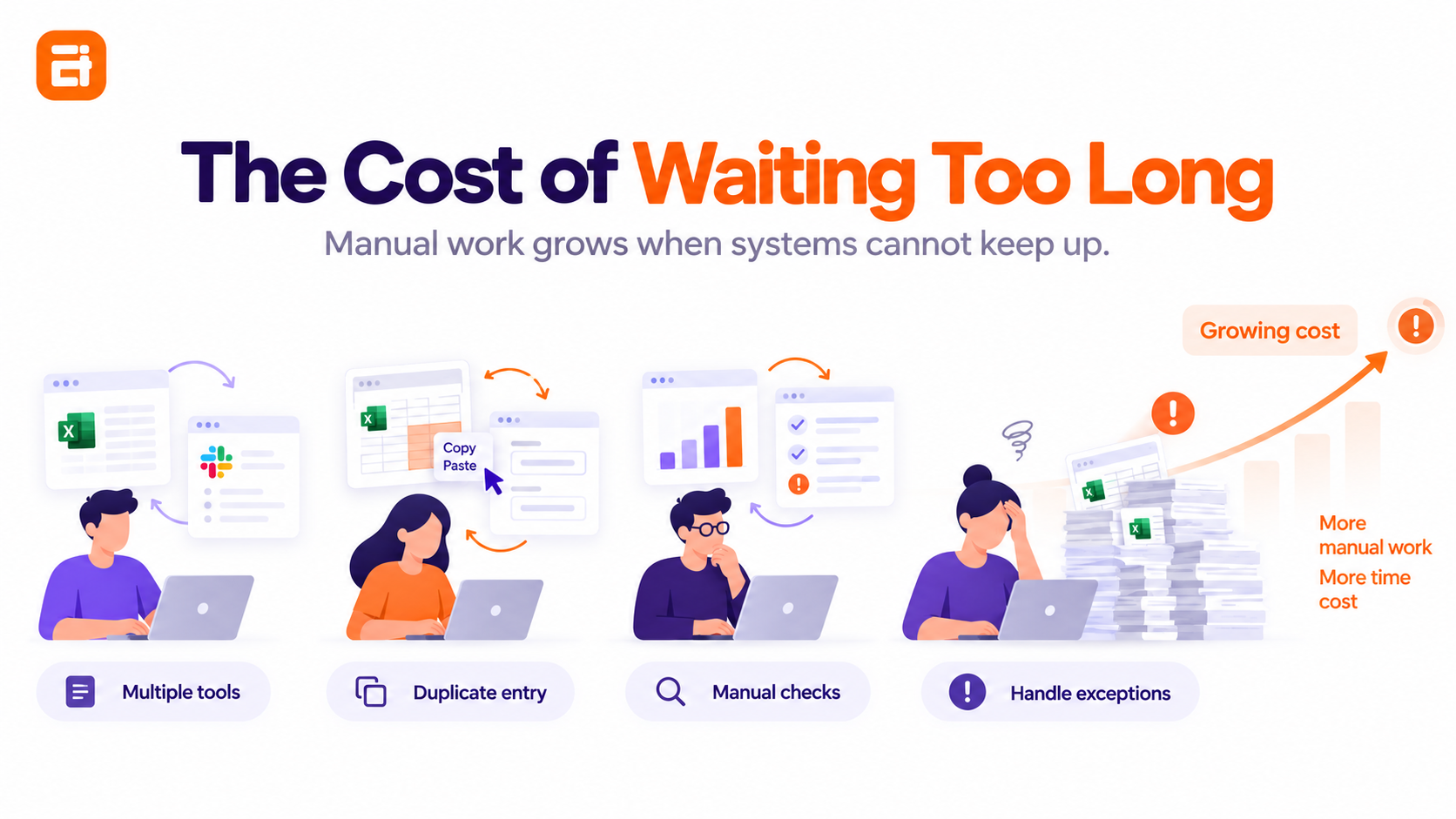
Waiting has a cost too, but it is harder to see because it rarely appears as a single invoice.
Employees keep reconciling spreadsheets, entering information more than once, rebuilding reports, checking whether systems agree, and manually handling exceptions that the software cannot represent.
As those workarounds become part of everyday operations, the business pays through staff time, slower decisions, delayed work, and reduced capacity.
Eventually, maintaining the workaround becomes more expensive than addressing the underlying system problem. That is the point where doing nothing is no longer the cheaper option.
How to Calculate Whether Custom Software Pays Back
Compare the annual cost of your current situation with the annualized cost of the alternative.
Before comparing the numbers, it helps to understand what goes into the build itself; our guide to software development costs breaks down the main cost factors in more detail.
Illustrative example:
1. Current annual cost
36,000 licenses and add-ons + 12,000 patch tools + (800 workaround hours × 30 loaded hourly cost) = 72,000
2. Alternative annual cost
120,000 build ÷ 4 expected years + 18,000 annual support = 48,000
3. Annualized difference
72,000 − 48,000 = 24,000
4. Simple payback period
120,000 ÷ (72,000 current annual cost − 18,000 ongoing support) = about 2.2 years
Treat the workaround-hours estimate carefully because small manual tasks spread across multiple employees are easy to underestimate.
The alternative calculation should also include the costs that continue after the first release, rather than comparing your current annual spend against the development quote alone.
When Different Business Types Need Custom Software
The five conditions stay broadly the same, but the point at which they become serious differs by industry and by system.
A restaurant can outgrow standard software for completely different reasons from a recruitment agency, while problems such as outgrowing spreadsheets can cut across many types of businesses.
By industry
- Is your restaurant outgrowing its software?
- When is standard logistics software no longer enough?
- Should a manufacturer build custom software?
- Has your recruitment agency outgrown its software?
By system
- Custom CRM or Salesforce?
- Do you need a custom ERP, or will a standard one do?
- Do you need custom inventory software?
- Is your hiring process bigger than your ATS?
- When is a standard POS no longer enough?
What to Do Before You Build Custom Software
Whatever score you reach, the next step should be diagnostic rather than commercial.
The four steps below help you clarify the problem, assess your current software, estimate costs, and define what a custom build should include:
- Write the process down end to end: Put every major step, exception, handoff, and human decision on one page. Problems that look like software limitations often become much easier to diagnose once the real workflow is visible.
- Ask your current vendor the fit question: Describe the exact sequence you need and ask, “Can the product be configured to do this?” You are testing the product's underlying assumptions, not simply asking whether a named feature exists.
- Cost the current situation honestly: Include licenses, plan upgrades, add-ons, integrations, patch tools, duplicated systems, and the staff hours consumed by workarounds. Without that baseline, a development quote has nothing meaningful to be compared against.
- Scope the smallest useful version: If the answer is build, start with the process that created the strongest case rather than turning every software frustration into a requirement.
These steps can usually be completed before any development commitment and remain useful even if the final decision is to keep what you already have.
Deciding Whether Custom Software Is Right for Your Business
The question was never whether custom software is better than off-the-shelf software.
It is whether your process is genuinely unusual enough to justify ownership and whether your organization is ready to take responsibility for what gets built.
Both must be true; either one on its own creates the wrong investment.
If the answer is no today, reassess when license costs rise significantly, manual workarounds become critical, or your core process no longer fits the software.
The decision is easier to reverse in one direction than the other. You can delay a custom build and reconsider later, but undoing one after money, data, workflows, and internal time have already been committed is much harder.
FAQs
1. What is considered custom software?
Custom software is software built around one organization's specific process or requirements rather than a standard product sold to many businesses.
2. How much does custom software cost?
Cost depends heavily on scope, integrations, data migration, complexity, and ongoing support, so compare your current annual operating cost with the build cost spread across its expected useful life plus maintenance.
3. When is custom software worth it?
Custom software is worth serious consideration when the process is a genuine differentiator; standard products have a structural fit problem, and your organization is ready to own the resulting system.
4. Can I build my own software instead of hiring a developer?
For straightforward internal processes, no-code or low-code tools are worth testing first; custom engineering becomes more relevant when the required logic, integrations, permissions, or data relationships exceed those tools.
5. How do I know if off-the-shelf software can be configured to do what I need?
Describe the exact workflow to the vendor and ask whether it can be configured; a missing feature is different from a structural limitation in how the product works.
6. What happens if we build custom software and it doesn't work out?
You still absorb development, migration, testing, training, and transition costs, which is why the business process and internal ownership should be validated before development starts.

Related insights
-in-Business_1763716856557-585605410_2025-11-21.png&w=3840&q=75)
The Rise of Virtual and Augmented Reality (VR/AR) in Business
21 Nov 2025

Choosing the Right E-Commerce Platform for Your Nepal-Based Business
21 Nov 2025

The Evolution of Software Development: A Journey Through Time
19 Dec 2025
Have a project in mind? Let's build something great.
Share your ideas or questions and our experts will get back to you shortly.
Unlock Expert Guidance
Need expert IT advice? Our seasoned professionals are here to help you navigate your tech challenges. Schedule a session with us and get personalized solutions tailored to your business needs.

Connect with Us and Let's Build Something Together
We'd love to hear from you! Whether you have questions, need support, or want to discuss a new project, our team is ready to assist. Fill out the form below, and we’ll get back to you as soon as possible.
Prefer a Direct Consultation?
Connect with our team for a 1-on-1 virtual session to discuss your project, understand your needs, and explore the right solution for your business.
What's Next?
- 1Connect with you at a convenient time
- 2Explore your needs, goals, and requirements
- 3Prepare a tailored proposal based on your needs
Why Choose Us
Connect with AITC
Select your inquiry type to route your request to the right department.
Our Office Locations
Operating across 3 key timezone hubs to serve global enterprise clients.