







Applications
Software
Web development
Your Training Business Is Growing. Is Your Software Keeping Up?

sachin pokharel
26 Oct 2026
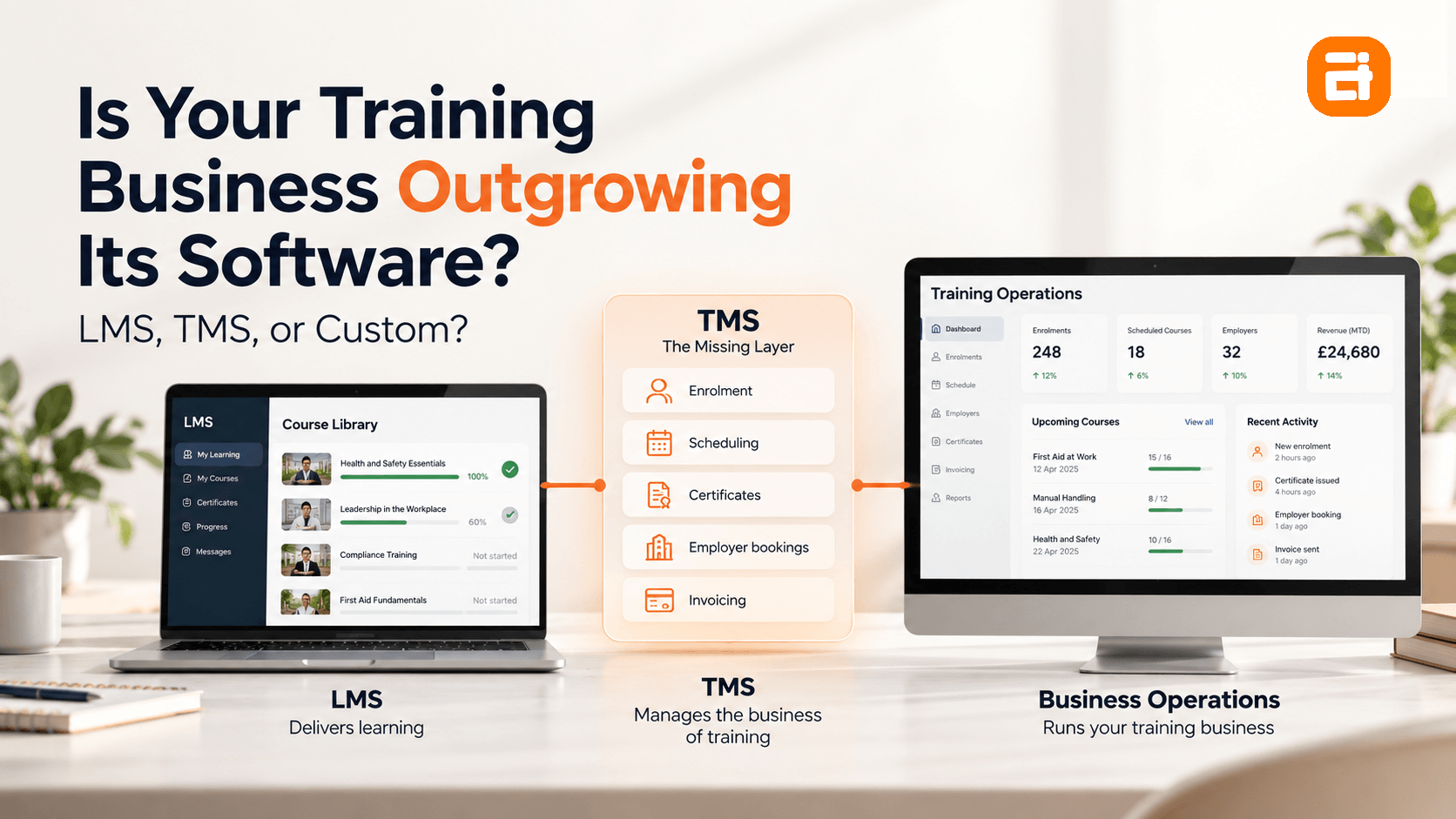
A learning management system (LMS) works well for delivering courses and tracking learner progress. However, it is not designed to manage the operational work around training, such as enrolments, scheduling, certificates, employer bookings, and invoicing.
That is where training management software (TMS) comes in. A standard system can handle the processes around your courses, while the LMS continues to manage the learning experience. For many providers, a standard TMS is enough. But when your delivery model or business workflows do not fit standard TMS, custom training management software becomes an option.
In this blog, you'll learn where an LMS falls short, when a standard TMS is enough, and when custom software makes sense for your training business.
Key Highlights
- An LMS is built mainly for learning delivery, while a training management system manages the wider business workflow.
- Enrolment, scheduling, certification tracking, employer billing and group bookings sit outside what an LMS is built to do.
- More trainers, locations, clients, and course types increase the number of dependencies your software must handle.
- A short workflow audit can show whether another standard platform is enough or whether a custom build is justified.
- Custom software makes more sense when the problem is structural rather than a missing feature.
LMS vs. Training Management System: What Does Your Business Actually Need?
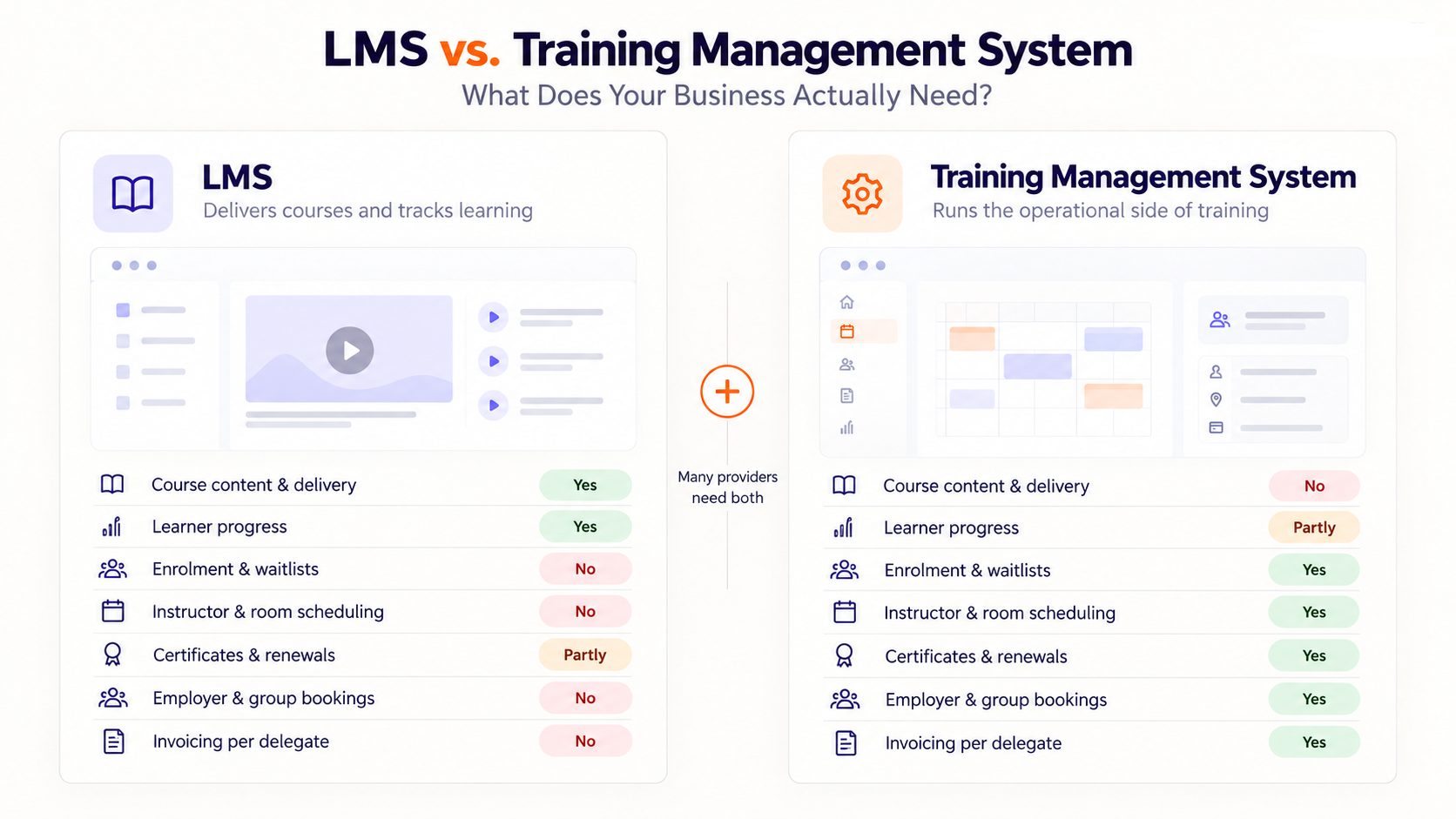
An LMS focuses on delivering courses and tracking student progress, while a TMS handles the operational processes around them. Most training providers need both because learning delivery, enrolment, scheduling, certification, and billing involve different processes.
| What it handles | LMS | Training management system |
| Course content and delivery | Yes | No |
| Learner progress | Yes | Partly |
| Enrolment and waitlists | No | Yes |
| Instructor and room scheduling | No | Yes |
| Certificates and renewals | Partly | Yes |
| Employer and group bookings | No | Yes |
| Invoicing per delegate | No | Yes |
Moreover, for a small training provider, an LMS combined with a few other tools may be enough. The problem appears when those tools no longer work as one process.
For a closer look at the options, see Moodle, TalentLMS, or Custom? Making the Call and compare what each approach offers.
What an LMS Does Not Do for a Training Business
An LMS does not manage the business side of training. It usually tracks learners and their course enrolments. Teams often manage details such as refunds, released places, and movement between cohorts in spreadsheets or inboxes instead.
These five areas show where an LMS falls short for a growing training business because they go beyond managing learning.
1 . Enrolment, Waitlists and Cancellations
An LMS does not handle the booking changes around the enrolment; it just records who is enrolled for what course. So, training providers need to manage what happens around each booking. Learners may cancel, move to another cohort, or join a waitlist. Each change affects available places, refunds, and course records.
These updates often require staff to check bookings, adjust places, process refunds, and update learner information across different systems. When this information sits in spreadsheets or inboxes, it becomes harder to keep records accurate as course volumes grow.
The LMS keeps the enrolment record, but the wider booking process still needs to be managed separately through training management system or custom training software.
2. Instructor, Room and Resource Scheduling
One of the key LMS limitations for training providers is that it does not manage the physical resources needed to run a course.
An LMS does not act as instructor scheduling software. When an instructor becomes unavailable, your team needs to assign another qualified instructor while keeping the room and equipment schedule aligned.
The challenge grows when several courses share the same instructor, room, or equipment. A change in one booking affects other courses, so your team needs to check these dependencies before confirming a new schedule. These shared resources become a direct constraint on how many courses you can run at the same time.
An LMS manages the learning side of the course, but these operational dependencies sit outside the learning platform. As the number of courses grows, managing them across separate tools becomes harder to maintain.
3. Certificates, Expiry and Renewal
An LMS issues a certificate when a learner completes a course, but managing certification does not end there. So, training providers need to track upcoming expiry dates, send renewal reminders, and keep certification records up to date manually.
The key difference is whether the software can manage the full certification lifecycle. Providers need records that show which learners hold valid certificates, which certifications are approaching expiry, and which require renewal. When these processes depend on custom business rules or integrations, a standard LMS may not provide everything the business needs.
4. Employer Relationships and Group Bookings
Training businesses often manage employer-sponsored training, so they need to track learners, bookings, payments, and completion records through a single employer’s view. However, an LMS can support these functions for individual learners but usually lacks the employer portal that allows the single view of their learner's information.
For example, an employer may send fifteen learners to four courses and need one invoice, one report, and one view of employee progress. Since the LMS stores this information across individual learner accounts, staff must combine it manually to give the employer a complete view.
As the number of employer clients grows, this creates more administrative work and makes client reporting harder to manage.
5. Invoicing, Funding and Part-Payment
An LMS does not manage the different payment and invoicing rules that training providers often need. It is built to track learners and their training, not accounting details.
Training fees vary per delegate, per cohort, or under an employer contract. This also means payment details need to follow changes in enrolments, attendance, cancellations, and cohort changes. The LMS records the training activity, while accounting software manages invoices and payments. Neither system, however, connects the full training and payment context.
For your team, this creates extra manual work. Staff need to check which fee applies, who pays, how much each party owes, and whether payment has been received. Then, they need to match these details across systems when the records do not align.
Our client, Karki Tax Consultancy, used to have staff manually transfer invoice, accounting, and client information between disconnected systems. They then had to check the records again to make sure the figures matched. We built custom software that connected their client information with the accounting system, reducing repetitive work and improving transparency.
When a Training Management Platform Is Enough
A standard training management platform is enough if you have common workflows such as fixed courses, simple pricing, standard accreditation, and straightforward bookings. With many proven platforms available, most providers are better off buying than building custom software.
- Standard course catalogue, standard terms: If you offer fixed courses with consistent pricing and one cancellation policy, off-the-shelf course booking and enrolment software covers these needs well.
- One accreditation framework: If your certification follows a single external standard, an established training management platform already provides the structure you need to manage it.
- Employers book, but simply: If employers make group bookings without needing bespoke reports or a dedicated client portal, standard platform features are usually enough.
- You need it running this term: Most platforms can be implemented in weeks, while a custom build takes months. If you need the system working this term, buying off the shelf training management software is a practical choice.
When a Training Provider Needs Custom Software
A training provider needs custom software when standard training platforms cannot support its core workflows without ongoing workarounds. This often happens when the provider has complex delivery processes, specific compliance requirements, or a customer structure that does not fit the platform's design.
1 . Your Delivery Model Isn't a Course Catalogue
Standard platforms are built around courses with clear start and end dates. That works well for fixed courses, but not for apprenticeships, rolling intakes, modular pathways, or blended cohorts with different completion rules.
The relevant question is whether the platform can represent these delivery models through its existing configuration, integrations, and workflows. When staff must repeatedly reconcile learner progress, manage exceptions manually, or maintain separate records, custom training management software may be worth evaluating.
2. Multiple Accreditation or Funding Bodies
Working with several accreditation or funding bodies creates parallel requirements for the same group of learners. For example, one company may require attendance records, while another needs competency evidence, outcome tracking, or milestone records. As a result, managing these requirements creates extra work for your team.
When your standard training software cannot manage these needs in one workflow, your team has to rely on manual workarounds. Meanwhile, custom software is designed around your workflows, so you can adapt the system to different client needs without relying on the same manual processes. Requirements differ by jurisdiction and must be confirmed locally.
3. Employers Are the Real Customer
If corporate clients make up most of your business, then you can focus on building a custom training management software that meets their specific needs. The employers may have different prerequisites for bookings, employee records, compliance information, or reporting. Standard training platforms follow a general structure, so fitting these clients' needs into the system creates gaps in your daily work.
Meanwhile, custom software is designed around your business and corporate client requirements from the start. This lets you reduce he need for workarounds as you manage corporate accounts. AITC has seen this type of problem in other industries as well.
From our discovery calls
We have seen training providers reach a point where employers are no longer simply booking learners. They need a system that offers an easy view of bookings, learner progress, compliance records, and reports, all at once along with ease of use for employees.
Explore our guide, Paying for 12 Tools That Don't Talk to Each Other?, to see how gaps between tools affect day-to-day operations.
What Custom Training Software Costs?
Custom training software can be expensive upfront. But you should evaluate the cost over the full life of the system, not just the initial development price.
Several factors such as complexity of features, integrations, user roles, number of users, workflows, and ongoing maintenance affect the expenses. A system that manages employer bookings, group enrolments, scheduling, learner records, certificates, invoicing, and accreditation requirements will have different development needs from a LMS.
The total cost also depends on how much your existing system needs to change. You may not need to replace your LMS or other tools. For example, your LMS can continue to handle learning delivery while a custom layer manages operational processes such as scheduling, enrolment, employer bookings, and certification.
Custom software does not mean replacing every system you already use. An LMS can continue to handle learning delivery, while a custom layer manages the operational work around it, such as scheduling, enrolment, employer bookings, and certification. These hidden operational costs are worth considering alongside the other investment to estimate the final cost of custom software development.
Get a Custom Training Software Estimate
Share the workflows, integrations, and client requirements your current software cannot handle. Our team will review your needs and prepare a tailored proposal.
When You Should Not Build a Custom Software
Custom software is usually not the right choice when an existing training management platform can meet the business's needs. Before commissioning custom system, check whether a suitable off-the-shelf platform already covers the required workflows.
- You have not tried a training management platform: If the LMS is the only system you've bought, the next step is the other category, not custom development.
- The course model is still changing: When you change delivery formats every term, your software requirements are still moving. Build once your core training model is stable.
- Enrolment volume is low: If your team handles a small number of enrolments, manual scheduling can cost less than building and maintaining custom software. Build when the volume makes that manual work costly.
- Nobody will own it: A build needs someone who can decide how enrolment and certification should work. Without that, the project stalls.
If you're unsure whether your organization is ready to own a custom system at all, the Do You Actually Need Custom Software? A Readiness Test is the place to check before going further.
What to Do Before You Change Systems
Before committing to custom software, map the workflow causing the most operational friction and confirm that the existing system cannot support it. The goal is to identify the specific gap that requires a custom solution before deciding to build.
- Separate the two problems: List every task that caused problems last term and mark each as delivery or business. This shows whether the issue sits in training delivery or the business processes around it.
- Count one intake cycle: Track the work involved in enrolment changes, schedule reworks, certificate chases, and invoices raised by hand. Include the staff time spent on each task.
- Track one learner's journey: Follow one learner from enquiry through enrolment, completion, certificate, and renewal. Note every system involved and where your team has to move or re-enter information.
- Ask a training management vendor the fit question. Describe your delivery model exactly, including rolling intakes, different completion rules, employer requirements, or other exceptions. Ask whether the platform supports that structure without workarounds.
Give yourself about a week and spend nothing. Step one alone can reveal whether the problem is really your training system or the process around it.
Deciding Whether Custom Training Software Is Worth It
The decision is not simply whether to keep your current software or build something new. You have three options: improve the system you already use, move to an off-the-shelf training management system, or build custom software. The right choice depends on where the problem sits and whether another platform already handles the work.
If your current system supports your basic needs, start improving it. Better configuration, integrations, or process changes can remove some of the workarounds without replacing the whole setup.
If the LMS handles learning, but your business needs better enrolment, scheduling, certification, or employer management, an off-the-shelf training management system is the next option to consider.
Custom software development only makes sense when your delivery model still does not fit the available platforms.
Moreover, the cost of the wrong decision is not just the software bill. It is the time spent maintaining workarounds, moving information between systems, and fixing problems that keep returning, making the overall business slow and less efficient. Choose the smallest change that solves the real problem, then build further only when your workflow demands it.
Training Software Built Around How You Actually Deliver
Build custom training management software around the way your business works. Connect enrolment, scheduling, certification, employer bookings, and reporting in one system.
FAQs
What is the difference between an LMS and training management software?
An LMS manages learning activities such as courses, content, assessments, and learner progress while training management software manages the wider business operations around training, including scheduling, trainers, employer bookings, certifications, reporting, and payments.
Do training providers need both an LMS and a training management system?
Yes, when the provider needs to manage both learning delivery and the business operations around it. The LMS handles course content and learner progress, while the training management system manages enrolments, scheduling, certification, employer bookings, and billing.
How much does custom training management software cost?
The cost of custom training management software varies based on the features, integrations, users, and level of customization required.
Can custom software work with the LMS we already use?
Yes, custom software can integrate with an existing LMS, keeping the LMS for learning while managing business workflows separately.
How long does custom training management software take to build?
The timeline depends on the workflows, integrations, and features required, so a focused operational system usually takes less time than a complete platform. A smaller build may take a few months, while a larger system takes longer.
Is custom software worth it for a small training business?
Custom software is worth considering when a small training business has complex workflows that standard platforms cannot handle well. For simple courses, enrolment, and scheduling, standard training provider software is usually the better choice.
What happens to our data when we move to custom software?
The data is usually migrated into the new system based on the agreed scope, with records mapped to the new structure. Existing systems can also be integrated so important data remains connected during the transition.
Related insights
-in-Business_1763716856557-585605410_2025-11-21.png&w=3840&q=75)
The Rise of Virtual and Augmented Reality (VR/AR) in Business
21 Nov 2025

Choosing the Right E-Commerce Platform for Your Nepal-Based Business
21 Nov 2025

The Evolution of Software Development: A Journey Through Time
19 Dec 2025
Have a project in mind? Let's build something great.
Share your ideas or questions and our experts will get back to you shortly.
Unlock Expert Guidance
Need expert IT advice? Our seasoned professionals are here to help you navigate your tech challenges. Schedule a session with us and get personalized solutions tailored to your business needs.

Connect with Us and Let's Build Something Together
We'd love to hear from you! Whether you have questions, need support, or want to discuss a new project, our team is ready to assist. Fill out the form below, and we’ll get back to you as soon as possible.
Prefer a Direct Consultation?
Connect with our team for a 1-on-1 virtual session to discuss your project, understand your needs, and explore the right solution for your business.
What's Next?
- 1Connect with you at a convenient time
- 2Explore your needs, goals, and requirements
- 3Prepare a tailored proposal based on your needs
Why Choose Us
Connect with AITC
Select your inquiry type to route your request to the right department.
Our Office Locations
Operating across 3 key timezone hubs to serve global enterprise clients.