






AI
ML
CI/CD
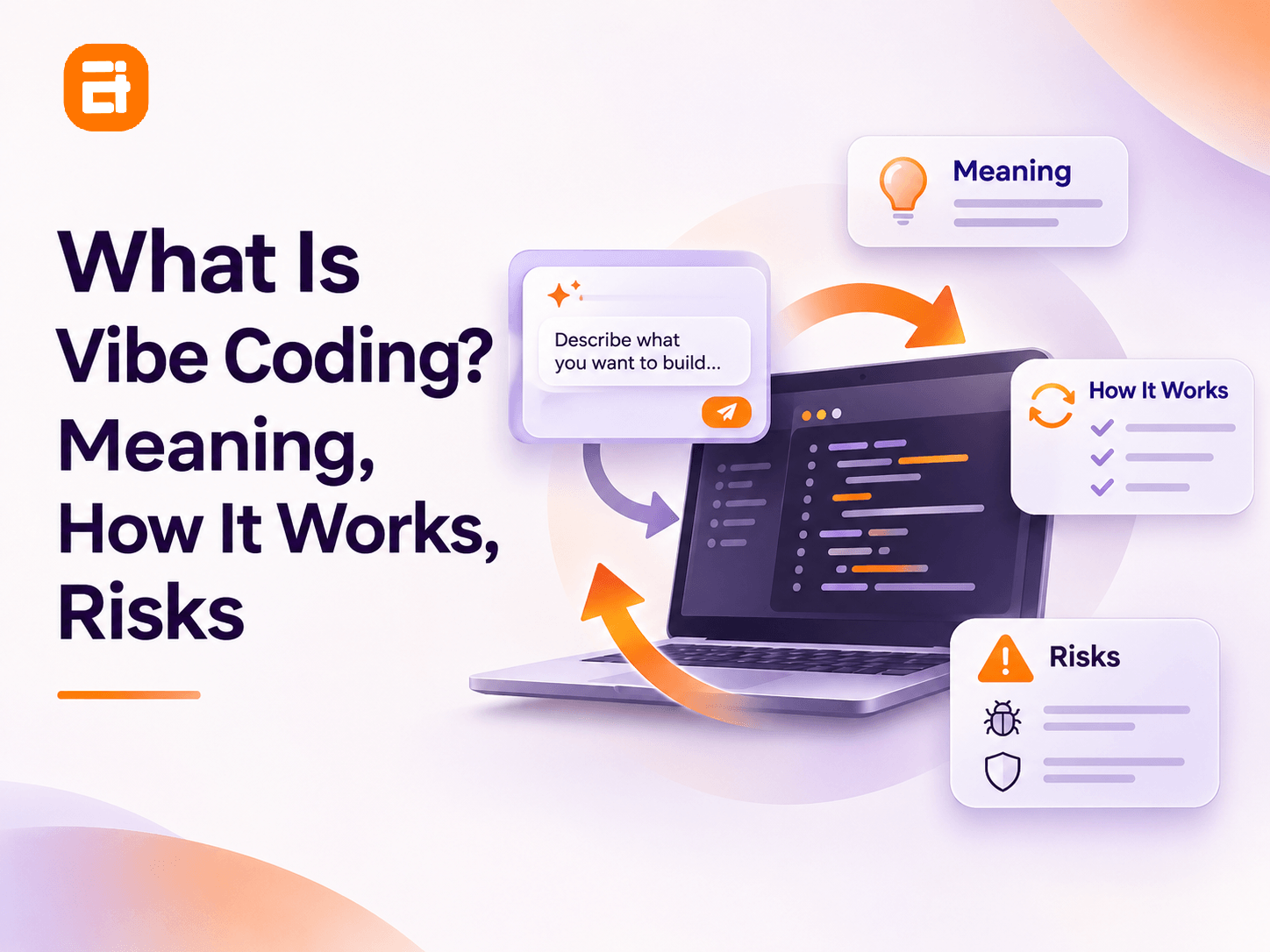
What Is Vibe Coding? Meaning, How It Works, Risks

sachin pokharel
05 Nov 2026
Vibe coding is a way of building software by describing what you want in plain language, letting AI generate the code, and checking whether the result works without necessarily reading or understanding the underlying code.
Instead of writing functions line by line, you give an AI coding tool instructions, run what it creates, and describe what needs to change.
For example, you might type:
"Build a simple appointment booking page where customers select a date, enter their details, and receive a confirmation."
The AI generates the application. You open the preview, try booking an appointment, and ask for changes when something doesn't work.
That's the appeal of vibe coding: you can move from an idea to a working prototype without writing much code yourself.
There's an important distinction, though. Using AI to generate code isn't automatically vibe coding. If you review the code, understand its behavior, and test it before accepting it, you're doing AI-assisted programming.
Vibe coding, in its original meaning, involves trusting the running result without fully examining the implementation. That can be useful for experimentation. It becomes risky when the software handles real users, sensitive information, payments, or business operations.
In this guide, we'll explain where vibe coding came from, how it works, which tools people use, and how to decide when AI-generated software needs professional review.
Key Highlights
- Vibe coding means directing AI with prompts and judging the resulting software primarily by its behavior.
- Andrej Karpathy introduced the term in February 2025 while describing his approach to experimental projects.
- The workflow follows a loop: describe, generate, run, review the result, and refine.
- Vibe coding and AI-assisted programming differ mainly in how much the developer reviews and understands the generated code.
- It works best for experiments and low-risk prototypes, not unreviewed production systems.
- Before publishing a real application, validate its security, functionality, data handling, and maintainability.
Where Did the Term "Vibe Coding" Come From?
Andrej Karpathy coined the term vibe coding in a post on X on February 2, 2025 (Merriam-Webster gives that date), describing an informal approach to building software with large language models.
Karpathy, an OpenAI co-founder and former AI leader at Tesla, described talking to an AI coding assistant, accepting its changes without reading the diffs, and pasting error messages straight back in. He wrote that he'd "forget that the code even exists."
His example was deliberately informal. He was working on personal projects he called "throwaway weekend projects," and he wasn't proposing a professional software development methodology.
The term spread quickly. Collins English Dictionary named vibe coding its 2025 Word of the Year, and Merriam-Webster lists it as slang and trending.
As it spread, its meaning broadened. Some people now use it for almost any software development that involves AI. Developer Simon Willison objected to that drift early on. In his discussion of vibe coding and AI-assisted programming, he argues that reviewing, testing and understanding AI-generated code is a different activity from accepting it without inspection.
The distinction matters because the risks are different.
How Does Vibe Coding Work?
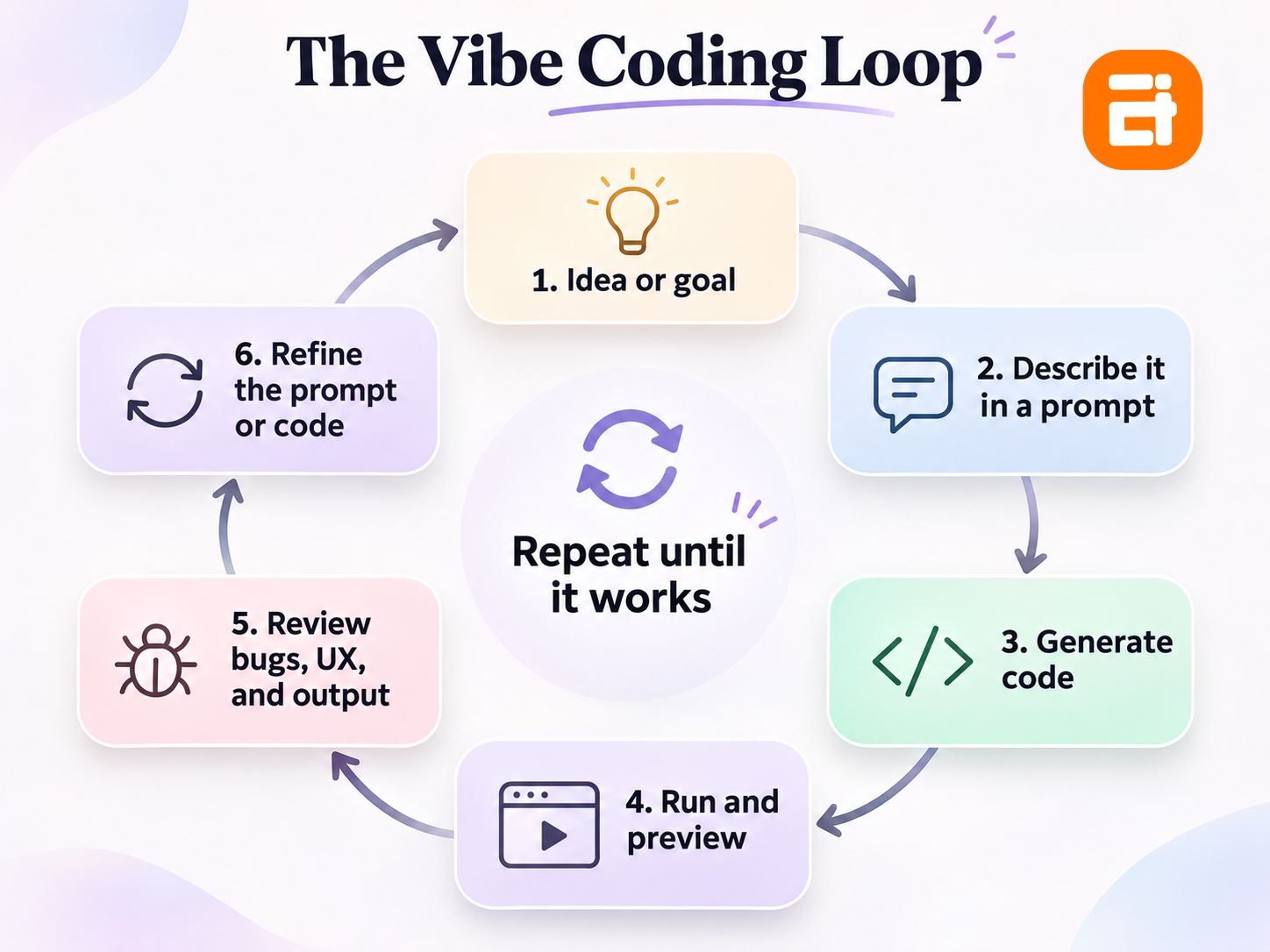
Vibe coding works through a repeated prompt-and-feedback loop: you describe a feature, AI generates the code, you try the result, and AI adjusts it based on your feedback.
You don't need to know every programming language involved to begin. You do need a clear idea of what the software should accomplish.
The process typically follows six steps.
1. Describe What You Want to Build
Start with an outcome rather than technical instructions. For example:
"Create a simple expense tracker where users can add expenses, assign categories, and view their monthly total."
The AI interprets your request and decides how to implement it. Clear instructions improve the first result, but even a detailed prompt may leave important requirements unspecified.
2. Let AI Generate the Code
The AI coding tool creates the files your application needs. Depending on the tool and project, that may include a user interface, application logic, database configuration, and integrations.
Some tools show the code directly. Others emphasize a working preview and hide much of the implementation.
3. Run and Preview the Application
Open the generated app and try using it. For an expense tracker, you might add several expenses, change a category, and check whether the monthly total updates.
At this stage you're judging what the application does, not how its code works. A successful preview covers the actions you tried and nothing else.
4. Describe What Needs to Change
When something doesn't work, explain the problem in natural language:
"The monthly total doesn't update when I delete an expense. Fix that without changing the layout."
You can also request new features, design adjustments, or changes to existing behavior.
5. Let AI Revise the Application
The AI changes the code based on your feedback. A fix for one issue can create another, especially when several features share the same data or logic. Each meaningful change needs another round of testing.
6. Repeat Until the Result Meets Your Goal
Continue prompting, generating, and testing until the application does what you intended. A small project may need only a few iterations. Larger applications can need many.
Every successful prompt can make the codebase larger without making it easier to understand or maintain.
Example: Building an Expense Tracker With Vibe Coding
Imagine you want a personal expense tracker.
Your first prompt creates a page with an expense form and a monthly total. You notice there's no way to edit an existing expense, so you request an edit button. Next, you ask the AI to save the data so it's still there after refreshing the page.
The app now appears complete.
But several questions remain unanswered. Where is the data stored? Who can access it? What happens if two expenses are saved at the same moment? Can a malformed value break the monthly total?
You may not find those problems by clicking through a few screens. Judging software only by its visible behavior leaves them hidden.
Vibe Coding vs. AI-Assisted Coding: What's the Difference?
The main difference is whether you accept AI-generated code based mainly on its visible output or also review and understand the implementation.
Both approaches use artificial intelligence. What changes is how much responsibility you keep for verifying what the AI produces.
| Comparison | Vibe coding | AI-assisted coding |
| Main approach | Describe outcomes and react to results | Use AI to support development |
| Code review | Often skipped or limited | Expected as part of the workflow |
| Programming knowledge | Little needed to start | Useful for evaluating suggestions |
| Primary validation | Running and previewing | Code review, testing, and runtime checks |
| Speed to first prototype | Often very fast | Can also be very fast |
| Typical applications | Experiments and personal prototypes | Prototypes and production applications |
| Main risk | Hidden implementation problems | Overlooking incorrect AI suggestions |
| Debugging | Often relies on further prompting | Uses code inspection and development tools |
Consider two people building the same booking application.
The first asks AI to create the entire app, tests the booking form, and publishes it when the interface seems to work.
The second uses AI to generate the same application but also checks validation, database permissions, error handling, and automated tests before deployment.
Both used AI to write code. Only the first clearly follows the original vibe coding approach.
Developers also move between the two. Someone might generate a prototype quickly to explore a product idea, then review and improve the code before real users depend on it.
What Tools Do People Use for Vibe Coding?
Vibe coding tools generally fall into two categories: prompt-to-app builders and AI coding environments.
Both generate software from natural-language instructions, but they give you different levels of control over the underlying code.
Prompt-to-App Builders
These tools emphasize creating and previewing applications from written descriptions. Examples include:
- Lovable: Builds web applications through natural-language prompts.
- Bolt: Provides an AI-driven environment for creating and iterating on applications.
- Replit: Combines AI-assisted app creation with a browser-based development and deployment environment.
- Base44: Emphasizes app creation through conversational instructions.
These products suit people without a conventional programming background. Even so, you still need to understand data storage, authentication, integrations, and deployment settings.
AI Coding Environments
These tools work more directly with source code and existing development projects. Examples include:
- Cursor: An AI-powered code editor that can generate, explain, and modify code.
- Claude Code: An AI coding agent designed to work with project files and development tasks.
- GitHub Copilot: An AI coding assistant integrated into development environments and workflows.
These tools can support both vibe coding and conventional AI-assisted programming. With the same tool you can accept every proposed change unread, or review the code and run tests.
Whether you're vibe coding depends on how you review the output, whatever tool you use.
Features, pricing, model access, and deployment capabilities change frequently. Check official product documentation before choosing a platform.
Is Vibe Coding Safe? The Main Risks to Understand
Vibe coding becomes risky when unreviewed code handles sensitive data, critical operations, or functionality that other people depend on.
An application can appear functional while containing vulnerabilities, logic errors, and unreliable data handling. The most important risks involve security, maintenance, uncontrolled AI actions, incorrect behavior, and exposed credentials.
1. Security Vulnerabilities Can Remain Hidden
A working interface doesn't prove that an application is secure. A generated app might display customer records correctly while failing to check whether the current user is allowed to see them. A login screen may look complete while the database permissions underneath are wrong.
Veracode's 2025 GenAI Code Security Report tested more than 100 large language models across Java, Python, C# and JavaScript. It found that 45% of the code samples failed security tests and introduced OWASP Top 10 vulnerabilities.
That doesn't mean 45% of all AI-generated applications are insecure. It shows that producing functioning code and producing secure code are separate challenges, and visual testing can't replace security validation.
2. AI-Generated Code Can Become Difficult to Maintain
Vibe coding can produce a working first version quickly, but repeated changes may add unnecessary complexity. Adding a discount feature could accidentally affect tax calculations if the AI modifies shared pricing logic.
Without automated tests, code review, and version history, a problem like that can go unnoticed for a long time. Established software development best practices exist to catch it earlier.
The 2025 Stack Overflow Developer Survey points the same way. Among respondents answering its AI frustration question, 66% cited "AI solutions that are almost right, but not quite", and 45% said debugging AI-generated code was more time-consuming.
Those findings cover AI development tools broadly, not vibe coding alone. They help explain why generating a first version and maintaining a reliable product are different tasks.
3. AI Agents Can Make Unintended Changes
Some coding agents can modify files, run commands, and connect to databases with limited supervision. That creates risk when the agent can reach important systems.
In July 2025, SaaStr founder Jason Lemkin reported that Replit's AI agent deleted data from his application's database during development. Replit later described the incident and the safeguards it added, including separate development and production databases and rollback. It said the data was eventually restored.
Prompts alone aren't a safeguard against destructive actions. Give development tools restricted permissions, and keep production data out of their reach.
4. Hidden Errors Can Produce Incorrect Results
Software can run without crashing and still give the wrong answer. A pricing calculator might work for ordinary purchases but apply discounts incorrectly when several conditions overlap. An appointment system might let two people reserve the same time slot.
These aren't visible design problems. They sit in the business logic underneath, so AI-generated code needs testing against expected behavior, edge cases, and failure conditions.
5. API Keys, Data, and Usage Costs Need Protection
A beginner may paste an API key into a prompt because the AI asks for it to configure an integration. That can expose the credential through chat history, generated source files, logs, or public repositories.
Some integrations also charge per request, so a poorly configured application can generate unexpected usage costs.
Keep secrets out of prompts, use the platform's secure secret-management features, and set billing limits where supported. Don't use real customer or production data to test an experimental application.
When Should You Use Vibe Coding?
Vibe coding is most useful when you need to test an idea quickly and the consequences of failure are limited.
Ask what happens if the application gives an incorrect result, exposes information, or stops working. That answer matters more than whether AI can build it.
The examples below show where quick experimentation is reasonable and where additional engineering controls are necessary.
| Reasonable uses for vibe coding | Requires reviewed engineering before launch |
| Clickable product prototypes | Payment processing |
| Personal calculators | Applications storing sensitive user data |
| Demo landing pages | Authentication and access-control systems |
| Experimental dashboards using dummy data | Medical or financial decision systems |
| Simple offline utilities | Customer-facing business applications |
| UI and feature experiments | Software supporting critical daily operations |
A dashboard containing fictional sales data is a reasonable experiment. The same dashboard connected to real customer accounts is a different responsibility.
Even an internal tool needs stronger safeguards if it can change records, expose employee information, or interrupt business operations.
A Practical Decision Rule
Before you vibe code an application, ask these four questions:
- Can the application fail without causing significant harm? If not, don't rely on unreviewed code.
- Does it store sensitive data or perform important transactions? If yes, verify the implementation before deployment.
- Will other people depend on it regularly? If yes, plan for testing, maintenance, monitoring, and support.
- Could a bug cost you money or reputation? If yes, treat it as production software from day one.
If any answer points to meaningful risk, the prototype may still be useful, but it shouldn't be treated as production-ready software.
Can You Turn a Vibe-Coded Prototype Into a Real Product?
Yes, but a working prototype needs technical assessment before it becomes a dependable product.
You don't necessarily need to discard everything the AI created. Some generated components may be reusable, while others need significant changes.
A practical review covers five areas.
Functionality and Testing
Confirm that the app works beyond the demonstrations used during development. Test invalid inputs, missing data, simultaneous actions, failed integrations, and unusual user behavior, and add automated tests for important business rules.
Security and Access Control
Review authentication, authorization, database permissions, input validation, and secret management. Test whether users can reach records or actions that belong to someone else.
Architecture and Maintainability
Examine how the code is organized, whether the dependencies are appropriate, and how easily a future developer could understand it. Look for duplicated logic, unnecessary complexity, and tightly coupled components.
Data and Infrastructure
Verify backups, recovery procedures, data integrity, environment separation, deployment configuration, and operational access. Don't give experimental agents unrestricted access to production systems.
Ownership and Ongoing Support
Decide who will maintain the application, respond to incidents, update dependencies, and review future changes. If nobody can explain how the software works, the business is relying on something it can't reliably support.
If you've already built something with an AI tool and want it checked before real users arrive, AITC International's launch-readiness service for vibe-coded SaaS starts with a code audit.
For an early-stage product, the goal should be to validate the idea before making a large engineering investment. AITC's MVP development services focus on defining and building a smaller product around the core idea that needs validation.
If you're unsure whether a custom application is justified, start with the custom software readiness guide before committing to development.
A prototype proves that an idea can be demonstrated. A production-ready product also has to prove it can be operated safely and maintained.
How to Start Vibe Coding as a Beginner
The easiest way to start vibe coding is to build one small, low-risk application with clear requirements and no sensitive data.
You don't need to begin with a complex SaaS platform, marketplace, or mobile application. A personal habit tracker, a simple calculator, or a project portfolio page makes a better first experiment.
Follow this process to keep the project manageable.
Step 1: Choose a Small Project
Pick something with one primary purpose. For example, build a habit tracker where you can add habits, mark them complete, and see daily progress.
Leave accounts, payments, complex integrations, and multiple user roles out of your first project.
Step 2: Write a Clear Initial Prompt
Describe the users, expected behavior, and basic constraints. Here's a sample prompt:
Build a simple personal habit tracker. Users should be able to add habits, mark each habit complete for the day, and view their daily progress. Keep the interface clean and mobile-friendly. Use sample data, do not add accounts or payments, and explain where the data is stored.
A prompt like this gives the AI clearer boundaries than simply asking it to build a productivity app.
Step 3: Test One Feature at a Time
Start by checking whether you can add a habit. Then test completion tracking, editing, deletion, and data persistence.
Avoid requesting many unrelated features at once. Smaller changes make unexpected behavior easier to trace.
Step 4: Save Working Versions
Create a checkpoint or version-control commit after each meaningful improvement. If a later change breaks something, you can restore the last working state instead of repeatedly asking AI to repair an increasingly unstable project.
Step 5: Learn What the AI Generated
Ask the AI to explain the major files, how data flows through the application, and which components handle important logic.
You don't need to understand every implementation detail immediately. Learning to review code does turn the project into a useful programming exercise instead of a process of accepting output blindly.
Step 6: Review Before Publishing
Before making the app public, check its data handling, permissions, dependencies, and deployment settings. For anything involving other users or sensitive information, arrange an appropriate technical review.
The safest starting point is a prototype you can experiment with, learn from, and discard if necessary.
Is Vibe Coding the Future of Software Development?
Vibe coding shows how natural-language interfaces can make software creation more accessible, but it doesn't eliminate the need for engineering judgment.
AI can reduce the effort required to create an interface, generate boilerplate, and explore a new idea. The harder responsibilities remain: defining correct behavior, securing data, handling unexpected conditions, and maintaining software over time.
For beginners, vibe coding offers an accessible way to explore software creation. For developers, AI can speed up implementation while review and technical decisions stay in human hands.
For businesses, a sensible approach is to experiment quickly, validate the idea, and bring in stronger engineering controls as the product becomes important.
Vibe Coding FAQ
What is vibe coding in simple terms?
Vibe coding means telling AI what software to build in everyday language and checking the running result without necessarily reviewing the generated code.
Who invented vibe coding?
Andrej Karpathy coined the term vibe coding in a post on X on February 2, 2025.
Do you need coding knowledge for vibe coding?
No, you can start without programming knowledge, but understanding code becomes important when debugging, securing, and maintaining applications.
What is an example of vibe coding?
An example is asking AI to build a habit-tracking app, testing the result, and requesting changes through prompts without inspecting the underlying code.
Is vibe coding the same as AI-assisted coding?
No, traditional AI-assisted coding involves developers reviewing and validating AI suggestions, while vibe coding often relies primarily on testing visible results.
Is vibe coding safe for production applications?
Unreviewed vibe-coded applications should not be considered production-ready without appropriate testing, security assessment, and operational safeguards.
What is the best tool for vibe coding?
The best tool depends on your skills and project, with prompt-to-app builders suiting beginners and AI coding environments offering greater code-level control.
How much do vibe coders earn?
There is no established salary for vibe coders because compensation usually follows the underlying role, such as software developer, freelancer, or product builder.
Will vibe coding replace software developers?
Vibe coding can automate parts of software creation, but reliable applications still require people responsible for architecture, security, testing, and maintenance.

Related insights
See More
Have a project in mind? Let's build something great.
Share your ideas or questions and our experts will get back to you shortly.
Unlock Expert Guidance
Need expert IT advice? Our seasoned professionals are here to help you navigate your tech challenges. Schedule a session with us and get personalized solutions tailored to your business needs.

Connect with Us and Let's Build Something Together
We'd love to hear from you! Whether you have questions, need support, or want to discuss a new project, our team is ready to assist. Fill out the form below, and we’ll get back to you as soon as possible.
Prefer a Direct Consultation?
Connect with our team for a 1-on-1 virtual session to discuss your project, understand your needs, and explore the right solution for your business.
What's Next?
- 1Connect with you at a convenient time
- 2Explore your needs, goals, and requirements
- 3Prepare a tailored proposal based on your needs
Why Choose Us
Connect with AITC
Select your inquiry type to route your request to the right department.
Our Office Locations
Operating across 3 key timezone hubs to serve global enterprise clients.