







Software
How AI Is Transforming Software Development


sachin pokharel
26 Feb 2026
You might have noticed that many software companies are now integrating Artificial Intelligence (AI) to enhance efficiency, improve products, and stay competitive.
From startups to enterprises, teams are turning to AI to stay afloat competitively. But how has AI become such a transformative force in recent years?
With AI driven shift, the question remains whether AI capabilities will complement human expertise or replace them.
In this blog, we take a deep dive into the role of AI in software development and examine its impact on the development process and its benefits.
What Is AI in Software Development?
AI in software development is the use of artificial intelligence technologies, including machine learning (ML), natural language processing (NLP), and deep learning, to help developers build software faster, smarter, and more reliably.
AI can analyze code, detect errors, suggest improvements, and automate repetitive tasks, reducing human effort and improving software quality. It also predicts bugs, optimizes performance, and streamlines testing, resulting in software that is more secure, scalable, and high performing.
AI-powered tools such as GitHub Copilot, Tabnine, and OpenAI Codex assist software developers by auto-generating code and offering intelligent suggestions, saving time and minimizing mistakes. When combined with cloud platforms, APIs, and DevOps workflows, AI enables teams to deliver software quickly and efficiently.
In short, AI transforms traditional software development into a data-driven, automated, and intelligent process, helping businesses in fintech, healthcare, e-commerce, and SaaS create reliable and future-ready applications.
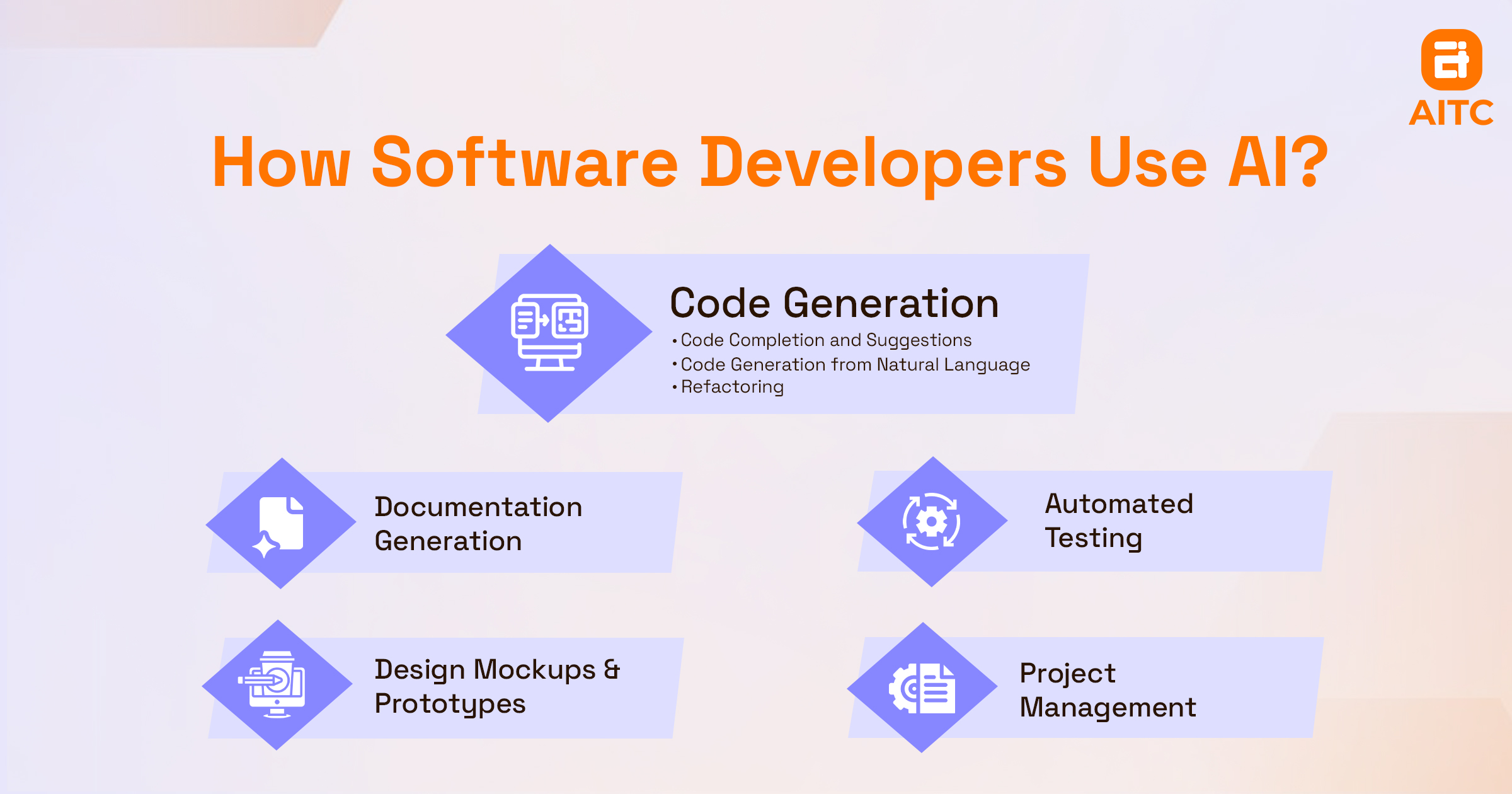
How Software Developers Use AI
By integrating AI with cloud infrastructure, microservices, and API-driven development, developers can focus on innovation and complex problem-solving, while AI handles routine coding, testing, and monitoring. The result is software that is scalable, reliable, high-quality, and future-ready, making AI an essential part of modern software development.
Automated Code Generation
AI-powered tools like GitHub Copilot, Tabnine, and OpenAI Codex can analyze code context, suggest snippets, and generate boilerplate code. This reduces repetitive coding tasks, speeds up development, and allows developers to focus on more complex challenges.
Bug Detection and Predictive Testing
AI scans code to detect potential bugs, security vulnerabilities, and performance issues before deployment. Predictive testing helps developers anticipate errors and ensures software remains high-quality and reliable.
Performance Optimization
AI continuously monitors application performance and provides recommendations for resource allocation, database optimization, and load balancing. This ensures software remains scalable, efficient, and robust under heavy usage.
Project Planning and Workflow Automation
By analyzing historical project data, AI can predict timelines, optimize task allocation, and suggest workflow improvements. This keeps teams on schedule and reduces development bottlenecks.
DevOps and Continuous Integration/Deployment (CI/CD)
AI assists in automating builds, deployments, and monitoring, while detecting anomalies in real time to improve system uptime. Cloud platforms like AWS, Azure, and Google Cloud integrate AI-driven monitoring to create smarter, more reliable DevOps pipelines.
Personalized Developer Assistance
AI also provides intelligent recommendations, documentation guidance, and code refactoring tips, helping developers learn faster and work more efficiently.
Popular AI-Powered Tools for Software Developers
Platforms like GitHub Copilot, Tabnine, Qodana, Grit.io, and Figstack use machine learning, natural language processing, and predictive analytics to make software development smarter and easier. AI-powered tools help developers write code faster, find bugs early, and maintain high-quality software.
Here’s a look at each tool and what it does:
| Tool | AI Capability | Key Features |
| Tabnine | Smart code completion | - Suggests code based on context across multiple languages and IDEs. - Helps with testing, documentation, and bug detection. - Supports private custom models with zero data retention. |
| Qodana | Real-time code review | - Auto-generates pull requests and bug reports. - Detects vulnerabilities and enforces coding standards. - Offers walkthroughs for code cleanup and best practices. |
| GitHub Copilot | AI code generation | - Suggests deploy-ready code, tests, and documentation. - Learns from your project files to give context-aware recommendations. - Integrates with logging tools, CI/CD, and feature flag systems. |
| Grit.io | Code migration automation | - Performs semantic-aware code upgrades. - Auto-generates pull requests and regression tests. - Ensures consistent, best-practice code refactoring. |
| Figstack | Code explanation | - Converts code into simple, natural language explanations. - Documents functions automatically. - Detects errors and security issues. - Suggests performance optimizations. |
By integrating AI-powered tools into development workflows, teams can focus on complex problem-solving and innovation, while AI handles routine coding, testing, and analysis. Combined with cloud platforms, APIs, and CI/CD pipelines, these tools enable faster, smarter, and more reliable software development.
How AI Is Reshaping the Software Development Lifecycle?
AI is transforming the software development process by introducing automation, precision, and efficiency at every stage. From requirements gathering to deployment and maintenance, AI-powered tools enhance decision-making, accelerate development, and improve software quality.
1. Requirements Gathering and Analysis
AI helps teams identify software requirements, analyze user behavior, and interpret business needs. Using Natural Language Processing (NLP), AI converts natural language inputs into structured Software Requirement Specifications (SRS). It can suggest features, detect gaps, and reduce ambiguities, ensuring that requirements are clear and stakeholders are aligned.
2. Design and Planning
AI-powered tools assist in system architecture design and UI/UX planning. They can recommend optimal architectures, propose database structures, and suggest interface layouts. AI can also convert JSON data into functional UI components and highlight usability improvements, reducing design time and preventing early technical debt.
3. Development
During development, AI acts as a coding assistant. Pair programming tools provide intelligent autocomplete, contextual suggestions, and automatic boilerplate code generation. By handling repetitive coding tasks, AI lets developers focus on logic, problem-solving, and innovation. AI-driven static analysis also improves code quality and security throughout development.
4. Testing
AI enhances software testing by automating test case generation, running regression tests, and detecting anomalies. Machine Learning models analyze historical defect data and usage patterns to predict high-risk areas, enabling risk-based testing, early bug detection, and higher software reliability.
5. Deployment
AI-powered Continuous Integration and Continuous Deployment (CI/CD) systems automate builds and releases. By analyzing deployment logs and performance metrics, AI can predict failures, identify optimal deployment windows, and reduce downtime, improving release stability and operational efficiency.
6. Maintenance and Support
AI supports real-time monitoring, anomaly detection, and predictive maintenance. It identifies performance degradation patterns and recommends preemptive fixes. AI-powered chatbots handle routine support queries and route complex issues to human teams, ensuring higher uptime and better user experience.
7. Documentation
AI can generate and update technical documentation automatically by extracting information from source code, version control systems, and comments. This ensures accurate documentation, reduces manual effort, and maintains knowledge consistency across development teams.
Benefits of AI in Software Development
Artificial Intelligence (AI) is revolutionizing software development. It’s no longer just a tool; it’s a strategic advantage for companies looking to innovate faster, reduce costs, and maintain a competitive edge. By integrating AI into the development process, teams can automate repetitive tasks, improve code quality, enhance decision-making, and optimize resources. Let’s explore how AI is transforming software development.
Automation of Repetitive Tasks
One of the most significant advantages of AI is its ability to automate repetitive and time-consuming tasks. Tasks like code generation, debugging, and testing can now be handled efficiently by AI tools, freeing developers to focus on more strategic work such as designing architecture, optimizing algorithms, and improving user experience.
For instance, tools like GitHub Copilot can generate boilerplate code for frameworks like Express or React instantly, eliminating the need for manual setup and reducing human error. The result is faster development cycles and smoother workflows.
Improved Code Accuracy and Quality
AI doesn’t just speed up coding—it makes it smarter. Modern AI tools analyze code in real time, detecting potential bugs, security vulnerabilities, and inefficiencies. They can also suggest performance improvements and ensure compliance with coding standards.
The outcome is cleaner, more maintainable code, fewer production issues, and faster release cycles. Organizations can deliver reliable software consistently, improving both customer satisfaction and developer productivity.
Predictive Analytics for Smarter Planning
AI-powered predictive analytics help teams anticipate challenges before they occur. By analyzing historical project data, AI can estimate development timelines, allocate resources effectively, and identify potential risks early.
This predictive capability allows teams to reduce delays, avoid budget overruns, and manage projects more efficiently. It shifts software development from reactive problem-solving to proactive planning, making every decision data-driven.
Accelerated Learning and Knowledge Management
AI can serve as a virtual assistant for developers, providing context-aware recommendations, suggesting relevant documentation, and even helping with code comprehension. Natural language processing (NLP) allows AI to understand queries and retrieve information from large codebases quickly.
This not only shortens onboarding for new developers but also fosters a continuous learning environment, ensuring that knowledge is shared seamlessly across teams.
Intelligent Testing and Quality Assurance
Testing has traditionally been time-consuming and prone to human error. AI changes that by automating regression tests, generating test cases based on historical bugs, and predicting maintenance needs.
By reducing QA cycles and detecting anomalies early, AI ensures software is robust, reliable, and user-friendly. This means fewer defects in production and higher overall software quality.
Enhanced Decision-Making with AI Insights
AI provides insights that help teams make better decisions throughout the development lifecycle. By analyzing user behavior, system performance, and market trends, AI can guide feature prioritization, optimize architecture, and balance trade-offs between cost, speed, and quality.
The result is software that is strategically aligned with business goals and more likely to succeed in dynamic markets.
Optimizing Continuous Integration and Deployment (CI/CD)
Integrating AI with CI/CD pipelines helps teams deploy software faster and more reliably. AI can monitor build processes, predict potential bottlenecks, and optimize server load, ensuring minimal downtime and high performance.
This automation makes releases smoother, reduces errors during deployment, and allows developers to focus on innovation rather than repetitive deployment tasks.
Cost Efficiency and Resource Optimization
By automating tasks, predicting issues, and improving efficiency, AI reduces operational costs in software development. Organizations can allocate resources strategically, minimize downtime, and optimize cloud infrastructure usage, leading to higher ROI on software projects.
Key Takeaways
- AI improves developer productivity by automating routine tasks like testing, debugging, documentation, and code generation.
- Key AI tools for development: GitHub Copilot, Tabnine, Qodana, Grit.io, and Figstack
- AI streamlines all SDLC phases from requirements to maintenance and documentation.
- Core Benefits of AI integration:
- Higher productivity
- Faster development cycle
- Improved code quality
- Smarter project planning
- Better team collaboration
- Lower project costs.
- Predictive AI analytics and pattern recognition drive informed decisions and risk reduction.
- AI-powered collaboration enables real-time teamwork and shared code understanding.
- AI delivers a strong Return on Investment in the long run.
- AI is transforming software development through automation and smart suggestions.
FAQs: AI in Software Development
Will AI Replace Software Developers?
No. AI will not replace skilled developers. It acts as a smart assistant, helping with repetitive tasks, finding bugs, and suggesting optimized code. This lets developers focus on complex problems, system design, and strategic decisions, where human expertise is essential.
How Secure Is AI-Assisted Coding?
AI can speed up coding, but it is not automatically secure. AI-generated code may have bugs or vulnerabilities, just like human-written code. To stay safe, organizations need human review, proper testing, and secure coding practices. Treat AI as a support tool, not a replacement for developers.
Which Programming Languages Are Best for AI?
Python is the top choice for AI. It is simple, widely supported, and has powerful libraries like TensorFlow, PyTorch, and Scikit-learn. Other useful languages include:
- R – Great for statistics and data analysis
- Java – Ideal for large-scale AI applications
- Julia – Fast and efficient for numerical computing
- C++ – Best for performance-critical AI tasks
Pick a language based on project needs, performance, and AI type.
Can AI Build Complete Software Applications?
AI can write code snippets, automate scripts, and handle small tasks, but it cannot build full applications alone. Humans are needed to:
- Design system architecture and app logic
- Add business rules and domain knowledge
- Test, debug, and optimize performance
AI works as a collaborative partner, boosting efficiency while developers make critical decisions.

Related insights
-in-Business_1763716856557-585605410_2025-11-21.png&w=3840&q=75)
The Rise of Virtual and Augmented Reality (VR/AR) in Business
21 Nov 2025

Choosing the Right E-Commerce Platform for Your Nepal-Based Business
21 Nov 2025
The Evolution of Software Development: A Journey Through Time
19 Dec 2025
Have a project in mind? Let's build something great.
Share your ideas or questions and our experts will get back to you shortly.
Unlock Expert Guidance
Need expert IT advice? Our seasoned professionals are here to help you navigate your tech challenges. Schedule a session with us and get personalized solutions tailored to your business needs.

Connect with Us and Let's Build Something Together
We'd love to hear from you! Whether you have questions, need support, or want to discuss a new project, our team is ready to assist. Fill out the form below, and we’ll get back to you as soon as possible.
Prefer a Direct Consultation?
Connect with our team for a 1-on-1 virtual session to discuss your project, understand your needs, and explore the right solution for your business.
What's Next?
- 1Connect with you at a convenient time
- 2Explore your needs, goals, and requirements
- 3Prepare a tailored proposal based on your needs
Why Choose Us
Connect with AITC
Select your inquiry type to route your request to the right department.
Our Office Locations
Operating across 3 key timezone hubs to serve global enterprise clients.