







Software
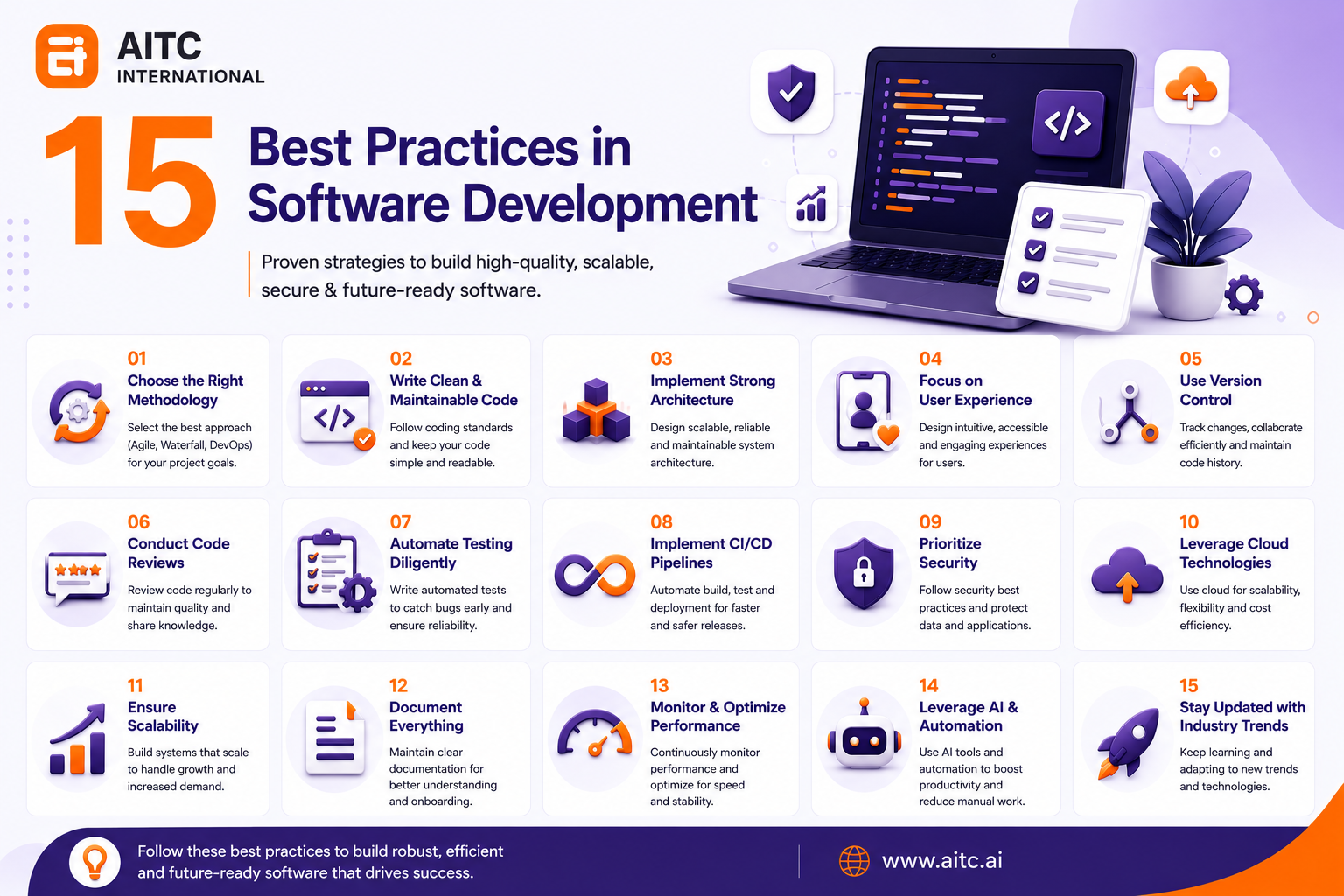
15 Best Practices in Software Development


roshan adhikari
01 Sep 2026
Software development in 2026 is no longer just about writing code. It is a strategic discipline that blends engineering principles, user experience, security, scalability, and business alignment. Whether you are building a SaaS platform, enterprise application, mobile app, or web solution, following best software practices ensures high performance, maintainability, and long-term success.
This comprehensive AITC International guide explores software development best practices to help both developers and decision-makers build robust digital products.
15 Best Practices in Software Development
Software development best practices include choosing the right methodology, writing clean and maintainable code, implementing strong architecture, prioritizing UX, using version control, automated testing, CI/CD, and security, leveraging cloud and AI, monitoring performance, documenting work, and staying updated with industry trends. Following best practices in software development ensures code quality, project efficiency, and long-term maintainability.
Choose the Right Software Development Methodology
Choosing the right software development methodology ensures projects are delivered on time, within budget, and meet quality standards. A software development methodology is a structured approach for planning, executing, and managing software projects.
The methodology—such as Agile, Waterfall, or DevOps—aligns development with project goals, reduces risks, improves team efficiency, and enhances stakeholder communication. Selecting the wrong methodology can lead to delays, cost overruns, and poor product outcomes.
Benefits of Choosing the Right Methodology:
- Aligned Project Goals: Matches workflow with project requirements and objectives.
- Improved Collaboration: Defines roles, responsibilities, and communication protocols.
- Risk Reduction: Anticipates and mitigates potential delays, errors, or scope changes.
- Optimized Resource Allocation: Ensures team and tools are used efficiently.
- Timely Delivery: Helps meet deadlines with predictable schedules.
- Enhanced Quality: Incorporates iterative testing, feedback loops, or structured verification.
- Flexibility and Scalability: Supports adapting to changing requirements or project expansion.
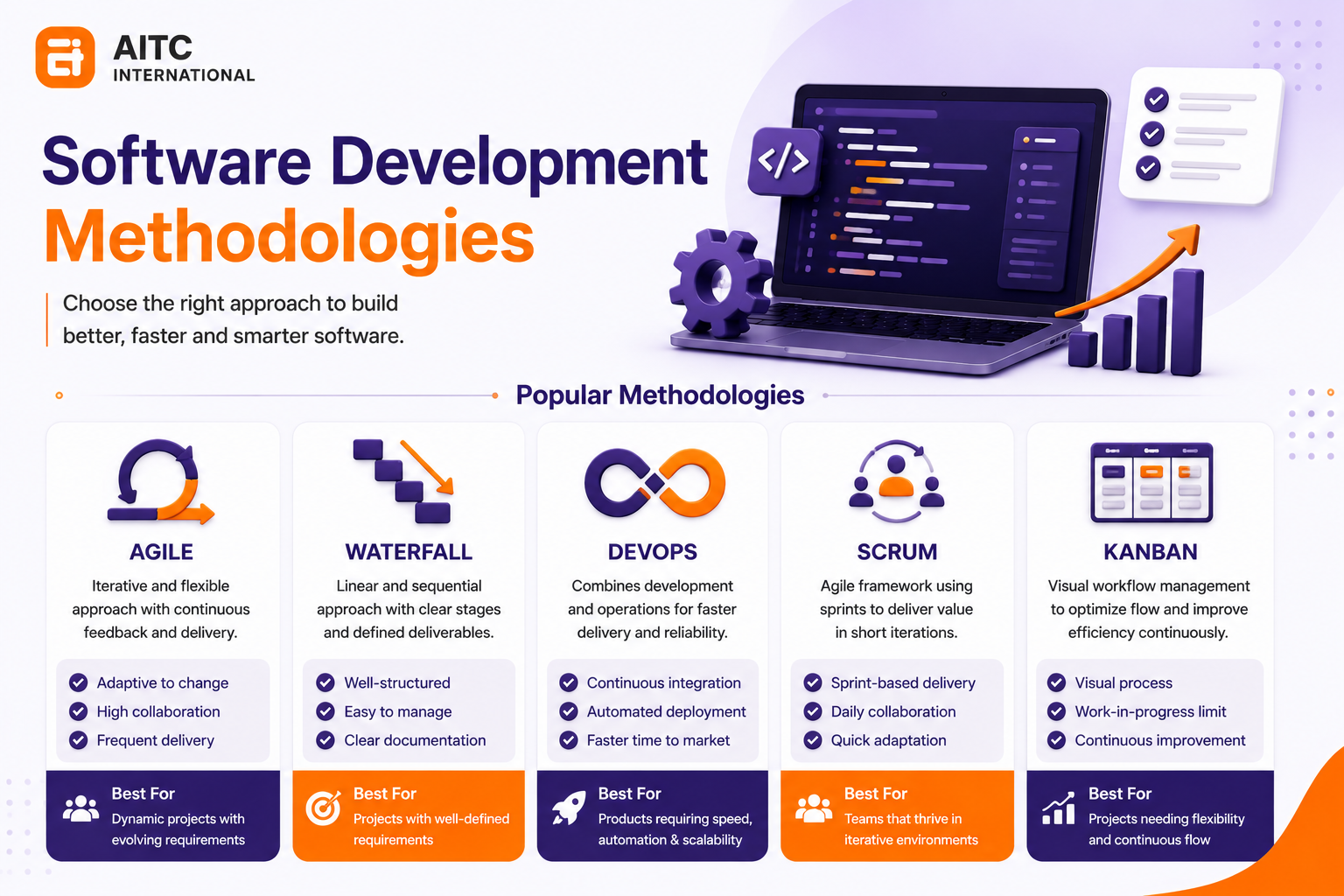
Popular Software Methodologies:
- Agile: Iterative, flexible, ideal for evolving requirements.
- Waterfall: Sequential, structured, suitable for well-defined projects.
- DevOps: Integrates development and operations for faster deployment.
- Scrum: Agile framework emphasizing sprints and collaboration.
- Kanban: Visual workflow management to optimize task flow and efficiency.
Best Practices for Selecting a Methodology:
- Assess Project Complexity: Choose iterative approaches for dynamic projects.
- Evaluate Team Size and Expertise: Select methodologies compatible with skills and collaboration needs.
- Consider Customer Involvement: Frequent feedback favors Agile-based methods.
- Align with Timeline and Budget: Ensure methodology supports realistic deadlines.
- Factor Technology Stack: Choose processes that integrate with tools and platforms.
- Review Risk Tolerance: Pick approaches that balance flexibility and predictability.
Prioritize Clean and Maintainable Code
Clean and maintainable code ensures software is easier to read, debug, and update. It reduces errors, simplifies collaboration, and accelerates future development. Well-structured code improves scalability, lowers technical debt, and ensures long-term project sustainability, saving time and costs over the software lifecycle.
Benefits of Clean and Maintainable Code:
- Improved Readability: Code is easier for developers to understand and navigate.
- Faster Debugging: Errors can be identified and fixed more efficiently.
- Enhanced Collaboration: Teams can work together seamlessly with standardized code.
- Accelerated Development: Future enhancements and feature additions are quicker.
- Scalability: Well-structured code supports software growth and new functionalities.
- Reduced Technical Debt: Maintains long-term code quality, lowering maintenance costs.
- Sustainable Software Lifecycle: Ensures software remains functional and maintainable over time.
Best Practices for Writing Maintainable Code:
- Meaningful Names: Use descriptive variable, function, and class names.
- Coding Standards: Follow consistent style guides and formatting conventions.
- Modular Functions: Keep functions small, focused, and reusable.
- Documentation: Write clear comments, explanations, and supporting documentation.
- Refactoring: Regularly improve code structure and remove redundancy.
Implement Strong Software Architecture
Implementing strong software architecture ensures a system is scalable, reliable, and maintainable. It defines clear module boundaries, improves performance, reduces technical debt, and simplifies future development. A well-architected system enhances team collaboration, minimizes errors, and supports long-term software sustainability, making it easier to adapt to evolving business and technology requirements.
Benefits of Strong Software Architecture:
- Scalability: Supports growth without compromising performance.
- Reliability: Reduces system failures and ensures stability.
- Maintainability: Simplifies updates, debugging, and feature addition.
- Performance Optimization: Improves efficiency through clear module design.
- Reduced Technical Debt: Promotes clean design and long-term sustainability.
- Improved Collaboration: Teams understand component boundaries and interactions.
- Flexibility: Adapts easily to new requirements or technologies.
Best Practices for Strong Software Architecture:
- Define Clear Module Boundaries: Separate concerns to simplify maintenance.
- Use Design Patterns: Apply proven solutions to common software problems.
- Plan for Scalability: Design with growth and future load in mind.
- Document Architecture: Maintain clear diagrams and specifications.
- Regularly Review and Refactor: Update architecture to meet evolving needs.
- Focus on Security and Reliability: Integrate security measures early in design.
Focus on User-Centered Design (UX/UI)
Focusing on user-centered design (UX/UI) ensures software meets real user needs, improves usability, and enhances satisfaction. User-centered design (UCD) is a design philosophy that places the user at the center of the development process. This design reduces errors, increases user engagement, and boosts adoption rates. By prioritizing intuitive interfaces, accessibility, and clear workflows, user-centered design creates a seamless experience that drives long-term product success and business growth.
Benefits of User-Centered Design:
- Improved Usability: Interfaces are intuitive and easy to navigate.
- Increased User Satisfaction: Meets user needs and expectations.
- Higher Engagement and Adoption: Users are more likely to use the product consistently.
- Reduced Errors: Clear workflows minimize mistakes and confusion.
- Accessibility: Designs are inclusive and usable by diverse audiences.
- Business Growth: Satisfied users lead to retention, loyalty, and positive reviews.
Best Practices for UX/UI Design:
- Conduct User Research: Gather insights through surveys, interviews, and analytics.
- Create User Personas: Represent target users to guide design decisions.
- Prototype and Test: Build wireframes and test usability early.
- Prioritize Accessibility: Ensure compliance with accessibility standards (WCAG).
- Iterate Based on Feedback: Continuously improve design based on user input.
- Consistent Visual Design: Maintain a cohesive interface across the product.
Adopt Version Control Systems
Adopting version control systems (VCS) is essential for efficient collaboration, code management, and project tracking.
A Version Control System (VCS) is a software tool that records code changes, enabling developers to track revisions, collaborate effectively, and maintain project history.
VCS allows teams to track changes, manage multiple code versions, and prevent conflicts.
Popular version control tools, such as Git, GitHub, GitLab, or Bitbucket, improve code reliability, enable safe experimentation, and streamline development workflows.
Benefits of Version Control:
- Collaboration: Multiple developers can work on the same project simultaneously without conflicts.
- Change Tracking: All modifications are logged, making it easy to revert to previous versions.
- Safe Experimentation: Developers can test new features without affecting the main codebase.
- Code Quality: Encourages peer reviews and structured workflows.
- Project Management: Simplifies release management and deployment planning.
Best Practices for Version Control:
- Use Branching Strategies: Create feature branches, maintain a main branch, and merge carefully.
- Write Clear Commit Messages: Describe changes clearly for better tracking.
- Perform Code Reviews: Ensure quality and detect errors before merging.
- Regularly Pull and Merge: Keep local repositories up-to-date with the main branch.
- Tag Releases: Mark stable versions for easier deployment and rollback.
Emphasize Code Reviews and Collaboration
Emphasizing code reviews and collaboration improves software quality, reduces bugs, and enhances team productivity. Regular peer reviews ensure adherence to coding standards, catch errors early, and promote knowledge sharing. Collaborative workflows foster better communication, faster problem-solving, and collective ownership, making development more efficient and maintaining high-quality, maintainable code.
Benefits:
- Improved Code Quality: Peer reviews catch errors and enforce coding standards.
- Early Bug Detection: Issues are identified before deployment.
- Knowledge Sharing: Developers learn from each other, spreading expertise.
- Enhanced Collaboration: Teams communicate effectively and resolve conflicts faster.
- Collective Ownership: Promotes accountability and consistent codebase management.
- Faster Development: Collaborative workflows reduce bottlenecks and streamline integration.
Best Practices for Code Reviews and Collaboration:
- Establish Review Guidelines: Define criteria and standards for code checks.
- Perform Regular Reviews: Review code frequently to maintain quality.
- Use Collaborative Tools: Utilize GitHub, GitLab, Bitbucket, or code review platforms.
- Encourage Constructive Feedback: Focus on improvements, not criticism.
- Document and Track Changes: Maintain records of suggestions, approvals, and decisions.
- Promote Pair Programming: Enhance collaboration and knowledge transfer.
Implement Automated Testing
Automated testing ensures software reliability, reduces bugs, and speeds up development. Automated testing is the use of software tools to execute pre-scripted tests on a codebase, verifying that functionality works as intended and detecting defects automatically.
Automated tests continuously validate code functionality, detect regressions early, and improve overall quality. By integrating testing tools into development workflows, teams can save time, enhance collaboration, and deliver maintainable, high-performing software with fewer errors.
Benefits of Automated Testing:
- Early Bug Detection: Identifies issues before deployment.
- Faster Development Cycles: Reusable test scripts accelerate testing processes.
- Improved Software Quality: Ensures consistent functionality across versions.
- Reduced Manual Effort: Minimizes repetitive testing tasks.
- Continuous Integration Support: Integrates with CI/CD pipelines for automated validation.
- Better Collaboration: Provides clear feedback for developers on code changes.
Best Practices for Automated Testing:
- Use the Right Testing Tools: Select frameworks like Selenium, JUnit, or Cypress based on project needs.
- Prioritize Critical Test Cases: Automate high-risk or frequently used functionalities first.
- Maintain Test Scripts: Regularly update tests to match evolving code.
- Integrate with CI/CD: Automate testing within development pipelines for continuous feedback.
- Combine with Manual Testing: Use automated tests for regression and repetitive tasks, and manual testing for exploratory scenarios.
- Track Test Coverage: Ensure sufficient coverage for critical components.
Ensure Software Security
Ensuring software security protects applications from cyber threats, data breaches, and unauthorized access. Implement software security best practices such as encryption, authentication, and regular vulnerability testing to maintain user trust. Secure software improves system reliability, prevents financial and reputational loss, and supports long-term project sustainability.
Benefits of Ensuring Software Security:
- Protects Against Cyber Threats: Prevents hacking, malware, and unauthorized access.
- Data Protection: Safeguards sensitive user and business information.
- Regulatory Compliance: Meets legal and industry standards (e.g., GDPR, HIPAA).
- Maintains User Trust: Secure software enhances confidence and adoption.
- Prevents Financial Loss: Reduces costs related to breaches and downtime.
- Sustainable Software Lifecycle: Security-focused development minimizes future risks.
Best Practices for Software Security:
- Secure Coding Practices: Validate inputs, prevent SQL injection, and avoid hard-coded credentials.
- Encryption: Protect sensitive data in transit and at rest.
- Authentication and Authorization: Implement strong password policies, multi-factor authentication, and role-based access control.
- Regular Security Testing: Conduct vulnerability scans, penetration tests, and code audits.
- Keep Dependencies Updated: Patch libraries and frameworks to prevent known exploits.
- Monitor and Respond: Track security incidents and apply quick mitigation measures.
Optimize Performance and Scalability
Ensure software runs efficiently under user load and growing data. Performance tuning reduces response times and resource usage, while a scalable architecture supports growth without disruptions. Optimized systems enhance user experience, reduce operational costs, and maintain reliability, enabling long-term sustainability and seamless expansion as business and technology demands evolve.
Benefits of Optimizing Performance and Scalability:
- Enhanced User Experience: Fast, responsive applications increase satisfaction and retention.
- Efficient Resource Usage: Minimizes server load, memory, and network consumption.
- Supports Growth: Scalable architecture handles more users, data, and features without crashes.
- Cost Efficiency: Reduces infrastructure and operational costs.
- Reliability and Availability: Maintains stable performance under heavy load.
- Future-Proofing: Prepares the software for evolving business requirements.
Best Practices for Performance and Scalability:
- Optimize Code: Remove redundancies, reduce complexity, and improve algorithms.
- Use Caching: Implement caching strategies for frequent queries and static resources.
- Database Optimization: Index data, normalize tables, and optimize queries.
- Load Balancing: Distribute traffic across servers for high availability.
- Asynchronous Processing: Handle tasks in the background to reduce latency.
- Scalable Architecture: Use microservices, cloud services, or modular design for growth.
- Performance Monitoring: Continuously track and tune system metrics.
Use Cloud Computing and Modern Infrastructure
Using cloud computing and modern infrastructure enables scalable, flexible, and cost-efficient software deployment. Cloud computing delivers computing resources over the internet, such as servers, storage, and databases. Modern infrastructure leverages microservices, containers, and serverless architectures to create flexible, scalable, and maintainable software systems.
Cloud platforms provide on-demand resources, high availability, and robust security. Modern infrastructure ensures faster development, simplified maintenance, and seamless scalability, allowing businesses to innovate rapidly while optimizing operational efficiency.
Benefits of Cloud Computing and Modern Infrastructure:
- Scalability: Adjust resources dynamically to meet changing workloads.
- Cost Efficiency: Pay-as-you-go model reduces capital expenditure.
- High Availability: Cloud services ensure uptime and disaster recovery.
- Faster Deployment: Modern infrastructure supports continuous integration and delivery.
- Simplified Maintenance: Automated updates and containerization reduce operational complexity.
- Security: Cloud providers offer built-in security and compliance features.
- Innovation: Teams can experiment with new technologies without infrastructure constraints.
Best Practices:
- Choose the Right Cloud Model: Public, private, or hybrid depending on needs.
- Leverage Containers: Use Docker, Kubernetes, or similar tools for portability.
- Adopt Microservices Architecture: Break applications into modular, scalable services.
- Implement Serverless Functions: Reduce server management and costs.
- Monitor Resources Continuously: Track performance, usage, and security metrics.
- Plan for Disaster Recovery: Backup and replicate critical data across regions.
- Ensure Security Compliance: Apply encryption, identity management, and access controls.
Follow Continuous Integration and Deployment (CI/CD)
Continuous Integration and Deployment (CI/CD) automate building, testing, and releasing software, ensuring faster, more reliable delivery. CI/CD is a set of development practices that automate code integration, testing, and deployment. Continuous Integration ensures frequent merging of code changes with automated testing, while Continuous Deployment automates delivery to production, enabling rapid and reliable software updates.
CI/CD reduces integration issues, detects bugs early, and improves collaboration among developers. By implementing CI/CD pipelines, teams achieve higher code quality, quicker feature releases, and seamless updates, enhancing overall software performance and maintainability.
Benefits of CI/CD:
- Faster Development Cycles: Automates repetitive tasks, accelerating feature delivery.
- Early Bug Detection: Continuous testing identifies issues immediately.
- Improved Code Quality: Automated checks enforce standards and reduce errors.
- Reliable Deployment: Reduces deployment failures and downtime.
- Enhanced Collaboration: Developers can integrate work frequently without conflicts.
- Scalable Workflows: Supports multiple teams and large codebases efficiently.
- Consistent Releases: Ensures predictable and repeatable deployment processes.
Best Practices for CI/CD:
- Automate Testing: Integrate unit, integration, and regression tests in pipelines.
- Use Version Control: Manage code with Git or similar tools to track changes.
- Implement Pipeline Monitoring: Track pipeline performance, failures, and metrics.
- Deploy Incrementally: Use feature flags or canary releases for safer rollouts.
- Maintain Build Consistency: Use containerization or reproducible build environments.
- Secure Pipelines: Apply access controls and secrets management.
- Continuous Feedback: Collect metrics and errors for ongoing improvement.
Documentation is non-negotiable
Maintaining thorough documentation is essential for software development. Software documentation is the structured recording of code, architecture, design decisions, APIs, and development processes. It ensures code clarity, facilitates collaboration, and simplifies onboarding of new team members.
Proper documentation reduces errors, supports maintenance, and accelerates future development. Clear records of design decisions, APIs, workflows, and processes enhance software quality, scalability, and long-term project sustainability.
Benefits of Documentation:
- Improved Collaboration: Teams understand code logic and workflow.
- Simplifies Onboarding: New developers quickly learn system architecture and coding standards.
- Error Reduction: Clear instructions prevent misinterpretation and mistakes.
- Accelerates Maintenance: Supports debugging, refactoring, and feature updates.
- Knowledge Preservation: Captures institutional knowledge to avoid dependency on individual team members.
- Compliance and Audit: Ensures regulatory and industry standards are met.
- Enhances Scalability: Well-documented systems are easier to expand and integrate with other tools.
Best Practices for Documentation:
- Document Code: Include inline comments, function descriptions, and variable explanations.
- Maintain Architecture Diagrams: Visualize system components and relationships.
- Update Regularly: Keep documentation in sync with code changes.
- Use Standard Templates: Ensure consistency across documents.
- Document APIs and Workflows: Provide clear usage examples for developers.
- Leverage Tools: Use wikis, Markdown, or automated documentation generators.
- Encourage Team Contribution: Make documentation a shared responsibility.
Monitor and Maintain Software
Monitoring and maintaining software ensure systems remain reliable, secure, and performant over time. Continuous monitoring detects errors, performance bottlenecks, and security vulnerabilities early, while regular maintenance updates features, fixes bugs, and optimizes resources. This practice extends software lifespan, reduces downtime, and guarantees a consistent, high-quality user experience.
Benefits of Monitoring and Maintenance:
- Early Issue Detection: Identify bugs, crashes, and performance bottlenecks quickly.
- Improved Reliability: Regular updates and fixes maintain stable operations.
- Enhanced Security: Detect and patch vulnerabilities to prevent breaches.
- Optimized Performance: Continuous tuning ensures efficient resource usage.
- Extended Software Lifespan: Maintenance keeps software relevant and functional over time.
- User Satisfaction: Ensures consistent experience and minimizes downtime.
- Compliance Support: Maintains adherence to industry and legal standards.
Best Practices for Monitoring and Maintenance:
- Implement Monitoring Tools: Use APM, log management, and analytics platforms.
- Automate Alerts: Notify teams immediately of errors or abnormal behavior.
- Schedule Regular Maintenance: Update dependencies, patch security issues, and optimize code.
- Track Metrics: Monitor performance, uptime, response time, and error rates.
- Document Changes: Keep detailed records of fixes, updates, and improvements.
- Plan for Scalability: Adjust resources based on usage trends.
- Conduct Post-Deployment Reviews: Evaluate system health after updates.
Leverage AI and Automation
Leveraging AI and automation in software development accelerates workflows, reduces human error, and improves decision-making. AI tools assist in code generation, testing, bug detection, and predictive analysis, while automation handles repetitive tasks. Together, they enhance productivity, optimize resource utilization, and enable faster delivery of high-quality, scalable, and maintainable software.
Benefits of AI and Automation:
- Increased Productivity: Automates repetitive development, testing, and deployment tasks.
- Improved Code Quality: AI-assisted code reviews and bug detection reduce errors.
- Faster Development Cycles: Speeds up feature implementation and testing.
- Predictive Analysis: AI forecasts system performance, user behavior, and potential risks.
- Optimized Resource Utilization: Reduces manual effort and operational costs.
- Enhanced Collaboration: Automates task tracking and integration across teams.
- Scalability: AI-driven insights support system scaling and efficient workload distribution.
Best Practices for Leveraging AI and Automation:
- Use AI-Powered Code Tools: Implement tools like GitHub Copilot or IntelliCode for suggestions and auto-completion.
- Automate Testing: Integrate automated unit, regression, and integration tests.
- Monitor Performance with AI: Use predictive analytics to detect bottlenecks and optimize systems.
- Automate CI/CD Pipelines: Reduce manual deployment errors and accelerate release cycles.
- Combine Human Oversight: Ensure AI-driven tasks are reviewed to maintain quality.
- Track and Optimize AI Workflows: Measure efficiency, accuracy, and ROI from automation.
- Integrate Across Teams: Ensure automation tools are connected to project management and collaboration platforms.
Stay Updated with Industry Trends
Staying updated with industry trends ensures software teams adopt the latest technologies, frameworks, and best practices. Awareness of emerging tools, security standards, and development methodologies improves innovation, efficiency, and competitiveness. Regularly tracking trends reduces technical debt, enhances decision-making, and ensures software solutions remain modern, relevant, and aligned with evolving user needs.
Benefits of Staying Updated:
- Adopt Modern Tools and Frameworks: Utilize technologies that improve efficiency and performance.
- Enhance Innovation: Apply new approaches to solve complex problems creatively.
- Maintain Competitive Edge: Stay ahead of competitors by leveraging emerging trends.
- Reduce Technical Debt: Prevent outdated solutions from slowing future development.
- Improve Security and Compliance: Implement the latest security standards and regulations.
- Better Decision-Making: Informed teams make strategic technology and architecture choices.
- Continuous Learning: Encourages professional growth and team skill enhancement.
Best Practices for Staying Updated:
- Follow Industry Blogs and News: Track updates from leading tech publications and websites.
- Participate in Conferences and Webinars: Learn from experts and network with peers.
- Engage in Online Communities: Join forums, GitHub discussions, or developer Slack groups.
- Experiment with New Tools: Test new libraries, frameworks, or automation tools in sandbox environments.
- Encourage Team Learning: Organize knowledge-sharing sessions or internal workshops.
- Subscribe to Newsletters and Podcasts: Receive curated insights regularly.
- Monitor Regulatory Changes: Stay informed about legal and compliance standards.
Conclusion
Software development best practices focus on quality, scalability, security, and continuous improvement. At AITC International, a leading software development company, we adopt modern methodologies like Agile and DevOps, prioritize clean code, implement robust architecture, and leverage cloud computing and AI technologies to build high-performance, future-ready applications.
At a strategic level, success comes from aligning technology decisions with business goals. At an execution level, it requires disciplined coding, automated testing, collaboration, and continuous monitoring.
Organizations that consistently follow these best practices reduce development risks, enhance software maintainability, and gain a competitive advantage in the evolving digital landscape.
Frequently Asked Questions (FAQs) – Software Development Best Practices
Q1: What is software development best practices?
A: Software development best practices are standardized methods and techniques used to improve code quality, efficiency, and scalability in software projects.
Q2: Why are best practices important in software development?
A: Best practices ensure reliability, security, maintainability, and faster development cycles, reducing errors and improving long-term software performance.
Q3: What is the most important practice in software development?
A: Maintaining clean code, implementing proper software architecture, and performing continuous testing are among the most critical practices for high-quality software.
Q4: How does DevOps improve software development?
A: DevOps improves collaboration, automates workflows, accelerates deployment, and enhances the overall efficiency and reliability of the development process.

Related insights
-in-Business_1763716856557-585605410_2025-11-21.png&w=3840&q=75)
The Rise of Virtual and Augmented Reality (VR/AR) in Business
21 Nov 2025

Choosing the Right E-Commerce Platform for Your Nepal-Based Business
21 Nov 2025

The Evolution of Software Development: A Journey Through Time
19 Dec 2025
Have a project in mind? Let's build something great.
Share your ideas or questions and our experts will get back to you shortly.
Unlock Expert Guidance
Need expert IT advice? Our seasoned professionals are here to help you navigate your tech challenges. Schedule a session with us and get personalized solutions tailored to your business needs.

Connect with Us and Let's Build Something Together
We'd love to hear from you! Whether you have questions, need support, or want to discuss a new project, our team is ready to assist. Fill out the form below, and we’ll get back to you as soon as possible.
Prefer a Direct Consultation?
Connect with our team for a 1-on-1 virtual session to discuss your project, understand your needs, and explore the right solution for your business.
What's Next?
- 1Connect with you at a convenient time
- 2Explore your needs, goals, and requirements
- 3Prepare a tailored proposal based on your needs
Why Choose Us
Connect with AITC
Select your inquiry type to route your request to the right department.
Our Office Locations
Operating across 3 key timezone hubs to serve global enterprise clients.