







Business Growth
Software
7 Signs Your Retail Business Has Outgrown Off-the-shelf Software

sachin pokharel
24 Sep 2026
The clearest signs your retail business has outgrown its software appear when the numbers your team depends on stop lining up.
Stock levels vary between channels; returns sit outside the main workflow; margins take too long to calculate, and staff rely increasingly on manual checks to keep operations moving.
These retail management software problems can look like general technology problems, but they often point to a deeper mismatch between the software and the way the business now operates.
This blog covers seven warning signs and the difference between IT issues and retail software problems.
You’ll also learn when to consider custom software and what to check before replacing your systems.
Key Highlights
- Stock disagreements across stores, warehouses, and online channels are a stronger warning sign than software simply feeling old.
- Manual returns and supplier pricing can make product-level margin look healthier than it really is.
- Multi-store reporting becomes a software-fit problem when every consolidated view requires exports and spreadsheets.
- Custom retail software is not automatically the answer; configuration, better data, or unused features in your current platform may solve the problem.
- Before replacing anything, measure reconciliation work, test stock accuracy, ask your vendor a precise fit question, and clean your product data.
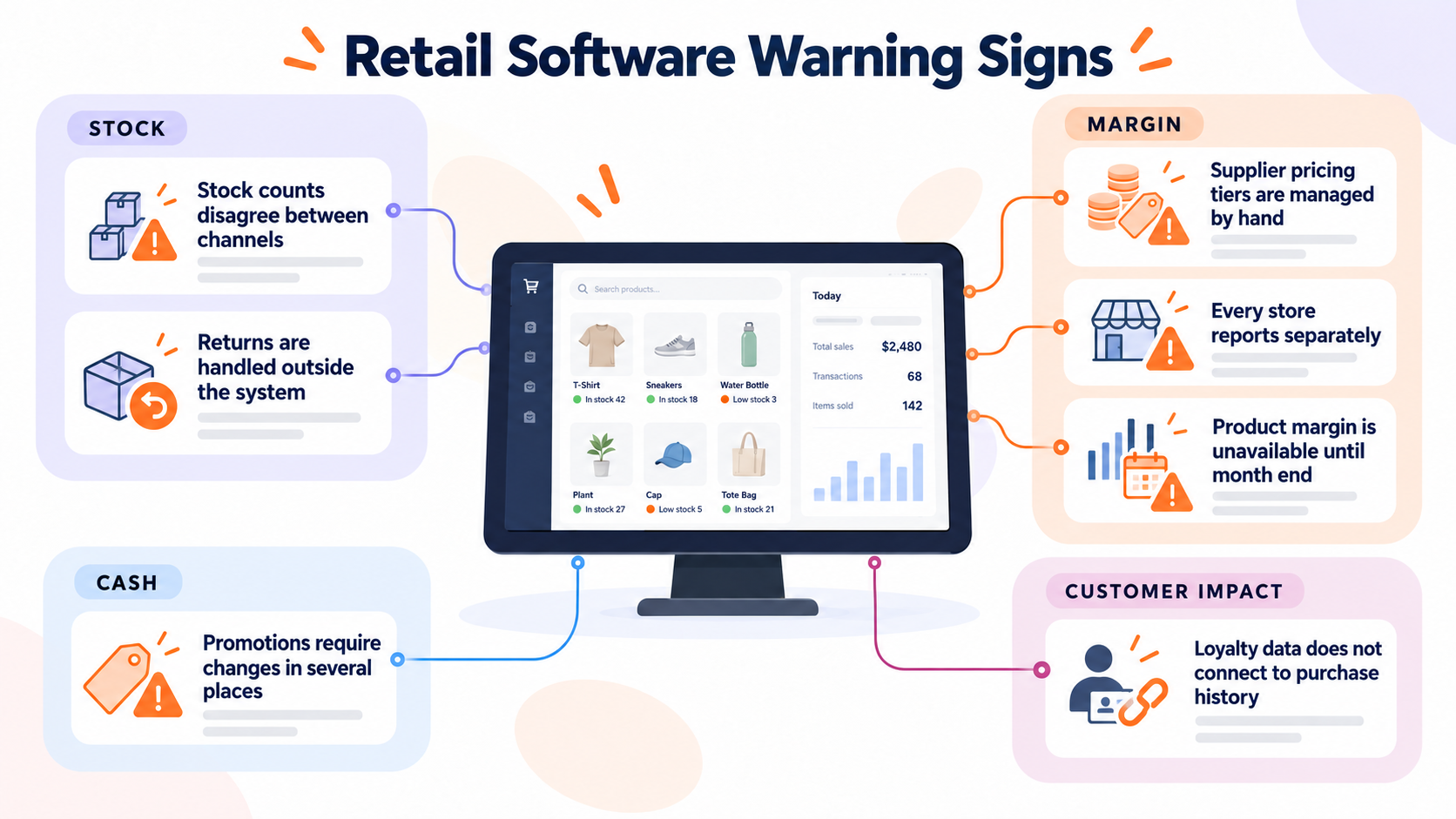
Retail Software Warning Signs: Quick Checklist
Tick the signs that apply to your operation: one issue may be a configuration problem.
When several appear together, especially where configuration cannot resolve them, the software may no longer reflect how the retail business actually works.
| The sign | Where it shows up | Fixable by configuration? |
| Stock counts disagree between channels | Stock | No |
| Returns are handled outside the system | Stock / Margin | Yes |
| Supplier pricing tiers are managed by hand | Margin / Cash | No |
| Loyalty data does not connect to purchase history | Customer | No |
| Every store reports separately | Margin | Yes |
| Promotions require changes in several places | Margin / Cash | No |
| Product margin is unavailable until month end | Margin | No |
Seven Signs Your Retail Software Is Costing You Margin
Retail software starts costing you margin when stock, returns, pricing, customer data, and reporting no longer stay aligned across the business.
The seven signs below show where those gaps appear in day-to-day retail operations:
1. Stock Counts Disagree Between Channels
When channel inventory does not update from one reliable stock-on-hand figure, both overselling and unnecessary safety stock become possible.
Staff begin checking one system against another before confirming orders, transfers, or restock.
The problem becomes more visible as the business adds channels.
A stock transfer may update one location before another; an online reservation may not reduce store availability immediately, or a canceled order may not return stock correctly.
That makes reorder points less reliable and turns inventory checking into routine manual work.
2. Returns Are Handled Outside the System
Returns and exchanges can create stock discrepancies and overstate product margins when refunds and returned stock are not linked to the same product record.
A refund may be entered at the point of sale while the returned SKU (Stock Keeping Unit) is placed back into stock manually. The return reason might sit in a spreadsheet, an email, or nowhere at all.
That creates more than a stock discrepancy. If returns are not tied back to the product, they may also be missing from margin by product.
A product can therefore look profitable because sales are visible while the cost of frequent refunds, exchanges, and damaged returns is not.
The system should connect the sale, refund, return reason, stock movement, and product record. When employees have to reconstruct those relationships afterward, the return process has outgrown the software model.
3. Supplier Pricing Tiers Are Managed by Hand
Manual supplier pricing can lead to missed volume discounts and inaccurate product margins when purchasing records do not reflect the supplier’s actual terms.
Your supplier price list may include volume breaks, seasonal pricing, trade discounts, negotiated agreements, or temporary terms for particular products.
If those rules live in a spreadsheet or someone's memory, the purchasing system does not know the real cost when a purchase order is raised. That affects buying decisions immediately.
A buyer may reorder based on the standard cost even though the next quantity qualifies for another tier. A promotion may look profitable until the actual supplier terms are applied.
Once supplier pricing becomes part of the commercial logic of the business, it needs to be represented consistently in purchasing and margin calculations.
If the software cannot model those rules, staff end up correcting the system instead of using it.
4. Loyalty Data Doesn't Connect to Purchase History
Disconnected loyalty and purchase records make customer targeting less precise and force staff to manually match points, purchases, and redemptions across systems.
One system may show that a customer has accumulated points while another holds the transaction history.
You know who spends, but not necessarily which products, categories, stores, or promotions generated that activity.
That makes customers target less precise and forces staff to combine data before they can answer relatively simple questions.
The same problem appears during redemption. Loyalty activity should be connected to the customer record and the relevant transaction rather than becoming another standalone dataset.
AITC's Jwalaji Reward Management replaced paper coupon redemption with a mobile loyalty app and web-based admin portal.
The practical test is simple: if understanding one customer's purchase and reward behavior requires two systems and manual matching, the loyalty workflow is no longer connected enough.
5. Every Store Reports Separately
Separate store reports delay decisions on stock transfers, purchasing, and promotions while head office manually combines data from each location.
Every store may produce accurate reports, but head office still needs to consolidate store-level reporting, online sales, stock movement, and other data.
By the time that view is ready, the conditions behind it may already have changed.
Multi-store retail software should make reporting more centralized as locations increase.
If adding another store also adds another spreadsheet, export, and reconciliation process, the reporting model is scaling manually rather than operationally.
6. Promotions Mean Changing Prices in Several Places
Promotion pricing becomes risky when one commercial decision requires several separate updates.
A price change may need to be entered in the point of sale, e-commerce platform, marketplace, loyalty system, and store communication. Staff then have to reverse those changes when the campaign ends.
A late start can reduce promotional sales. A late end can continue discounting after the promotion should have stopped.
More complex campaigns expose the limitation faster. A promotion might apply only to selected SKUs, specific stores, loyalty members, bundles, or a defined date range.
When the same pricing rule has to be recreated manually in several systems, staff are effectively maintaining the integration themselves. The issue is not merely slow price entry; it is that one promotion does not exist as one rule across the retail operation.
7. You Can't See Margin by Product Until Month End
Waiting until month end for product margins means making range and reorder decisions before you know which products are actually profitable.
Sales reports can tell you which products sell. They do not automatically tell you which products make money.
Accurate margin by product can depend on supplier cost, trade discounts, promotion pricing, returns, and shrinkage. When those inputs live in different systems, profitability has to be assembled after the fact.
A fast-selling SKU may appear successful even though discounts and returns make its margin weak. Another product may look slow but perform better commercially once its actual costs are considered.
When product profitability becomes a month-end exercise instead of an operational view, the software is providing the right information too late.
If inventory accuracy and stock reconciliation are contributing to that delay, 5 Signs You Need Custom Inventory Software (insights/custom-inventory-software ) can help you assess whether the underlying inventory system also needs attention.
Why Most "Outgrown Your Software" Advice Misses Retail
Most "outgrown your software" advice misses retail because it treats technology problems and retail operating-model problems as the same issue.
An IT problem affects the technology supporting the business, while an operating-model problem appears when the software no longer reflects how the business trades.
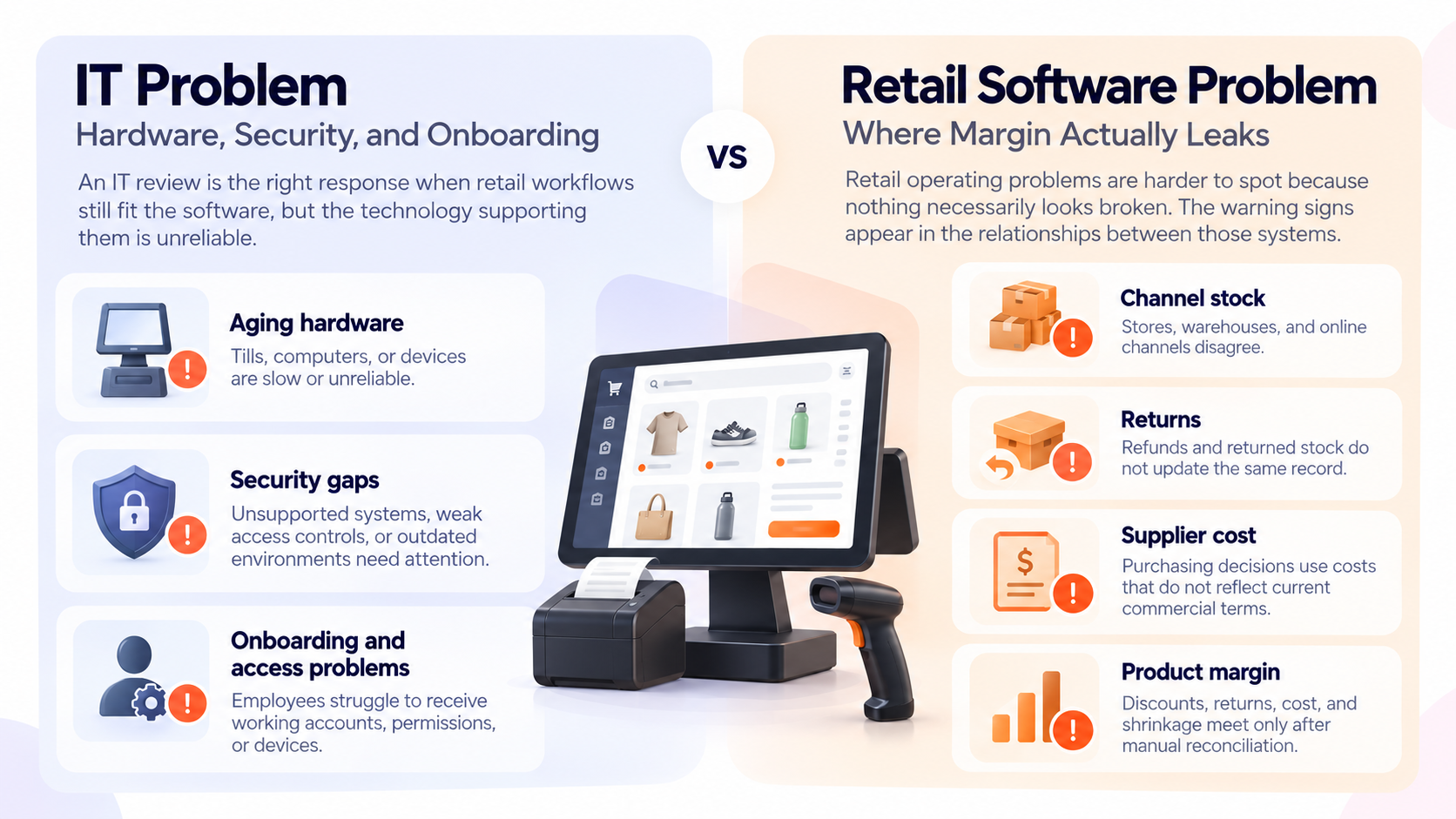
The IT Answer: Hardware, Security, and Onboarding
An IT review is the right response when retail workflows still fit the software, but the technology supporting them is unreliable.
Common signs include:
- Aging hardware: Tills, computers, or devices are slow or unreliable.
- Security gaps: Unsupported systems, weak access controls, or outdated environments need attention.
- Onboarding and access problems: Employees struggle to receive working accounts, permissions, or devices.
If those are the main symptoms, the right next step is usually an IT review. The retail software itself may still be doing exactly what the business needs.
The Retail Answer: Where Margin Actually Leaks
Retail operating problems are harder to spot because nothing necessarily looks broken. Reports still generate; orders still arrive, and the point of sale still works.
The warning signs appear in the relationships between those systems:
- Channel stock: Stores, warehouses, and online channels disagree.
- Returns: Refunds and returned stock do not update the same record.
- Supplier cost: Purchasing decisions use costs that do not reflect current commercial terms.
- Product margin: Discounts, returns, cost, and shrinkage meet only after manual reconciliation.
When these numbers are spread across separate systems, each tool may work as intended while the wider retail operation remains disconnected.
That is why omnichannel inventory problems and margin problems can survive a conventional IT review. The system may be technically healthy while its design no longer matches the operating model.
When staff manually transfer and reconcile data between several applications, the problem may extend beyond one tool.
Our guide to disconnected business systems (insights/disconnected-systems) explains when these handoffs become a bottleneck in daily retail operations.
From our delivery work
In retail discovery conversations, we have encountered businesses that had already improved their IT infrastructure but still could not get a reliable view of product margin. The underlying issue was not system speed or hardware; the commercial data needed to calculate margin remained spread across separate workflows and systems.
What Custom Retail Software Costs
The cost of custom retail software depends on the workflows, integrations, data, and ongoing support the system needs.
To compare that cost fairly, start with the full cost of your current setup—not just subscription fees. Include add-ons, integrations, and the staff time spent reconciling stock, returns, supplier pricing, promotions, store reports, and margin.
Then compare that with a custom build spread across its expected useful life, plus hosting, maintenance, and support.
The purpose is not to prove that custom retail software is cheaper. It is to compare both options on the same basis and identify whether the current stack is inexpensive only because the manual work around it has never been costed.
In our scoping conversations, this is often where the cost picture changes: work that looked like part of normal retail operations becomes visible as staff time spent checking, transferring, and reconciling information between systems.
The first project also does not have to replace the entire stack. Keep the POS, e-commerce platform, payment system, or other tools that already work and focus first on the reconciliation or workflow creating the largest burden.
That may mean integrating systems rather than replacing them. For a deeper view of build-cost drivers, explore our guide on How Much Does Software Development Cost?.
When Your Retail Business Doesn't Need Custom Software
Your retail business does not need custom software when standard tools still fit your workflows; your current system is underused, your product data needs fixing, or you need an immediate seasonal solution.
The four situations below show when improving or stabilizing the current setup is the better next step:
- Single store, single channel: One location with straightforward stock, purchasing, pricing, and reporting is usually well served by off-the-shelf software. Custom development is unlikely to be a constraint on growth.
- You have not used what you already pay for: Check whether your current platform already includes purchasing, stock, reporting, loyalty, or integration features that were never configured. Activate and test them before replacing the system.
- The product data is not clean: Inconsistent SKUs, costs, and barcodes will move into the next system unless you fix them first. Use established GS1 standards as a reference for product identification and barcode data, then clean the records before deciding whether the software itself is the problem.
- Peak trading is weeks away: A custom build is not a sensible response to an immediate seasonal deadline. Stabilize the current process first and review the larger system decision when the business has time to scope and test it properly.
What to Do Before You Replace Your Retail Systems
Before replacing anything, collect evidence from the operation itself. A short diagnostic can show whether the problem is configuration, data quality, one disconnected workflow, or a system that no longer fits.
- Count one week of reconciliation: Record every manual check against the seven warning signs, who performs it, and how long it takes.
- Run a stock accuracy check: Count one category across every store, warehouse, and channel, then compare the physical quantity with the system quantity. Record each retail stock discrepancy.
- Ask your vendor the fit question: Describe the exact workflow. "Not on the roadmap" suggests a missing feature; "the system doesn't work that way" suggests a structural fit problem.
- Clean the product data: Standardize costs, SKUs, barcodes, duplicates, and related product records. You need clean data whether you keep the platform, integrate it, or replace it.
About a week of evidence can make the next decision much clearer, and the work remains useful even if you decide to keep the software you already have.
“We were at the point where we had too many channels and too many avenues of business to not have tight control over inventory allocation.”
— Mara Galeb-Roskopp, Operations Lead
Deciding Whether Custom Retail Software Is Worth It
If your warning signs are mostly about slow devices, login problems, security, or infrastructure, fix the IT environment first.
If they are about stock, costs, returns, loyalty, and margin producing different versions of the business, infrastructure improvements will not correct the underlying operating model. That is when custom retail software becomes worth evaluating.
If the answer is "not yet," watch what happens when complexity increases. A second sales channel creates another stock position to reconcile.
A third store adds another location and stock transfer path. The first supplier agreement with tiered pricing introduces commercial rules that a basic purchasing model may not represent. Each change multiplies relationships between data instead of simply adding another task.
The hardest retail software costs to see are often the ones that never appear as a software invoice.
Margin lost through bad data, delayed decisions, repeated reconciliation, or incorrect pricing stays hidden inside normal operations, which is why the problem can continue long after the software has stopped fitting the business.
Frequently Asked Questions
1. What Is the Difference Between Off-the-Shelf and Custom Retail Software?
Off-the-shelf software uses workflows designed for many retailers. Custom retail software is built or extended around the stock, pricing, reporting, customer, and operational rules specific to one business.
2. How Much Does Custom Retail Software Cost?
Cost depends on the workflows being built, integrations, data migration, and ongoing support. Compare that total with your current software costs and the staff time spent working around its limitations.
3. Can Custom Software Work With the POS and E-Commerce Platform We Already Use?
Yes, when the existing systems provide suitable APIs, exports, webhooks, or other integration methods. A custom project does not automatically mean replacing the POS or e-commerce platform.
4. How Long Does It Take to Build Custom Retail Software?
The timeline depends on scope, integrations, data quality, testing, and migration requirements. A focused integration or reconciliation workflow is usually easier to scope than replacing an entire retail stack.
5. Is Custom Software Worth It for a Single-Store Retailer?
Usually not when one store, one channel, and standard retail workflows are already covered by an existing platform. It becomes more relevant when the operating model itself stops fitting standard software.
6. What Happens to Our Stock and Customer Data if We Change Systems?
Plan migration before the change. Identify the source records, clean duplicates and inconsistencies, back up the original data, map it to the new structure, and validate the migrated records before relying on the new system.

Related insights
-in-Business_1763716856557-585605410_2025-11-21.png&w=3840&q=75)
The Rise of Virtual and Augmented Reality (VR/AR) in Business
21 Nov 2025

Choosing the Right E-Commerce Platform for Your Nepal-Based Business
21 Nov 2025

The Evolution of Software Development: A Journey Through Time
19 Dec 2025
Have a project in mind? Let's build something great.
Share your ideas or questions and our experts will get back to you shortly.
Unlock Expert Guidance
Need expert IT advice? Our seasoned professionals are here to help you navigate your tech challenges. Schedule a session with us and get personalized solutions tailored to your business needs.

Connect with Us and Let's Build Something Together
We'd love to hear from you! Whether you have questions, need support, or want to discuss a new project, our team is ready to assist. Fill out the form below, and we’ll get back to you as soon as possible.
Prefer a Direct Consultation?
Connect with our team for a 1-on-1 virtual session to discuss your project, understand your needs, and explore the right solution for your business.
What's Next?
- 1Connect with you at a convenient time
- 2Explore your needs, goals, and requirements
- 3Prepare a tailored proposal based on your needs
Why Choose Us
Connect with AITC
Select your inquiry type to route your request to the right department.
Our Office Locations
Operating across 3 key timezone hubs to serve global enterprise clients.