







Software
Custom
Native Vs Cross-platform App Development- What to Choose?


sachin pokharel
29 Oct 2025
The most important decision when building a mobile app is choosing between native and cross-platform development. Should you create separate apps for each platform or follow a write-once, run-everywhere strategy?
Deciding which approach is best for your project can be challenging. This blog highlights key considerations to help you choose between native and cross-platform app development.
What is Native App Development?
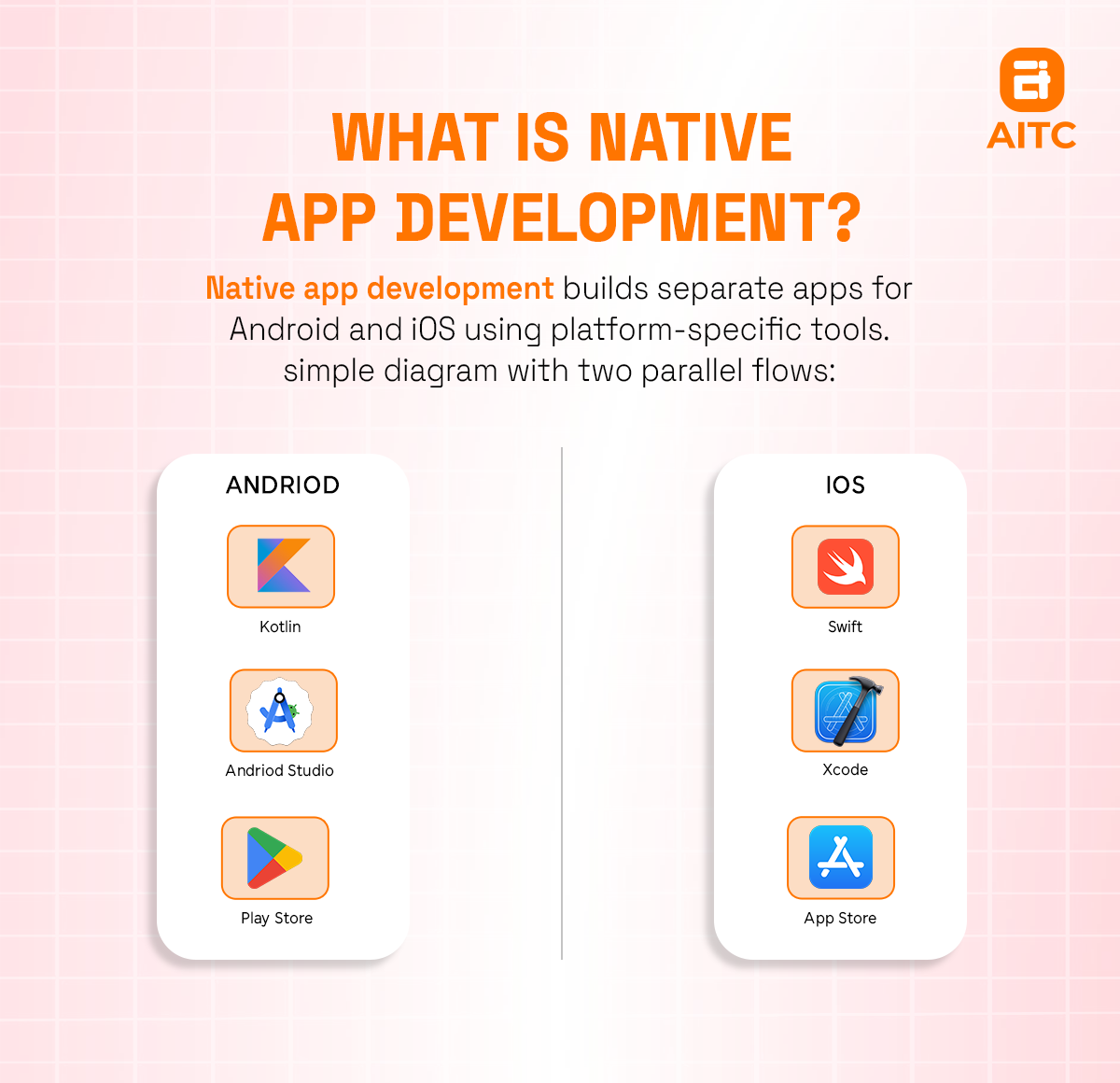
Native app development involves building mobile applications specifically for a single mobile operating system. These apps use platform-specific languages like Kotlin or Java for Android and Swift or Objective-C for iOS.
You choose native app development based on your target operating system and audience by coding the app in that OS’s required native language.
Native Mobile App Examples
Popular native apps developed natively for iOS and Android:
- Spotify
- Google Maps
Why Choose Native App Development for Businesses?
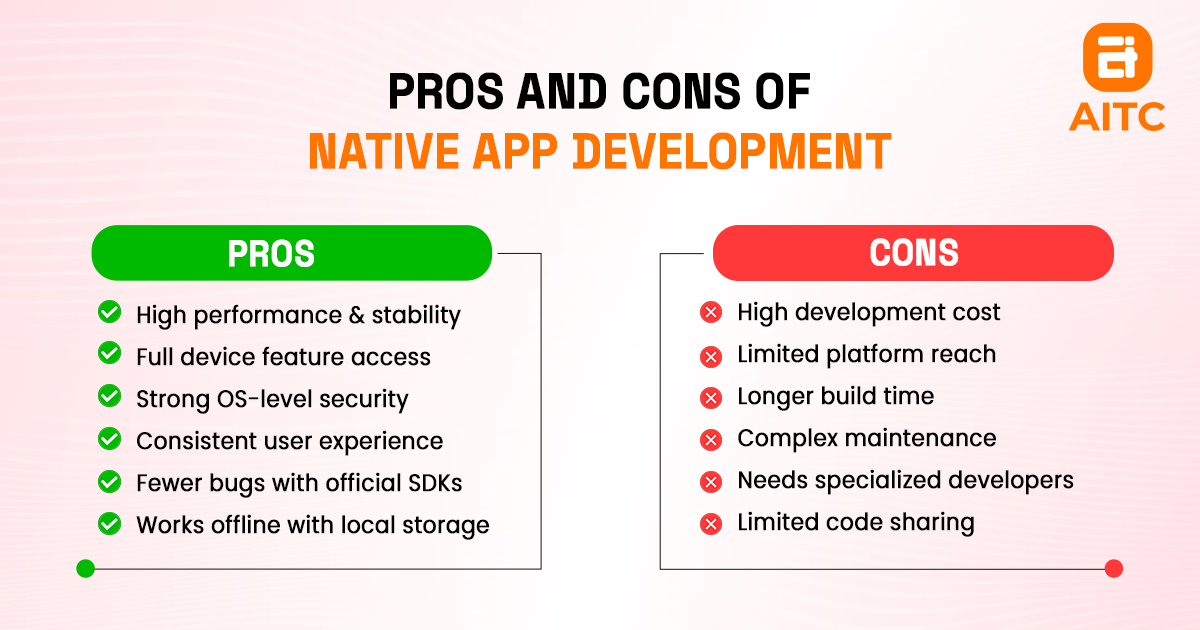
Native app development offers businesses several advantages including high performance, strong security, and a smooth user experience.
Pros of Native app development in detail:
1. High Performance
Native apps offer high performance and stability by using platform-specific languages and APIs. They load faster, run smoother, and handle complex tasks efficiently with fewer crashes or compatibility issues.
They are often smaller than cross-platform apps which enable faster downloads and saves data and storage. This makes them ideal for users with limited space or bandwidth.
2. Full Access to Device Features
Native apps directly access hardware and features like the camera, GPS, microphone, sensors, and push notifications without limitations. This allows easy implementation of advanced integrations and features for a more immersive user experience.
3. Better Security
Built-in security features provided by the operating system, such as encryption, biometric authentication, and fraud detection offer superior security.
4. Intuitive and Quality UX
Native apps can fully customize the user experience (UX), creating seamless navigation and interactions. They follow platform-specific design guidelines such as Apple’s Human Interface Guidelines for iOS and Google’s Material Design for Android. This ensures a consistent and familiar interface that enhances user engagement and satisfaction.
5. Fewer Bugs
Native apps benefit from official Software Development Kit (SDKs) and platform updates, reducing compatibility issues and ensuring long-term stability with fewer performance interruptions.
6. Offline Functionality
Native apps can be designed to store data locally and operate without an internet connection. Offline data syncing enables data access in low-connectivity areas and preserves updates for when the connection returns.
Disadvantages of Native App Development
1. Higher Cost
The requirement for separate codebases and dedicated development teams increases both the time and cost of the development process. You’ll need Java or Kotlin developers for Android, and Swift or Objective-C developers for native iOS.
2. Limited Reach
Native apps are platform-specific in nature which restricts the initial reach of your app to only users on the specific platform they are built for. To target both iOS and Android users, you need to develop two separate native apps.
3. Lack of code reusability
Developers need to write different code for Android and iOS platforms. The risks of having different logic for each platform means the code written for one mobile platform cannot be customized for another platform.
Native App Development Frameworks
Popular native frameworks include Swift and Objective-C for iOS, and Java and Kotlin for Android.
1. Android Native Frameworks
- Kotlin
Kotlin is Google’s preferred language for Android development. It's concise, expressive, and fully interoperable with Java. Kotlin supports modern programming practices and improves productivity and code safety.
- Java
Java was once the primary language for Android and remains widely used in legacy applications.
- Jetpack Compose & Android Studio
Jetpack Compose is a modern, declarative UI toolkit that simplifies and accelerates native Android UI development using Kotlin. Android Studio, Google's official IDE, provides robust support including live previews, performance profiling, and integrated tools for building, testing, and debugging.
2. iOS Native Frameworks
- Swift
Developed by Apple, Swift is the modern, fast, and safe programming language for iOS, iPadOS, macOS, and watchOS development. It replaces Objective-C as the preferred choice for new iOS apps.
- Objective-C
A legacy language is still used in many older iOS apps and supported by Apple for compatibility with existing codebases.
- Xcode IDE
Xcode is Apple’s official integrated development environment for macOS. It supports Swift, Objective-C, and includes powerful tools like Interface Builder, simulators, performance analyzers, and automated testing frameworks.
- SwiftUI
SwiftUI is a declarative framework for building user interfaces across all Apple platforms, including iOS, macOS, watchOS, and tvOS. It allows developers to create responsive and dynamic UIs with less code by using simple syntax. It offers features like live previews, drag-and-drop design tools, and automatic support for dark mode, localization, and accessibility.
Cross-Platform App Development
What is Cross-Platform App Development?
Cross-platform app development is the process of building a single mobile application that runs on multiple operating systems using one shared codebase.
Using this approach, apps maintain high performance and deliver a user experience comparable to fully native applications without the need for multiple versions.
Cross-Platform App Examples
- Alibaba
- Google Ads
Why Choose Cross-Platform App Development for Businesses?
1. Reduced development cost
A single unified codebase for deployment means fewer developers are needed and less time is spent on developing for individual platforms. Developers can write a single codebase and deploy it across multiple platforms, which significantly reduces development time and costs.
2. Faster time to market
A single codebase enables faster development which translates to early deployment across multiple platforms simultaneously. It streamlines app iterations, testing, updates, and bug fixes by leveraging built-in libraries.
3. Code reusability
Using shared code helps reduce development time, especially for common features and functionalities. Cross-platform frameworks like React Native and Flutter enable developers to reuse a large portion of their codebase across multiple platforms.
Challenges of Cross-Platform App Development
Performance limitations
Cross-platform frameworks may not fully support certain native features, such as advanced graphics processing or specific hardware functionalities. These limitations can impact performance and integration.
UI/UX consistency
Maintaining consistent design across different devices can be challenging as both iOS and Android have their own interface design guidelines. Not being able to achieve truly a native look and feel across platforms can lead to poor user experience.
Delayed access to new features
Cross-platform apps often face delays in adopting new features introduced by operating system providers (Apple or Google). Developers may need to wait for framework updates to support these new features, causing delays to the app's access to the latest platform capabilities.
Dependency on frameworks
Cross-platform development often relies on third-party frameworks and libraries for app functionality and stability. Any changes or updates to these frameworks mean developers depend on external factors like update schedules, community support, and compatibility.
Key Cross-Platform Frameworks
Flutter or React Native are popular frameworks for programming cross-platform apps.
1. React Native
React Native is an open-source JavaScript framework introduced by Meta Platforms (formerly Facebook) in 2015. Based on Facebook’s React library, it allows developers to build cross-platform mobile apps with native performance and rendering. React Native lets you create Android, iOS, and web apps from a single codebase.
Programming Language: JavaScript
Examples of mobile apps built using React Native include:
- Meta: Facebook, Instagram, Messenger (desktop), Oculus
- Microsoft: Skype, Office, Xbox Game Pass
Advantages of React Native:
- Shared codebase for Android, iOS, and web
- Hot Reload for faster development
- Large community and wide plugin support
- Access to native components using third-party libraries
- Backed by Meta and widely adopted in production apps
2. Flutter
Flutter is Google’s open-source UI software development kit. To build apps with Flutter, you’ll need to use the Dart programming language which is also developed by Google.
Programming Language: Dart
Examples of apps built with Flutter:
- Google Ads
- Alibaba
- BMW
- eBay Motors
- Reflectly
Advantages:
- Single codebase for multiple platforms (iOS, Android, web, desktop)
- Highly customizable UI with built-in widgets
- Fast rendering with its own Skia graphics engine
- Strong performance and smooth animations
- Backed by Google with regular updates
3. Ionic
Ionic is an open-source mobile UI toolkit released in 2013. It allows developers to build cross-platform apps using web technologies such as HTML, CSS, and JavaScript. It works well with frameworks like Angular, React, and Vue.
Programming Language: JavaScript (with HTML & CSS)
Examples of Apps Built with Ionic:
- Sworkit
- MarketWatch
- Pacifica
- JustWatch
Advantages of Ionic:
- Uses familiar web technologies
- Rich library of pre-built UI components
- Easy integration with Angular/React/Vue
- Rapid prototyping and development
- Compatible with Progressive Web Apps (PWAs)
4. Xamarin
Xamarin is a Microsoft-owned open-source framework that allows for cross-platform development using C#. It enables code sharing across Android, iOS, and Windows platforms while giving access to native APIs.
Programming Language: C#
Examples of Apps Built with Xamarin:
- Microsoft Azure mobile app
- Alaska Airlines
- The World Bank
- Olo (food delivery)
Advantages of Xamarin:
- Deep integration with Visual Studio
- Native API access for full platform functionality
- Strong performance and near-native UX
- Code sharing across platforms (up to 90%)
- Backed by Microsoft with enterprise-level support
Native vs Cross-Platform app development: What to choose?
Choosing between native and cross-platform development depends on your project’s specific needs and priorities. Cross-platform development enables faster builds with a single codebase, while native apps deliver superior performance and access to platform-specific features.
When to Choose Native App Development?
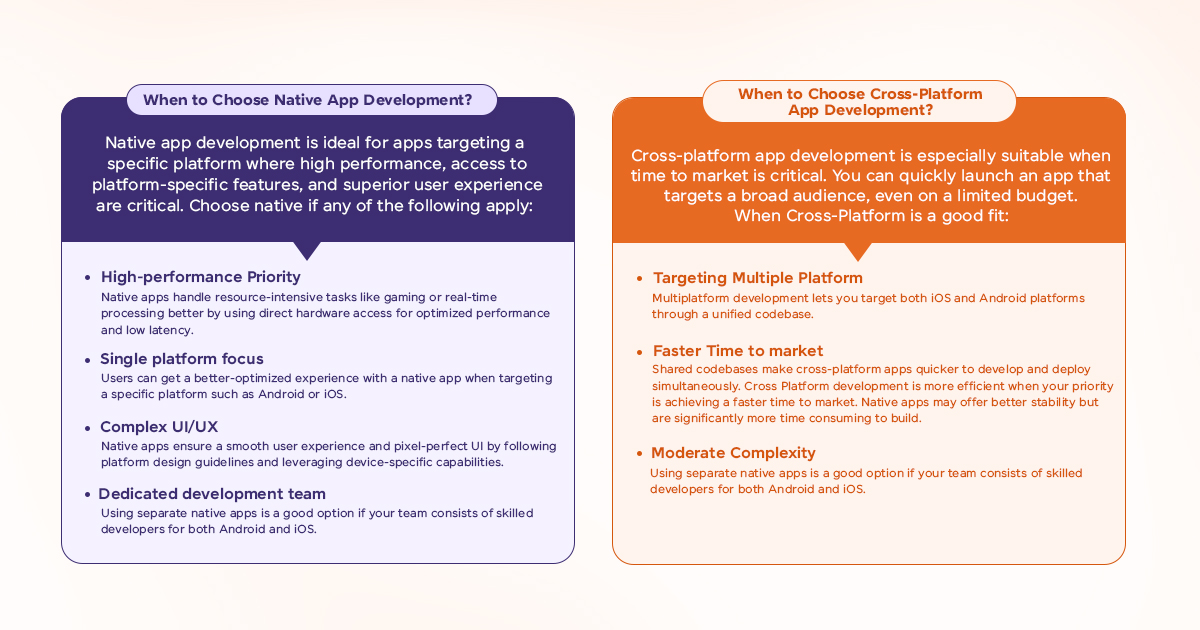
Native app development is ideal for apps targeting a specific platform where high performance, access to platform-specific features, and superior user experience are critical.
Choose native if any of the following apply:
- High-performance Priority
Native apps handle resource-intensive tasks like gaming or real-time processing better by using direct hardware access for optimized performance and low latency.
- Single platform focus
Users can get a better-optimized experience with a native app when targeting a specific platform such as Android or iOS.
- Complex UI/UX
Native apps ensure a smooth user experience and pixel-perfect UI by following platform design guidelines and leveraging device-specific capabilities.
- Dedicated development team
Using separate native apps is a good option if your team consists of skilled developers for both Android and iOS.
When to Choose Cross-Platform App Development?
Cross-platform app development is especially suitable when time to market is critical. You can quickly launch an app that targets a broad audience, even on a limited budget.
When Cross-Platform is a good fit:
- Targeting Multiple Platform
Multiplatform development lets you target both iOS and Android platforms through a unified codebase.
- Faster Time to market
Shared codebases make cross-platform apps quicker to develop and deploy simultaneously. Cross Platform development is more efficient when your priority is achieving a faster time to market. Native apps may offer better stability but are significantly more time consuming to build.
- Moderate Complexity
If your apps don't heavily rely on platform-specific features for core functionality.
How to choose Between Native and Cross-Platform App Development?
Deciding between native and cross-platform app development includes key considerations such as performance, development cost, data security and scalability.
Performance needs
Native apps are a better choice if your app demands high performance and deep integration. Cross-platform apps typically require more time and effort to optimize for complex or graphically intensive applications.
Development Cost and Budget
If you have a limited budget and a small development team, Cross platform development might be best suited. Cross-platform apps can be built, tested, debugged, and updated simultaneously across platforms which lowers development time and expenses. In comparison, native mobile development can be time-consuming and resource intensive.
Target Audience
Cross-platform development is ideal when your target audience is distributed across both Android and iOS platforms.
Data Security
Native apps typically provide enhanced security by leveraging platform-specific protections such as built-in encryption, secure APIs, and system-level authentication.
Future scalability
Native apps can be easily scaled with new features due to direct access to native Api and hardware. Cross-platform frameworks may require more effort to integrate new functionalities.
Key Takeaways
- Native apps offer better performance, security, and user experience through full access to platform features.
- Cross-platform apps reduce development time and cost with a shared codebase for Android and iOS.
- Choose native if your app needs high performance, complex UI, or platform-specific functionality.
- Cross-platform is ideal for faster launch, limited budgets, and reaching users on both platforms.
- Native apps scale easily and adapt quickly to new OS features.
- Cross-platform apps may face delays integrating new features due to framework dependencies.
- Popular native tools: Kotlin, Swift, Jetpack Compose, SwiftUI.
- Popular cross-platform tools: React Native, Flutter, Ionic, Xamarin.
FAQs
Q. What is the difference between native vs cross vs hybrid app development?
Native apps use platform-specific, non-reusable code, while cross-platform and hybrid apps rely on reusable codebases. Consequently, these approaches differ in speed, user experience, cost, time to market, and other key factors.
Q. How to pick between native, cross app and hybrid app development?
Choosing between cross-platform, native, or hybrid app development depends on factors like your target audience, app complexity, and required functionality. Budget, time to market, developer expertise, and business priorities also significantly influence this decision.
Q. Can I switch from cross-platform to Native later?
Yes, you can generally transition from cross-platform to native development later. Cross-platform frameworks like React Native or Flutter help you launch quickly, but you can migrate parts or the entire app to native code as needed. This may require rewriting code or using native libraries within the existing framework.
Q. Which is better for startups: native or cross-platform development?
For startups, cross-platform development is often the preferred initial choice because it’s faster, more cost-effective, and reaches a wider audience. However, native development is better for apps needing deep hardware integration, top performance, or platform-specific features. The ideal approach depends on the startup’s unique needs and priorities.

Related insights
-in-Business_1763716856557-585605410_2025-11-21.png&w=3840&q=75)
The Rise of Virtual and Augmented Reality (VR/AR) in Business
21 Nov 2025

Choosing the Right E-Commerce Platform for Your Nepal-Based Business
21 Nov 2025

The Evolution of Software Development: A Journey Through Time
19 Dec 2025
Have a project in mind? Let's build something great.
Share your ideas or questions and our experts will get back to you shortly.
Unlock Expert Guidance
Need expert IT advice? Our seasoned professionals are here to help you navigate your tech challenges. Schedule a session with us and get personalized solutions tailored to your business needs.

Connect with Us and Let's Build Something Together
We'd love to hear from you! Whether you have questions, need support, or want to discuss a new project, our team is ready to assist. Fill out the form below, and we’ll get back to you as soon as possible.
Prefer a Direct Consultation?
Connect with our team for a 1-on-1 virtual session to discuss your project, understand your needs, and explore the right solution for your business.
What's Next?
- 1Connect with you at a convenient time
- 2Explore your needs, goals, and requirements
- 3Prepare a tailored proposal based on your needs
Why Choose Us
Connect with AITC
Select your inquiry type to route your request to the right department.
Our Office Locations
Operating across 3 key timezone hubs to serve global enterprise clients.