







SEO
Domain
NP Domain Registration in Nepal: Free .com.np Guide + Cover Letter (2026)


sachin pokharel
30 Oct 2026
NP domain registration in Nepal is free. You apply for a .com.np domain at register.com.np, the official portal run by Mercantile Communications Pvt. Ltd. There's no registration fee and no renewal invoice. The hard part is the paperwork: a cover letter in the right format, two ID documents under 200 KB each, and two working nameservers. Get one wrong and the application comes back rejected.
Here's the whole process, including what trips people up.
How does .np domain registration in Nepal work?
To register a free .com.np domain, create an account at register.com.np, search for your domain, apply for it, upload your documents and a cover letter (each under 200 KB), and enter two nameservers. Approval takes a few working days. Individuals upload their citizenship plus one more document (driving license, birth certificate or PAN card). Companies upload a registration certificate.
Who can apply, and what do you need?
Nepali citizens, non-resident Nepalis, registered businesses, schools, colleges and NGOs can apply for a free .np domain. Individuals need their citizenship, one more document (driving license, birth certificate or PAN card) and a cover letter. Businesses need a company registration certificate plus a cover letter on letterhead, signed by an authorized person.
- Nepali citizens: a domain based on your full name.
- Non-resident Nepalis (NRNs): eligible, with supporting documents.
- Registered businesses: a domain based on the company name or trademark.
- Schools, colleges and NGOs: extensions like .edu.np or .org.np.
The domain has to match who you are. A personal application for a catchy brand name that isn't yours is the most common way to get rejected.
| Individuals | Businesses and organizations | |
| Main ID | Citizenship certificate | Company registration certificate (Office of the Company Registrar) |
| Cover letter | Required (template below) | Required, on letterhead, signed by an authorized person, addressed to Mercantile |
| Extra document | One more: driving license, birth certificate or PAN card | ID of the authorized signatory (citizenship or passport) |
File rules for every upload: JPG, PNG or PDF; 200 KB maximum per document; no spaces or special characters in filenames.
Check the size before you upload. A phone photo of a citizenship card is often several megabytes, and the portal won't take it. Compress it first.
How to register a .np domain in 5 steps
- Search for your domain name at register.com.np.
- Create a user account and verify your email.
- Apply for the domain and enter two nameservers.
- Upload your citizenship, one more document and the cover letter, each under 200 KB.
- Wait two to four working days for approval.
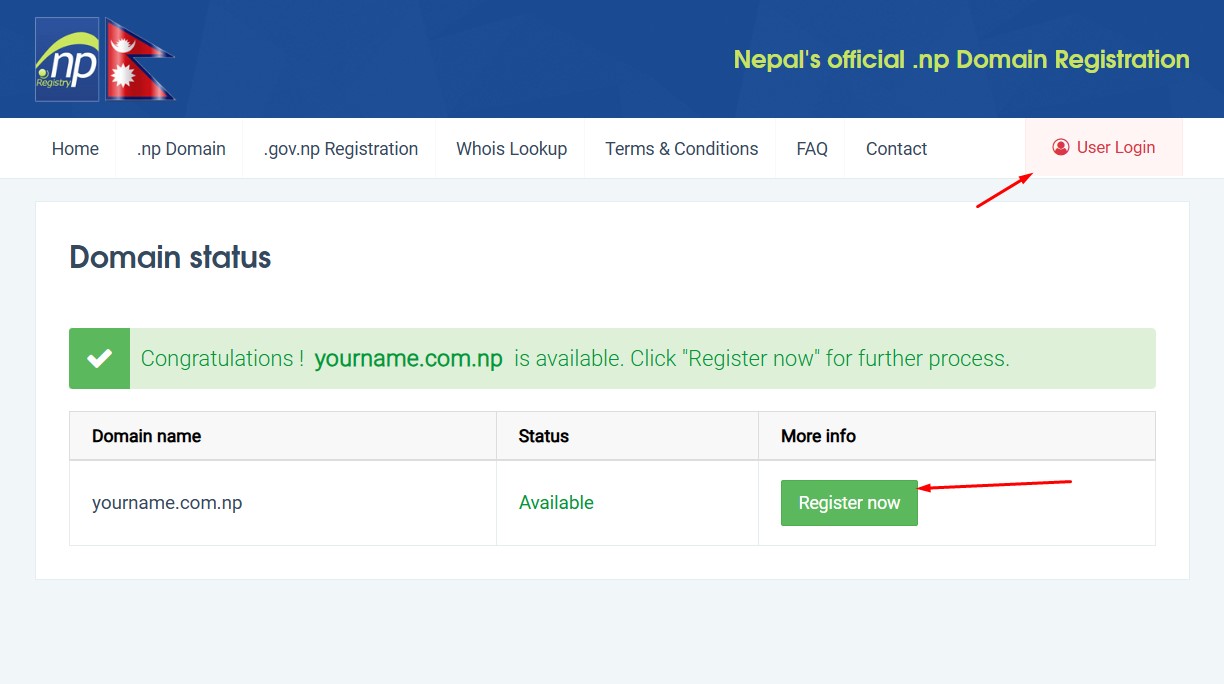
Step 1: Check if your domain is available
Go to register.com.np and search for the name you want. If it's taken, change it slightly. Don't jump to something unrelated, because the name still has to match your own or your business name.
Step 2: Create your account
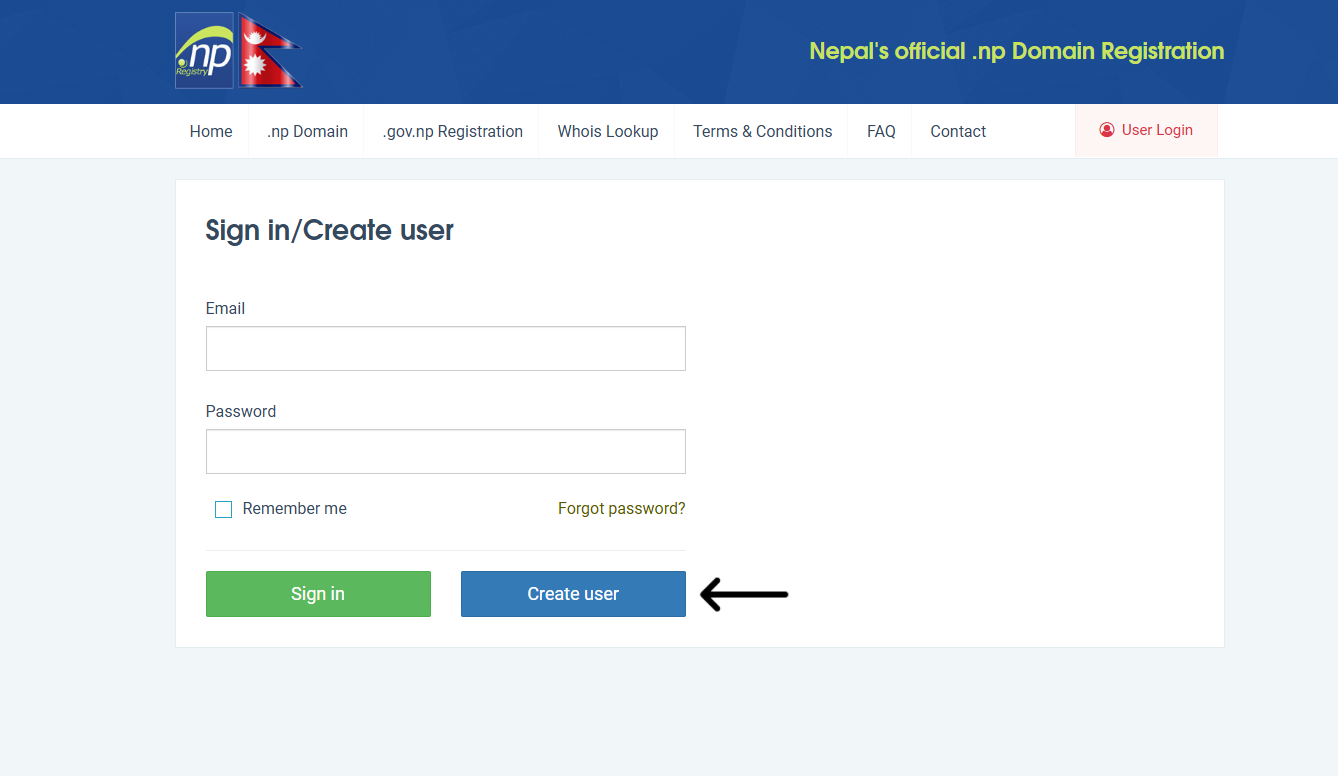
Click Create User. Enter your full name, email and a password, then click the verification link in your inbox. Use an email address you'll still have in two years, because every notice from the registry goes there.
Step 3: Apply for the domain
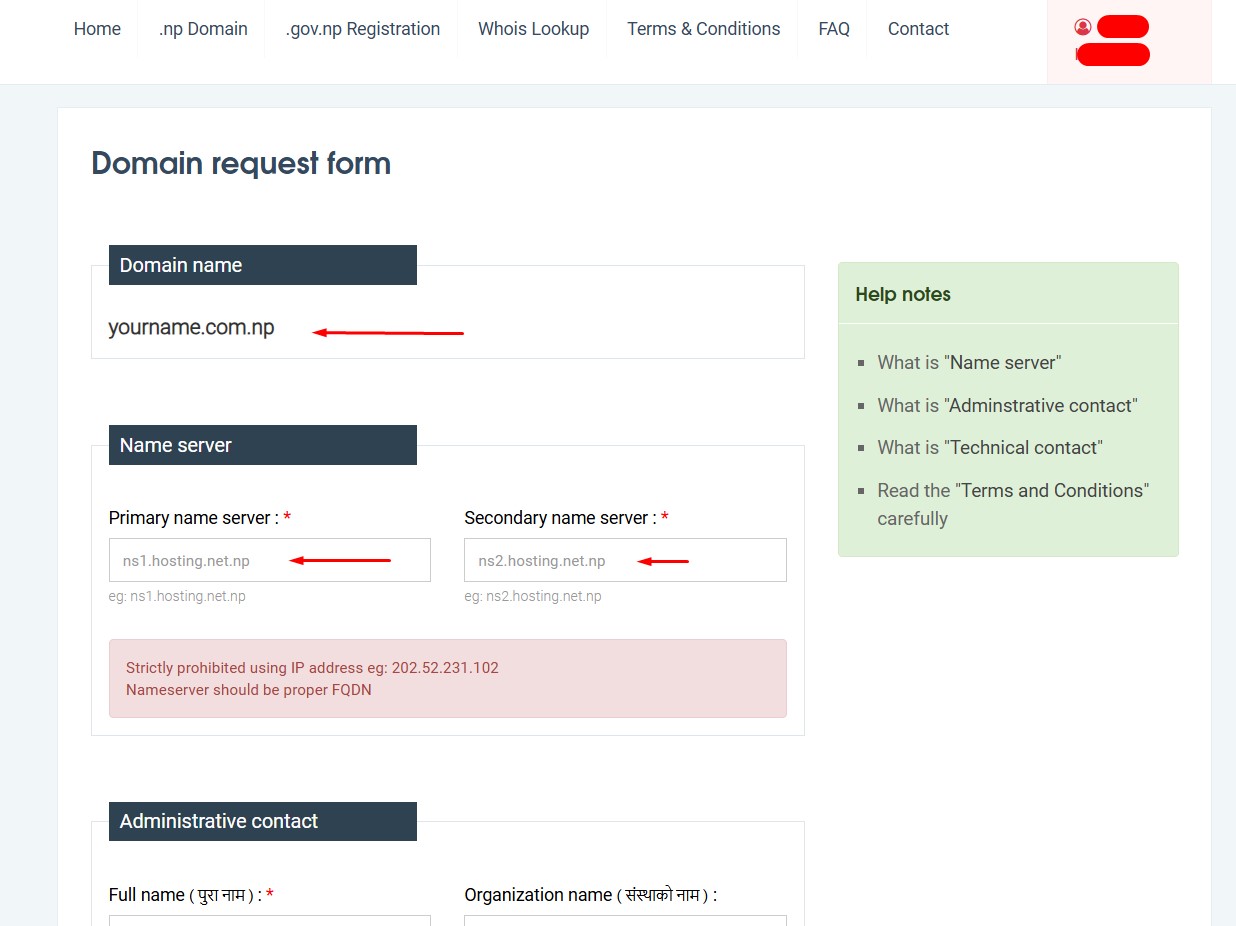
After you log in, click Apply for New Domain. Enter the name and pick an extension: .com.np for most people and businesses, .org.np for organizations, .edu.np for educational institutions.
The form asks for nameservers. If you already have hosting, use the two your host gave you. If you don't, add the domain to a free DNS provider such as Cloudflare first, and paste the two nameservers it assigns. Leaving this blank or entering junk values is a common reason for rejection.
Step 4: Upload your documents and cover letter
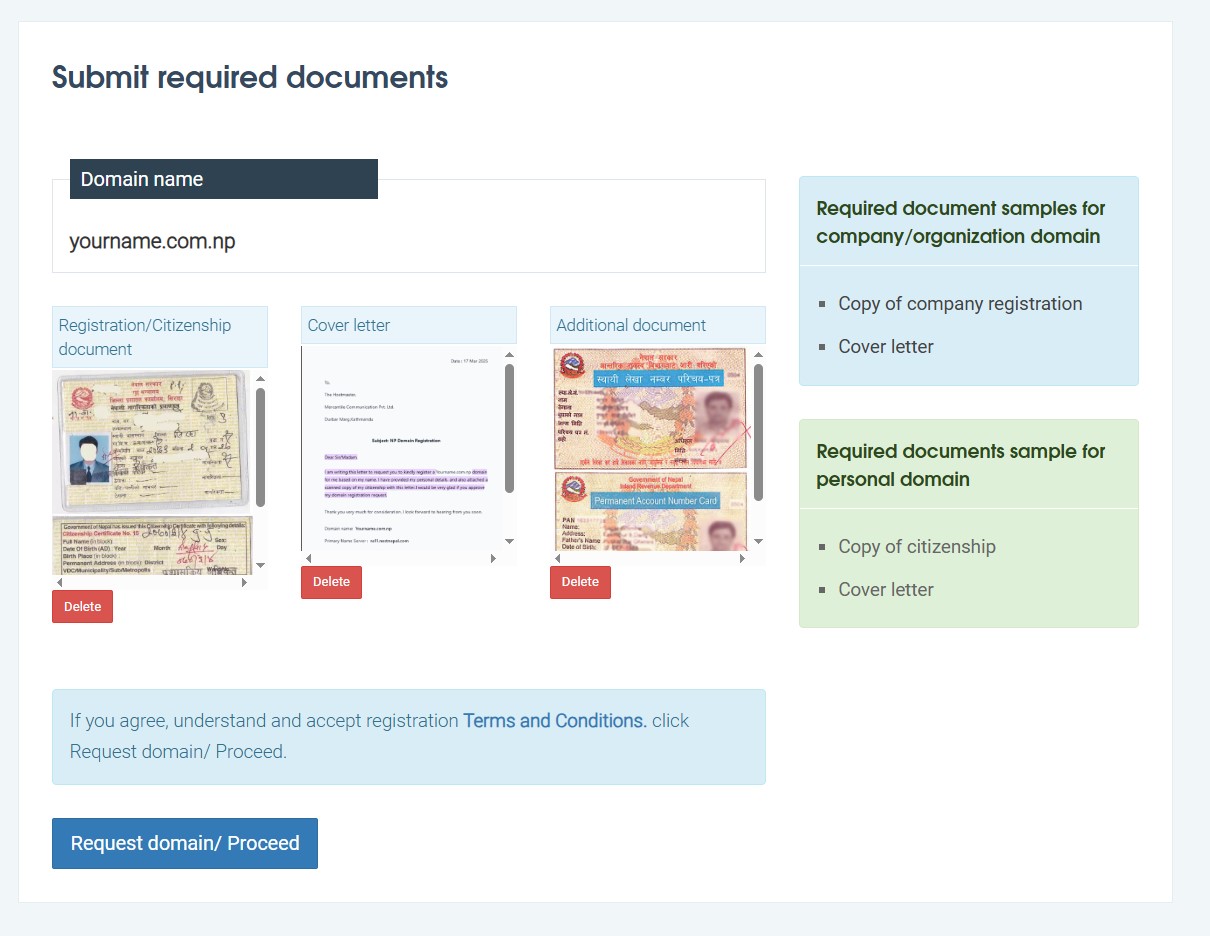
Upload your citizenship, one more document (driving license, birth certificate or PAN card) and the cover letter. Each document must be under 200 KB.
Step 5: Wait for approval
Expect roughly two to four working days. It can run longer if the registry has a backlog, because every document is checked by hand. Track the status in your register.com.np dashboard. Once it's approved, point the domain at your hosting and you're done.
For Business
For a company, print the same content on letterhead. Use the company name, state the domain you want, and have an authorized person sign it. Then scan it to under 200 KB.
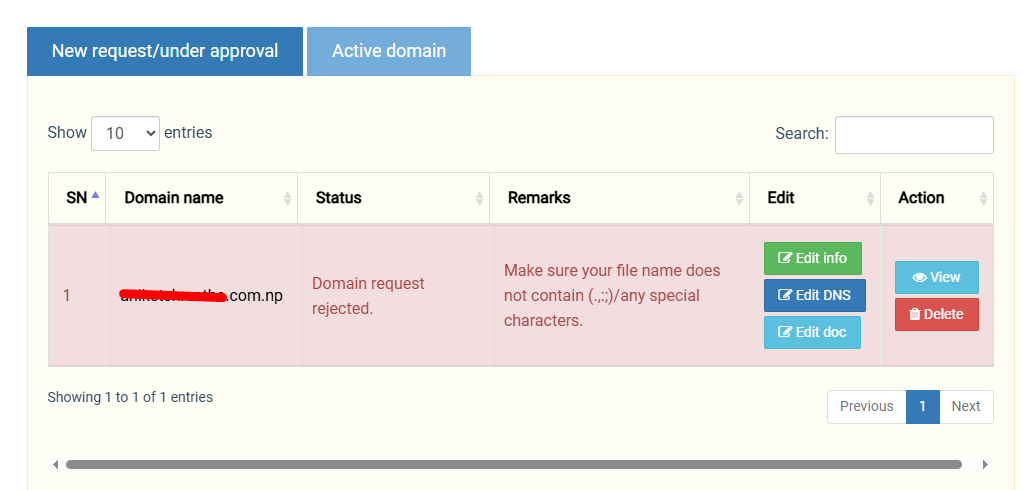
Step 5: Wait for Approval
- After submitting your application, it will be reviewed within 2-3 working days.
- You can check the status of your application in your register.com.np dashboard.
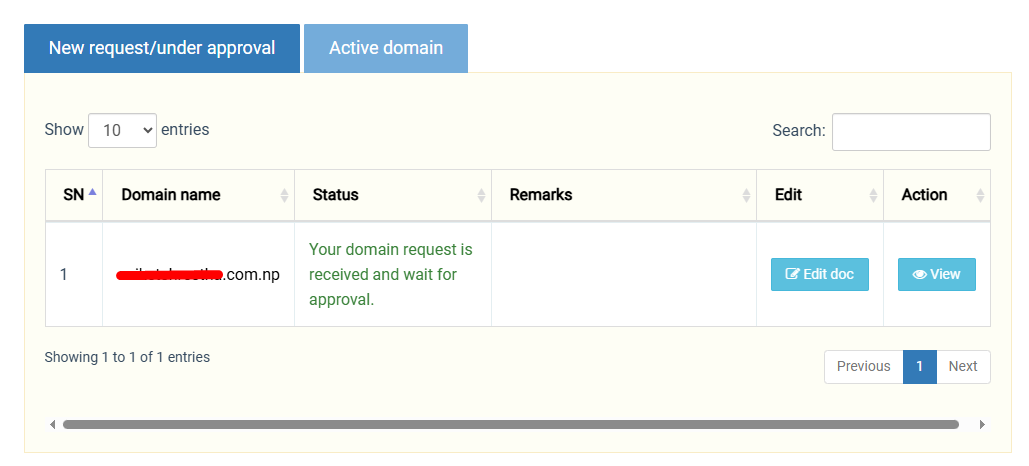
Once approved, your domain will be active, and you can connect it to web hosting services.
How do you write a cover letter for domain registration in Nepal?
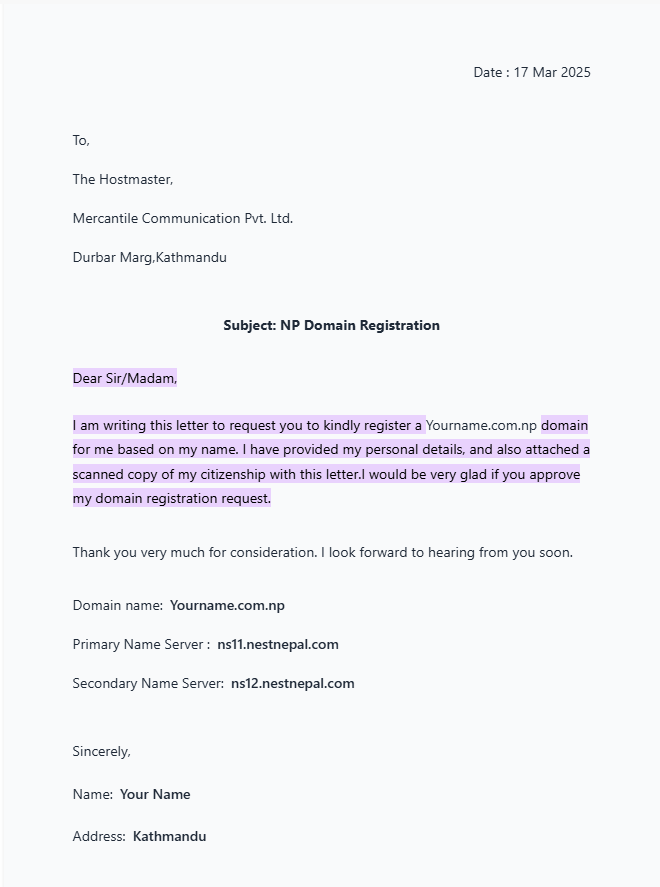
A cover letter for .np domain registration is a short letter to Mercantile Communications that states the purpose, the subject ("Domain name registration"), the exact domain name, your primary and secondary nameservers, and your name and address. Companies print it on letterhead and have an authorized person sign it.
The letter needs these elements:
- Purpose: Personal (or the company's purpose)
- Subject: Domain name registration
- The exact domain name you're requesting
- Primary and secondary nameservers
- Your name and address
Here's a template for individuals. Replace everything in brackets: Click Here
Here is the link for Cover letter for .com.np domain registration :
Here are some cover letter samples
Why do .np domain applications get rejected?
Most .np domain applications are rejected for one of four reasons: the domain doesn't match the applicant's name, the uploaded documents are blurry or over 200 KB, the cover letter is incomplete, or the nameservers are missing or invalid.
| Reason | Fix |
| Domain doesn't match your name or business name | Apply for a name that matches your ID or registration certificate |
| Blurry or oversized upload | Rescan clearly, then export as JPG, PNG or PDF under 200 KB |
| Cover letter missing or incomplete | Include purpose, subject, domain, nameservers, name and address |
| Nameservers invalid or missing | Set up DNS (Cloudflare or your host) first, then paste both nameservers |
If you see "rejected", read the reason in the dashboard, fix that one thing and resubmit. Don't start a new account.
How long does .np domain registration take?
A .np domain application takes two to four working days to be approved. Backlogs and unclear documents slow it down.
Does a .np domain expire?
A .np domain has no expiry date and no yearly renewal fee. It isn't free of obligations, though: the registry is reverifying older domains, and a domain that fails reverification can be suspended and later released for anyone to register.
Since December 2024, the registry has been running a reverification of older domains. Its own notice says reverification emails went out three times. If your dashboard shows a reverification status, you'll need to resubmit your documents and confirm your administrative details. Older guides list a 35-day window, and if you miss it the domain can be suspended and eventually released for anyone to register.
So if you registered years ago and forgot the login, find it now.
How does .np domain reverification work?
- Log in at register.com.np and check whether your domain is flagged.
- Prepare ID (citizenship or passport) for individuals, or the registration certificate for companies. Use .jpg files under 200 KB with clean filenames.
- Upload the documents through the portal. Email submissions aren't accepted.
- Check that your administrative details are accurate.
- Wait for Mercantile to confirm.
The portal's terms page also marks the "free" claim with an asterisk. Read that footnote before you build a business on the domain, and don't count on the pricing staying the same.
How do you change nameservers or contact details?
Nameservers: log in, open Active Domain, pick the domain, click Edit DNS, enter the new nameservers and save. Changes can take 24 to 48 hours to spread.
Name or contact details: you'll need to send a formal request to Mercantile with supporting documents, such as an updated citizenship or registration certificate.
Is a .com.np domain good for SEO?
Yes, for Nepal only. A .com.np domain is a country-code domain, which tells Google your site targets Nepali users. It won't boost rankings by itself, because content, links and site quality still decide that.
If you plan to sell outside Nepal, a paid .com is the better long-term choice. Many Nepali businesses run the .com.np as a free starter and move to a .com once international customers matter.
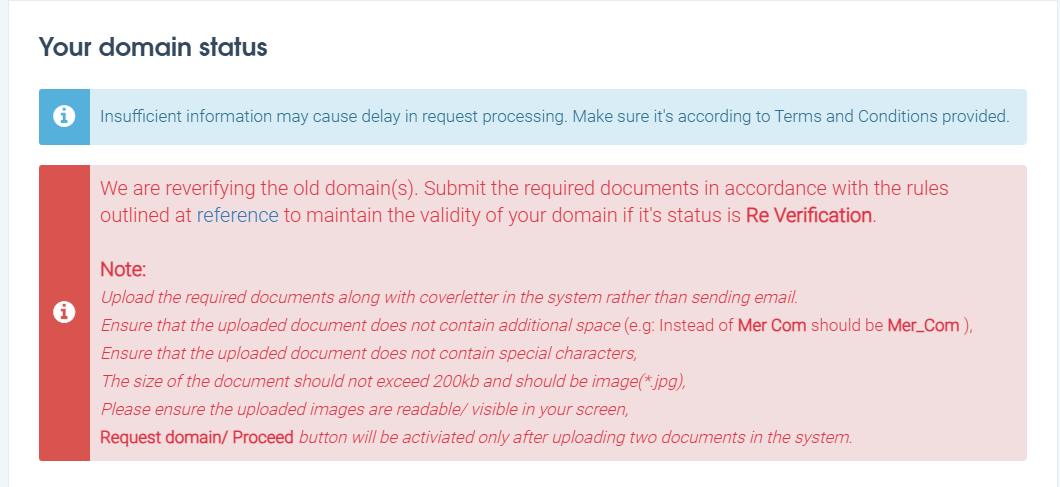
How does the .np domain reverification process work?
The email from Mercantile contains detailed guidelines for the step-by-step reverification process.
Log In to Your Account:
Go to register.com.np and sign in to your account.
Check Domain Status:
Confirm whether your domain is flagged for reverification.
Prepare Documents:
For companies, a business registration certificate is required. Individuals need to provide identification, such as a citizenship card or passport.
Ensure the files are in .jpg format, under 200 KB, and avoid using spaces or special characters in the filenames.
Upload Documents:
Submit the documents directly through the portal. Email submissions will not be accepted.
Verify Administrative Details:
Make sure all administrative information is accurate and complete.
Await Approval:
Mercantile will review your submission and notify you of your domain’s status.
Why is it necessary to complete the .np domain reverification?
The sudden reverification process seems to be driven by the need to maintain accurate records and prevent the potential misuse of .np domains. Over time, unclear or unmanaged registrations have accumulated, raising concerns about accountability and proper utilization.
Additionally, this initiative may be paving the way for the Nepal government’s proposed changes to domain management, which could include the introduction of an annual fee and stricter compliance requirements.
FAQs
What is a .np domain?
.np is Nepal's country-code top-level domain. Individuals, businesses and organizations use it for a web presence tied to Nepal.
How much does .np domain registration cost?
Registration is free, with no fee at sign-up and no annual renewal charge. Check the portal's terms for the current conditions.
How long does it take to register a .np domain?
A .np domain application takes two to four working days to be approved. Backlogs and unclear documents slow it down.
Does a .np domain expire?
It has no expiry date, but older domains are being reverified. Respond to any reverification notice on time or you can lose the domain.
Can I register a .np domain without hosting?
Yes. Use a free DNS provider like Cloudflare to get two nameservers, and connect hosting later.
What is a domain registry?
A registry is the database that holds every domain under a top-level domain and the details of who registered it. For .np, that's Mercantile.
Sources

Related insights

How IoT is Shaping Smart Businesses
19 Dec 2025

A Beginner’s Guide to Building Scalable Web Applications
11 Mar 2026

Web Development Companies in Nepal – Top 10 Picks for 2026
27 Feb 2026
Have a project in mind? Let's build something great.
Share your ideas or questions and our experts will get back to you shortly.
Unlock Expert Guidance
Need expert IT advice? Our seasoned professionals are here to help you navigate your tech challenges. Schedule a session with us and get personalized solutions tailored to your business needs.

Connect with Us and Let's Build Something Together
We'd love to hear from you! Whether you have questions, need support, or want to discuss a new project, our team is ready to assist. Fill out the form below, and we’ll get back to you as soon as possible.
Prefer a Direct Consultation?
Connect with our team for a 1-on-1 virtual session to discuss your project, understand your needs, and explore the right solution for your business.
What's Next?
- 1Connect with you at a convenient time
- 2Explore your needs, goals, and requirements
- 3Prepare a tailored proposal based on your needs
Why Choose Us
Connect with AITC
Select your inquiry type to route your request to the right department.
Our Office Locations
Operating across 3 key timezone hubs to serve global enterprise clients.