







Applications
Software
What Is Saas? Understanding the Software as a Service Model for Modern Businesses


sachin pokharel
21 Jan 2026
Today, businesses and individuals increasingly use cloud computing to work efficiently.
A key part of this is Software as a Service (SaaS), a cloud-based model that lets users access software applications over the internet without installation or maintenance.
SaaS handles updates, security, and storage automatically, making it easy for businesses to focus on their core work. Popular SaaS tools include Google Workspace for productivity, Salesforce for CRM, and Zoom for online communication and collaboration.
This blog explores SaaS, how it works, and its growing importance for businesses leveraging cloud technology, enterprise software, and remote work solutions.
Let’s Start!
What is SaaS?
Software as a Service (SaaS) is a cloud-based software delivery model in which users access applications over the internet instead of installing them on a local computer.
Rather than purchasing a one-time software license, businesses and individuals subscribe to SaaS applications and use them through a web browser or online platform.
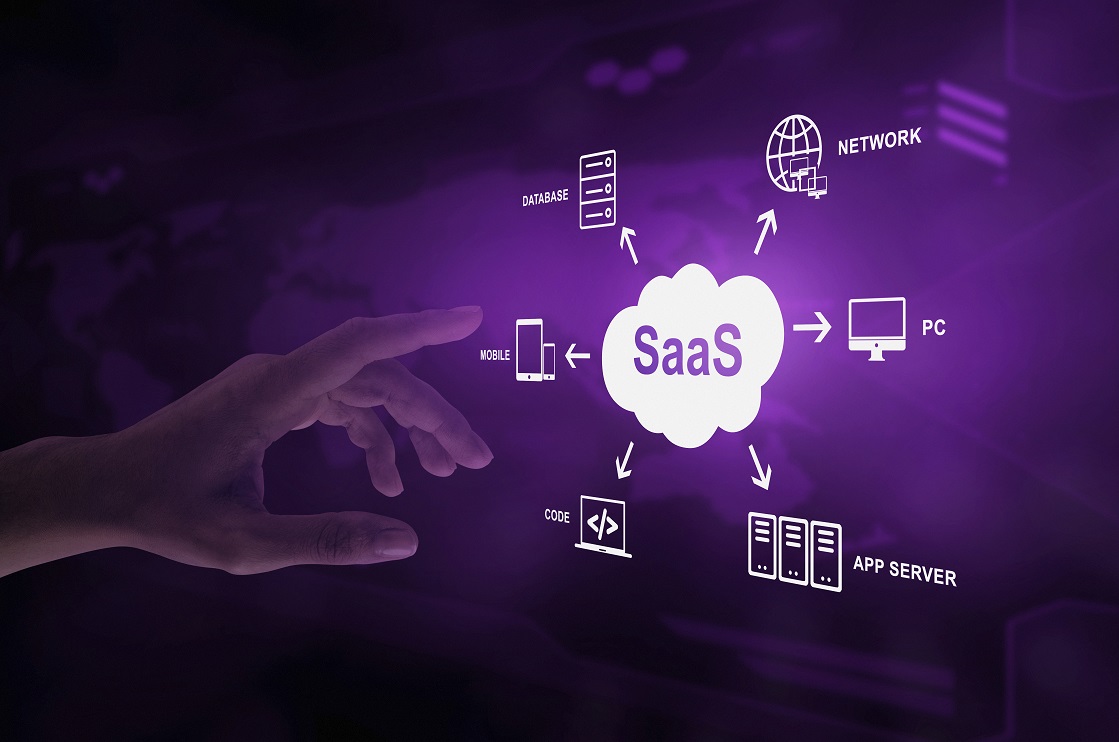
How SaaS Differs from Traditional Software
SaaS (Software as a Service) and traditional software differ in deployment, maintenance, updates, and accessibility. Understanding these differences helps businesses choose the right software model for their needs.
Traditional Software
Traditional software is installed locally on a device or server and typically requires direct management by the user or IT team. Key characteristics include:
- Installation Required: Must be downloaded and installed on each device.
- Device-Specific: Usually works only on the device it is installed on.
- Manual Updates: Users or IT teams must install updates and patches.
- IT-Managed Maintenance: Internal IT teams handle troubleshooting, security, and performance.
Example: Installing Microsoft Office 2016 on a PC requires local installation, manual updates, and IT support for issues.
Software as a Service (SaaS)
SaaS applications are hosted on cloud servers and accessed via the internet. The service provider manages infrastructure, updates, and maintenance. Key characteristics include:
- Web-Based Access: Runs in a web browser, no installation required.
- Cross-Device Compatibility: Works on desktops, laptops, tablets, and smartphones.
- Automatic Updates: Updates, security patches, and new features are applied by the provider.
- Provider-Managed Maintenance: The SaaS provider ensures uptime, performance, and support.
Example: Microsoft 365 or Google Workspace allows users to access applications online, receive automatic updates, and use the software on any device without IT intervention.
Key Advantages of SaaS Over Traditional Software
- Reduced IT Complexity: No local installation or manual maintenance.
- Faster Deployment: Users can start working immediately after subscription.
- Lower Total Cost of Ownership: Subscription-based pricing eliminates large upfront license fees.
- Scalability: Easily add users or features without hardware limitations.
How SaaS Works: Step-by-Step
Software as a Service (SaaS) delivers applications over the internet, allowing users to access software without installing it locally. While it appears simple on the surface, SaaS relies on complex cloud systems that handle processing, storage, and security behind the scenes.
1. User Access Workflow
When you use a SaaS application, the user experience typically follows these steps:
- Open a Web Browser or Mobile App – Users access the SaaS platform through supported browsers or mobile applications.
- Enter the SaaS Website or Application URL – The request is sent to the cloud-hosted server.
- Log In with Credentials – Authentication ensures that only authorized users can access their data.
- Load the Application Interface – The software interface is delivered from cloud servers and displayed on the user’s device.
- Access Your Data – Your files, settings, and records are retrieved from cloud storage in real time.
Example: Logging into Google Workspace instantly provides access to Gmail, Google Docs, and Google Drive on any device without installation.
2. Backend Cloud Processes
Behind the scenes, SaaS operates on cloud servers that handle all processing and storage:
- Server-Side Computation: Cloud servers process requests and run the application logic instead of relying on your device.
- Data Storage: User data is securely stored in cloud databases with redundancy and backup systems.
- Automatic Updates: The provider applies software updates, security patches, and feature enhancements automatically.
- Scalability and Performance: Cloud infrastructure dynamically allocates resources to handle multiple users efficiently.
This architecture ensures fast load times, seamless updates, and accessibility from any device.
SaaS vs On-Premise Software: A Complete Comparison
Choosing between SaaS and on-premise software depends on business needs, budget, and scalability requirements. Here’s a detailed, factual comparison.
1. Understanding On-Premise Software
On-premise software is installed and runs on computers or servers located within a company. Key features include:
- Installed on company hardware
- Managed by the internal IT team
- Updates and patches applied manually
Examples:
- Accounting software installed on office desktops
- ERP systems running on in-house servers
- Internal databases stored in server rooms
Key Insight: On-premise software gives full control over data and customization but requires significant infrastructure and maintenance.
2. Infrastructure Requirements
| Feature | On-Premise | SaaS |
| Hardware | Physical servers, storage devices, networking | None required; cloud-hosted |
| IT Staff | Dedicated team required | Managed by provider |
| Maintenance | Manual patching, backups, security | Automatic and provider-managed |
| Setup Complexity | High | Low |
| Cost of Setup | High upfront investment | Minimal upfront investment |
3. Cost Comparison
On-Premise Costs:
- High upfront license fees
- Hardware and installation expenses
- IT staff salaries and maintenance
- Upgrade and security costs
SaaS Costs:
- Subscription-based pricing (monthly/yearly)
- Lower upfront costs
- Predictable and scalable expenses
- Automatic updates included
Example: Microsoft Office 2016 (on-premise) requires $500+ per license plus IT costs, while Microsoft 365 (SaaS) costs $12–$35 per user/month with updates and support included.
4. Maintenance and Updates
| Feature | On-Premise | SaaS |
| Updates | Manual, downtime possible | Automatic, no downtime |
| Security Patches | Applied by internal IT | Managed by provider, immediate |
| Version Consistency | Users may run outdated versions | All users always on latest version |
5. Accessibility and Remote Work
| Feature | On-Premise | SaaS |
| Access | Limited to office network | Accessible from anywhere |
| Devices | Usually desktops or company devices | Any device with internet |
| Remote Performance | Requires VPN, may be slow | Optimized for cloud access |
| Ideal For | On-site teams | Remote and hybrid teams |
6. Scalability and Growth
On-Premise: Scaling requires additional servers, licenses, and IT staff; slow and costly.
SaaS:
- Add users instantly
- Upgrade plans easily
- Resources scale automatically
- Supports rapid business growth
Example: Slack (SaaS) can scale from 10 users to 1,000 users in minutes without hardware upgrades.
7. Security
On-Premise:
- Security depends on internal expertise and budgets
- Risk of outdated systems
SaaS:
- Managed by specialized security teams
- Uses encryption, continuous monitoring, and regular audits
- Often provides stronger security for most businesses
8. Control and Customization
| Feature | On-Premise | SaaS |
| Control | Full | Limited to configurations |
| Customization | Deep, code-level possible | Standardized, template-based |
| Best For | Complex, regulated industries | Standardized business processes |
9. Reliability and Downtime
On-Premise Risks: Hardware failures, power outages, manual backups
SaaS Advantages: High uptime SLAs, redundant cloud servers, automatic failover
Example: Salesforce guarantees 99.9% uptime with multi-region redundancy.
10. Compliance and Data Control
On-Premise:
- Full control over data
- Easier to meet certain regulatory requirements
SaaS:
- Providers comply with GDPR, HIPAA, ISO standards
- Legal agreements ensure data protection
- Compliance depends on provider and industry
11. Choosing Between SaaS and On-Premise
| Business Type | Recommended Software |
| Startups | SaaS – low cost, quick deployment |
| SMEs | SaaS – scalable, flexible |
| Large Enterprises | On-Premise – deep customization, full control |
| Highly Regulated Industries | On-Premise – compliance control |
| Remote Teams | SaaS – accessible from anywhere |
Key Insight: SaaS is ideal for most modern businesses due to lower costs, scalability, and automatic updates. On-premise remains suitable for enterprises with strict customization or compliance needs.
SaaS vs PaaS vs IaaS: Cloud Service Models Explained
Cloud computing offers three primary service models: Infrastructure as a Service (IaaS), Platform as a Service (PaaS), and Software as a Service (SaaS). Each model varies in user responsibility, cost, complexity, scalability, and security.
1. What Is IaaS (Infrastructure as a Service)?
IaaS provides virtualized computing resources over the internet:
- Virtual servers
- Storage systems
- Networking components
- Operating systems
Responsibilities:
| Component | Managed By |
| Hardware | Provider |
| OS | User |
| Applications | User |
| Security | User (mostly) |
Analogy: Renting land and building your own house. You provide the structure, the provider offers the foundation.
Typical Users: Developers, IT teams, large enterprises building custom applications.
2. What Is PaaS (Platform as a Service)?
PaaS provides a platform for developing, running, and managing applications without managing the underlying infrastructure:
- Infrastructure (servers, storage)
- Operating systems
- Development tools
- Runtime environments
Responsibilities:
| Component | Managed By |
| Infrastructure | Provider |
| Platform (OS, runtime, tools) | Provider |
| Application Code | User |
| Data | User |
Analogy: Renting a ready-made kitchen to cook your own recipes. You focus on cooking; the kitchen is ready to use.
Typical Users: Software developers, app-building teams, tech startups.
3. What Is SaaS (Software as a Service)?
SaaS delivers fully functional applications over the internet:
- Complete software with ready-to-use features
- No technical setup required
- Automatic updates and maintenance
Responsibilities:
| Component | Managed By |
| Hardware | Provider |
| OS & Platform | Provider |
| Applications | Provider |
| Security | Provider |
| Users | Just use the software |
Analogy: Ordering food from a restaurant instead of cooking. Everything is ready to use.
Typical Users: Non-technical users, remote teams, small to medium businesses.
4. Responsibility Comparison Across Models
| Service Model | Provider Responsibility | User Responsibility |
| IaaS | Hardware, storage, networking | OS, applications, security |
| PaaS | Infrastructure, platform | Application code, data |
| SaaS | Everything | Use the software |
Key Insight: As you move from IaaS → PaaS → SaaS, user responsibility decreases while simplicity increases.
5. Cost and Complexity Comparison
| Service Model | Cost | Complexity | Ideal For |
| IaaS | Flexible, pay-per-use | High technical skill required | Complex, custom systems |
| PaaS | Moderate | Moderate | Faster app development |
| SaaS | Predictable subscription | Low | Non-technical users, small & medium businesses |
Example: Hosting a virtual server (IaaS) requires technical skills and infrastructure, while using Google Workspace (SaaS) costs a fixed subscription and is ready to use.
6. Scalability Across Models
| Service Model | Scalability Focus | User Effort |
| IaaS | Infrastructure | High – user manages resources |
| PaaS | Applications | Moderate – deployment handled by platform |
| SaaS | Users & Features | Low – automatic scaling by provider |
SaaS allows organizations to scale quickly without technical intervention.
7. Security Responsibilities Across Models
| Service Model | Security Responsibility |
| IaaS | Mostly user-managed |
| PaaS | Shared (user + provider) |
| SaaS | Mostly provider-managed |
Key Insight: SaaS is safest for businesses without in-house security expertise, while IaaS provides maximum control for experienced IT teams.
8. Real-World Examples (Generic)
| Service Model | Example Use Case |
| IaaS | Virtual server hosting for custom apps |
| PaaS | App development platforms for startups |
| SaaS | Online document editors, CRM software |
These examples show how each cloud model fits different business needs and technical skills.
Types of SaaS Applications Explained
SaaS (Software as a Service) applications vary by target audience, industry focus, functionality, and scale. Understanding the types helps businesses select the right software, reduce unnecessary spending, and align tools with operational goals.
| SaaS Type | Description | Target Users | Typical Use Cases | Key Benefit |
| Horizontal SaaS | Solves general business problems across multiple industries | Any company or industry | Email, CRM, Accounting, Project Management, Marketing Automation | Large market potential; easy adoption and integration |
| Vertical SaaS | Provides specialized solutions for a single industry | Single industry (e.g., healthcare, education, real estate, hospitality, manufacturing) | Compliance management, industry-specific workflows | Faster deployment; tailored to industry standards; higher value per user |
| B2B SaaS | Designed for businesses and organizations | Teams, departments, enterprises | CRM, HR/payroll, Sales automation, Analytics | Multi-user support; role-based access; operational efficiency |
| B2C SaaS | Designed for individual consumers | Individuals | Email services, Cloud storage, Streaming platforms, Online learning | User-focused experience; scalable adoption |
| Internal SaaS | Used only within the organization | Employees | Internal dashboards, HR systems, Team collaboration | Improves coordination, productivity, and decision-making |
| Customer-Facing SaaS | Directly used by external customers | Customers | Customer portals, Booking systems, Self-service applications | Enhances customer satisfaction, trust, and revenue |
| Micro-SaaS | Small, focused applications solving a single problem | Small teams or niche markets | Single-function apps, niche reporting tools | Low development cost; high efficiency; profitable with a small user base |
Horizontal SaaS (Cross-Industry Use)
Definition: Software that addresses general business functions applicable across multiple industries.
Examples:
- CRM platforms for sales teams in retail, finance, or healthcare
- Email marketing automation platforms
- Project management tools
Key Advantages:
- Large potential market
- Easy integration and adoption
- Applicable to a wide range of businesses
Vertical SaaS (Industry-Specific Software)
Definition: Software designed for a specific industry, providing tailored workflows, compliance features, and standards.
Examples:
- Healthcare patient management software
- Real estate property management platforms
- Hospitality booking and operations tools
Key Advantages:
- Faster deployment with minimal customization
- Industry-specific compliance and standards built-in
- Higher value per user compared to general solutions
B2B vs. B2C SaaS
| Feature | B2B SaaS | B2C SaaS |
| Users | Businesses, teams, departments | Individual consumers |
| Focus | Operational efficiency, business growth | Ease of use, user experience, scalability |
| Access | Multi-user accounts, role-based permissions | Single-user accounts, optional sharing via links or invitations |
| Revenue Model | Subscription plans, enterprise pricing | Free/low-cost plans, ad-supported, scale-based |
| Examples | Salesforce CRM, HR tools | Dropbox, Gmail, Netflix |
Insight: Globally, most SaaS revenue comes from B2B subscriptions due to enterprise-scale contracts.
Internal vs Customer-Facing SaaS
| Feature | Internal SaaS | Customer-Facing SaaS |
| Visibility | Accessible only by employees | Accessible by external customers |
| Purpose | Manage internal operations, collaboration, and reporting | Enhance customer experience and satisfaction |
| Examples | Internal dashboards, HR systems | Booking systems, customer portals, self-service applications |
| Key Benefit | Improves productivity and decision-making | Directly impacts revenue and customer satisfaction |
Note: Examples listed are illustrative, not exhaustive.
Micro-SaaS (Niche, Focused Solutions)
Definition: Small, highly focused software applications designed to solve one specific problem.
Characteristics:
- Narrow target audience
- Simple and specific feature set
- Low development and maintenance costs
- High efficiency and measurable ROI
Examples:
- Single-feature email tracking tool
- Reporting dashboard for a specific industry metric
Why Micro-SaaS is Popular:
- Simple to develop
- Profitable with a small number of users
- Addresses specific pain points effectively
Functional Classification of SaaS
SaaS can also be categorized based on business function. Companies often integrate multiple applications to create a SaaS stack, a collection of tools that work together to manage operations efficiently.
| Function | Example SaaS Tools | Purpose |
| Marketing | Email marketing platforms, Marketing automation | Generate leads, manage campaigns, improve marketing ROI |
| Sales | CRM, Sales automation tools | Track customers, improve sales processes, increase revenue |
| Finance | Accounting, Invoicing software | Manage budgets, payments, and financial reporting |
| HR | Payroll, Employee management systems | Staff onboarding, payroll processing, performance tracking |
| Operations | Project management software | Streamline workflows, improve coordination |
| Customer Support | Helpdesk, Ticketing systems | Resolve customer issues efficiently, improve satisfaction |
SaaS Use Cases Across Industries: Tools, Features, and Benefits
SaaS (Software as a Service) has become indispensable across industries. Businesses adopt SaaS to cut costs, accelerate operations, improve efficiency, enable remote work, automate processes, and scale rapidly. SaaS solutions are designed to fit the unique workflows, compliance requirements, and growth goals of each industry.
Below is an in-depth look at industry-specific SaaS use cases, the tools commonly used, and their key benefits.
1. Marketing SaaS: Automation and Analytics
Overview: Marketing teams increasingly rely on SaaS to streamline campaigns, improve targeting, and measure results in real time.
Common Tools:
- Email Marketing Platforms: Campaign automation, segmentation, analytics (e.g., Mailchimp, Klaviyo)
- Social Media Scheduling Tools: Content calendars, auto-posting (e.g., Buffer, Hootsuite)
- SEO & Content Marketing Platforms: Keyword tracking, content optimization (e.g., SEMrush, Ahrefs)
- Analytics Dashboards: Real-time performance and ROI tracking (e.g., Google Analytics, Databox)
- Content Management Systems (CMS): Centralized publishing and workflow management (e.g., WordPress, HubSpot CMS)
Key Benefits:
- Faster campaign execution and deployment
- Improved audience segmentation and targeting
- Real-time monitoring of performance and ROI
- Consistent brand messaging across channels
2. Sales SaaS: CRM and Lead Management
Overview: Sales teams leverage SaaS to manage pipelines, automate workflows, and enhance customer engagement.
Common Tools:
- CRM platforms (e.g., Salesforce, HubSpot)
- Sales automation software
- Lead scoring and tracking tools
- Revenue forecasting platforms
Key Benefits:
- Centralized customer data for all teams
- Streamlined communication between sales, marketing, and support
- Faster sales cycles and deal closures
- Improved customer relationship management
3. Finance and Accounting SaaS
Overview: Finance departments use SaaS to reduce manual errors, speed up reporting, and maintain accurate financial records.
Common Tools:
- Accounting software (e.g., QuickBooks, Xero)
- Budgeting and expense tracking platforms
- Invoicing and payment automation tools
- Financial reporting dashboards
Key Benefits:
- Accurate, real-time financial data
- Reduced errors in transactions and reporting
- Faster monthly, quarterly, and annual reporting
- Simplified audit and compliance processes
4. HR and Payroll SaaS
Overview: Human Resources teams use SaaS to streamline recruitment, payroll, performance management, and employee engagement.
Common Tools:
- HR Management Systems (HRMS)
- Payroll and benefits platforms (e.g., Gusto, ADP)
- Recruitment and applicant tracking systems
- Performance review and feedback tools
Key Benefits:
- Faster hiring and onboarding processes
- Improved employee satisfaction and engagement
- Accurate payroll and benefits management
- Efficient record-keeping and reporting
5. Education SaaS (EdTech)
Overview: Educational institutions adopt SaaS to support remote learning, manage student data, and monitor academic progress.
Common Tools:
- Learning Management Systems (LMS) (e.g., Canvas, Moodle)
- Online classroom platforms (e.g., Zoom, Google Classroom)
- Student information systems (SIS)
- Virtual labs and course management tools
Key Benefits:
- Enables remote and hybrid learning
- Provides interactive and diverse learning resources
- Tracks student progress and performance
- Enhances collaboration between students and teachers
6. Healthcare SaaS
Overview: Healthcare organizations use SaaS to improve patient care, streamline operations, and secure sensitive information.
Common Tools:
- Electronic Health Records (EHR) and Patient Management Systems
- Appointment scheduling software
- Telemedicine platforms (e.g., Teladoc, Amwell)
- Billing and insurance management tools
Key Benefits:
- Faster patient service and appointment management
- Improved medical record organization and security
- Enhanced doctor-patient communication
- Simplified billing and insurance processes
7. eCommerce SaaS
Overview: eCommerce businesses rely on SaaS to manage online stores, track inventory, and engage customers efficiently.
Common Tools:
- Online store platforms (e.g., Shopify, BigCommerce)
- Inventory and order management systems
- Payment processing and checkout automation
- Marketing automation platforms
- Customer support and CRM tools
Key Benefits:
- Rapid online store setup and launch
- Streamlined inventory and order management
- Enhanced customer experience and support
- Higher conversion rates and sales
8. Manufacturing SaaS
Overview: Manufacturers use SaaS to optimize production, manage inventory, and maintain quality standards.
Common Tools:
- Production process tracking software
- Inventory and supply chain management platforms
- Maintenance scheduling and monitoring tools
- Quality assurance and control systems
Key Benefits:
- Increased operational efficiency
- Optimized resource allocation
- Reduced waste and errors
- Improved product quality and regulatory compliance
9. SaaS for Startups vs Enterprises
Startups:
- Why They Use SaaS: Speed, low cost, quick scaling, flexibility
- Common Tools: CRM, Marketing, Project Management, Collaboration software
Enterprises:
- Why They Use SaaS: Standardized processes, global collaboration, automation at scale, compliance
- Common Tools: ERP, Security, Data Analytics, HR SaaS
Key Insight: SaaS enables both startups and enterprises to automate workflows, scale efficiently, and adapt quickly to market changes.
Why SaaS Works Across Industries
SaaS adoption succeeds because it:
- Solves real business problems specific to each workflow
- Supports businesses of all sizes
- Improves collaboration, transparency, and data visibility
- Reduces manual work and operational errors
- Enables scalability, growth, and innovation
Even highly regulated or traditional industries can leverage SaaS to enhance operational efficiency and business outcomes.
Future of SaaS
The future of SaaS will focus on automation, security, speed, and customization. With the support of AI, cloud computing, and advanced networking, SaaS will remain a key part of business digital transformation.
- AI and Machine Learning Integration.
Modern SaaS platforms are integrating Artificial Intelligence (AI) and Machine Learning (ML) to improve automation and decision-making.
AI-powered SaaS tools help with:
- Workflow automation
- Predictive analytics
- Personalized user experiences
- Business intelligence
This allows companies to analyze big data, reduce manual work, and make smarter decisions.
- Low-Code and No-Code Platforms.
Low-code and no-code development platforms allow users to build applications with minimal coding.
These SaaS tools help:
- Small businesses.
- Non-technical users.
- Startups and enterprises.
They speed up application development and support digital transformation.
- Stronger SaaS Security Measures.
As cyber threats increase, SaaS providers invest in cloud security and cybersecurity technologies.
Common security features include:
- End-to-end encryption.
- Multi-factor authentication (MFA).
- AI-based threat detection.
- Compliance standards.
These measures help protect user data and cloud infrastructure.
- Industry-Specific SaaS Solutions.
Many SaaS products are built for specific industries, such as:
- Healthcare SaaS
- Finance SaaS
- Retail SaaS
These solutions offer industry-specific features, regulatory compliance, and better workflow management.
- Edge Computing and 5G Integration
Edge computing and 5G networks enhance SaaS performance by reducing latency and speeding up data processing.
This benefits:
- Internet of Things (IoT) devices.
- Video streaming platforms.
- Real-time cloud applications.
These technologies make SaaS applications faster and more reliable.
Conclusion
SaaS (Software as a Service) is changing the way businesses work. It provides cloud-based software solutions that are low-cost, flexible, and easy to use.
Many industries such as healthcare, finance, retail, and education use SaaS because it improves team collaboration, productivity, and business efficiency.
New trends like Artificial Intelligence (AI), low-code and no-code platforms, and advanced cloud security are making SaaS even more powerful. These technologies help businesses automate tasks, protect data, and build applications faster. Companies that adopt SaaS early gain a competitive advantage in the digital world.
Whether you are a startup, small business, or large enterprise, SaaS can help you:
- Work more efficiently using cloud applications.
- Reduce costs with subscription-based software.
- Stay ahead of competitors through digital transformation.
Want to build your own SaaS product?
Contact AITC International today to start building your custom SaaS solution with our end-to-end SaaS development services, designed to meet your specific business needs.
Related insights
-in-Business_1763716856557-585605410_2025-11-21.png&w=3840&q=75)
The Rise of Virtual and Augmented Reality (VR/AR) in Business
21 Nov 2025

Choosing the Right E-Commerce Platform for Your Nepal-Based Business
21 Nov 2025
The Evolution of Software Development: A Journey Through Time
19 Dec 2025
Have a project in mind? Let's build something great.
Share your ideas or questions and our experts will get back to you shortly.
Unlock Expert Guidance
Need expert IT advice? Our seasoned professionals are here to help you navigate your tech challenges. Schedule a session with us and get personalized solutions tailored to your business needs.

Connect with Us and Let's Build Something Together
We'd love to hear from you! Whether you have questions, need support, or want to discuss a new project, our team is ready to assist. Fill out the form below, and we’ll get back to you as soon as possible.
Prefer a Direct Consultation?
Connect with our team for a 1-on-1 virtual session to discuss your project, understand your needs, and explore the right solution for your business.
What's Next?
- 1Connect with you at a convenient time
- 2Explore your needs, goals, and requirements
- 3Prepare a tailored proposal based on your needs
Why Choose Us
Connect with AITC
Select your inquiry type to route your request to the right department.
Our Office Locations
Operating across 3 key timezone hubs to serve global enterprise clients.